Hello, HOW DO YOU CLEAR A PLEDGE.
I have ideas on why the balances don't match between your checking account and the one on the Statement of Financial Position. I'll also give solutions on how to fix the problem.
There are reasons why the bank balance doesn't match with your checking account on the Statement of Financial position.
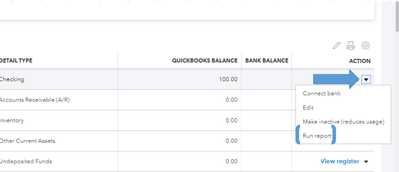
One prime reason is that there are transactions that were not yet entered or they're simply duplicated. In this case, you'll want to review the checking account in the Chart of Accounts. Here's how:
- Go to Accounting, then choose Chart of Accounts.
- Find the checking account, then click the arrow icon beside View register.
- Choose Run report.
- Compare the transactions on Account QuickReport versus your actual checking account.
If there are duplicated or missing transactions, simply delete or create them respectively. However, you might want to reach out to an accountant before making any changes, especially if the transactions are under a closed accounting period. They can give proper guidance on correcting your books and ensure they are accurate.
You'll also want to check the Statement of Financial Position's reporting date and accounting method. Both factors can affect how the balances are shown on the report.

Take note that if you've connected your bank account in QuickBooks Online, it will display the latest balance from the last update. If there are any missing bank transactions that you need to add, simply click on the Update button from the Banking page. Add or match the new ones accordingly.
We have articles (for both the regular Online and Non-Profit editions) that can help you with other tasks. Give them a shot if you need assistance.
I'm here to offer future help if you have other questions for QBO. Drop by here again and I'll point you in the right direction.


