I understand how this bank connectivity issue with Wise in QuickBooks Online (QBO) can affect your business operations, ingiux. I’m committed to assisting you through this. I have a set of proven solutions that will help resolve this problem swiftly, allowing you to focus on what you do best, running your business.
When you encounter error 101 while syncing transactions from your bank, it could be due to an inactive account or unaccepted terms and conditions. To fix this, start by logging into their website using a new tab or a different browser to see if you can access your account without interruption.
Once signed in, verify if your account is active. You can tell it’s operating if you see a current balance or if you've had any transactions in the last year.
Next, check for any missed prompts or messages that require your attention. If you find any, make sure to acknowledge them. After that, you’ll want to refresh your account in QBO. Here’s how you can do that:
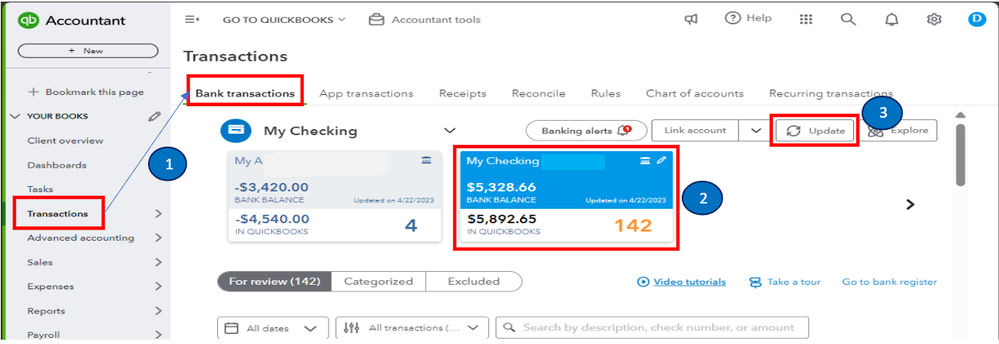
- Log in to your QuickBooks Online (QBO) account and select Bank transactions from the Transactions menu.
- Choose the blue tile for your linked Wise account.
- Click the Update button.
However, if the error continues, sign in to QuickBooks using an incognito or private browser or attempt other browser troubleshooting options.
Once the connectivity issue is resolved and your transactions are downloaded, review and categorize them. Then, reconcile your accounts so they always match your monthly statements.
I'm just a reply away if you have any other banking concerns or challenges managing your transactions in QBO, ingiux. Don’t hesitate to reach out anytime because I'm always ready to help you out. Enjoy the rest of the day!


