The option to enter lbs. (pounds) in your invoice is unavailable, Michoacan. I'll provide you with an alternative approach to effectively resolve this issue in QuickBooks Online.
As a workaround, you'll have to set up the inventory item and then track the lbs. as quantity. In the meantime, you can submit feedback to our Product Development team. This will allow them to evaluate your suggestion and potentially incorporate this feature in future updates. Here’s how you can do that:
- Go to the Gear icon, then select Feedback.
- Enter your comments or product suggestions.
- Click Next to submit the Feedback.
On the other hand, if you are referring to QuickBooks Desktop, you'll have to activate the feature unit of measure before you can add the lbs. (pounds) to your Invoice. Here's how:
- Go to the Lists menu, then select Item List.
- Click the Item tab at the bottom and select New.
- Select Inventory Part and enter the Item Name.
- Add a new U/M Set and select Weight.
- Click Next and choose Pound (lb.).
- Tap Next twice then Finish.
- Enter all the necessary details for this inventory before clicking OK.
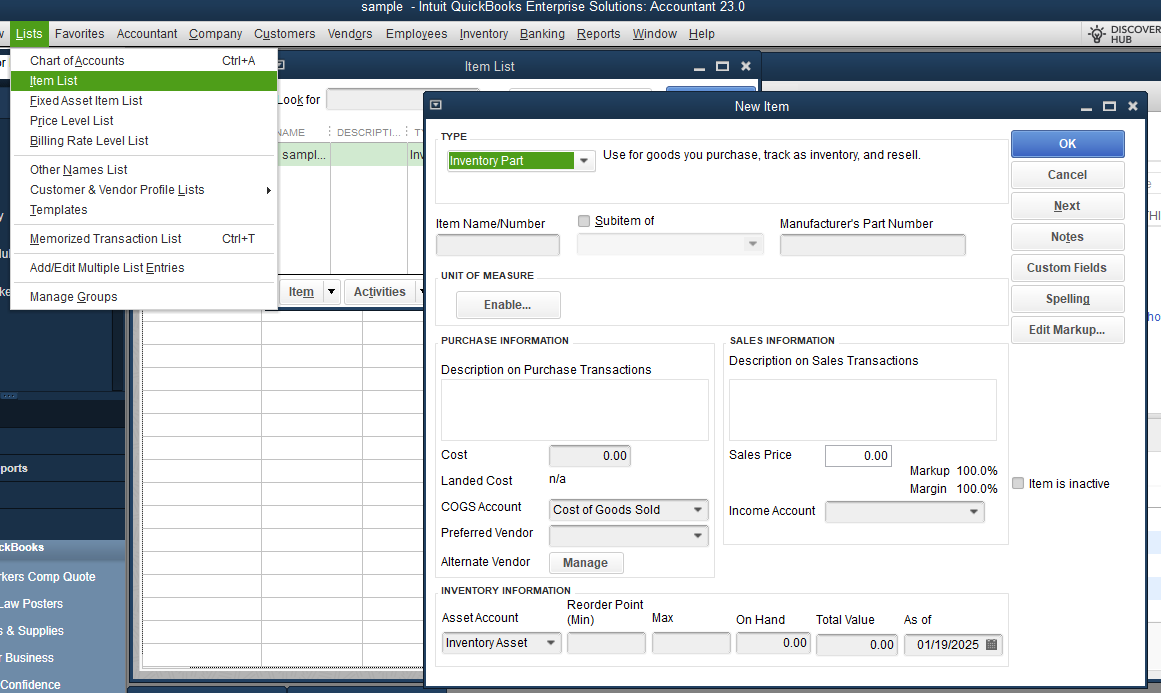
Here's an article about the detailed process for the next step under the Add a unit of measure set field: Use single and multiple units of measure for items.
For your convenience, here’s an article you can refer to whenever a customer makes a payment in the future. It serves as a handy guide to streamline the process: Record invoice payments in QuickBooks Online.
Thank you for engaging with our services. I'm committed to providing you with the best possible service. If you have any more questions or need further help with managing your invoices or any other concerns, rest assured I'll respond to you directly.


