Hello, @carries2. Since the paycheck has already been processed, please note that reversing it is not possible. However, if it was issued as a paper check, we can void the paycheck and recreate it without the healthcare contribution to correct the payroll entry.
Here's how:
- Navigate to the Paycheck list tab.
- Click the dropdown arrow under the Action column of the paycheck.
- Select Void, then Void Paycheck.
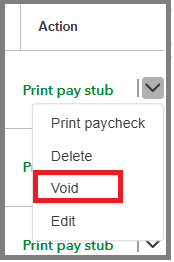
If you do not see the option to make this change, a message will appear indicating the reason. In this case, please contact our Customer Care team for assistance with the correction.
If the paycheck was issued via direct deposit, we can request a direct deposit reversal within 5 business days from the pay date. Please be aware that a fee of $75 per payroll will apply, regardless of whether the funds are successfully recovered. For more information on this process, please refer to this article: Reverse a direct deposit.
If you prefer not to proceed with the reversal option, I recommend establishing an internal agreement with your employee to arrange for repayment once they receive the funds. This will ensure clarity and mutual understanding between both parties.
For more insight about fixing an employee's paycheck, check out this resource: Edit, delete, or void employee paychecks.
Don't hesitate to click the Reply button below if you have further questions. I'll jump right back in to answer them for you.


