Hi there, Cindy. I have the process of emailing an employee's pay stubs for the entire year.
Please know that the pay stub feature isn't activated by default. You'll need to enable it before you can email pay stubs. Follow the steps below:
- In QuickBooks, navigate to the Edit menu and choose Preferences.
- Click on the Send Forms option, and then go to the My Preferences tab.
- Within the Send email using section, select one of the options.
- Once finished, click OK.
Here's how to email pay stubs:
- Access the File menu and choose Switch to Single-user Mode.
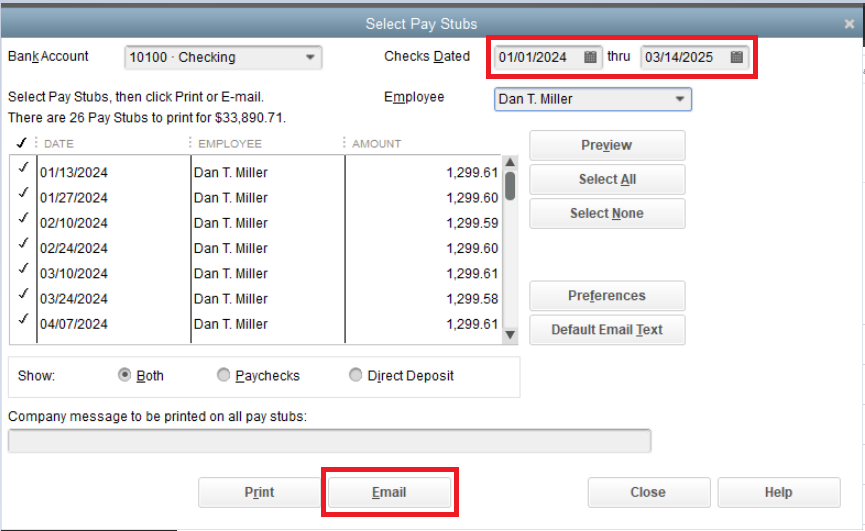
- From the File menu, hover over Print Forms and then pick Pay Stubs.
- Choose the Bank Account used for payroll.
- Set the date range for the pay stubs to be emailed.
- Select the employees to receive pay stubs, and uncheck any you don't want to include. Preview each pay stub and then click Email to send.
- Follow the on-screen instructions.
See the screenshot for visual reference:
For detailed information, read this article: Email pay stubs from QuickBooks Desktop.
You can also run the Payroll Detail Review Report and customize it with the details you want to include in the report.
You'll want guidance on setting up and printing your paystubs within the program. Check out this article: Print or reprint paychecks and pay stubs.
I'm always prepared to help you achieve your objective in QuickBooks Desktop. Kindly leave a comment below if there's anything else you need. Take care.


