Turn on suggestions
Auto-suggest helps you quickly narrow down your search results by suggesting possible matches as you type.
Showing results for
Get 50% OFF QuickBooks for 3 months*
Buy nowI have an employee that lost his paycheck. I have been checking the posts to see how I can give him another check without messing up the payroll taxes. I know I can't void it. I see that I can edit the check #, then void the original check number. Does that not void the taxes also?
Solved! Go to Solution.

Hi there, missmissySEI.
In QuickBooks Desktop (QBDT), if the payment has been submitted to Intuit or already sent to the agency, there are no longer adjustments will be made. That means you are only canceling the payment, but the payroll tax calculations remain unchanged.
You'll want to recreate the replacement paycheck with zero net pay. This way, the total amount will be reflected in the direct deposit liability check. This will help balance your check register and ensure that your employees are not paid twice.
I'll share the article on how you can recreate a missing or voided direct deposit paycheck in QuickBooks Desktop Payroll for the detailed steps.
Don't hesitate again or click the Reply button below to post if you have any other concerns about voiding a paycheck in QBDT. I'm always here to help. Wishing you and your business continued success.
Hi there, missmissySEI.
In QuickBooks Desktop (QBDT), if the payment has been submitted to Intuit or already sent to the agency, there are no longer adjustments will be made. That means you are only canceling the payment, but the payroll tax calculations remain unchanged.
You'll want to recreate the replacement paycheck with zero net pay. This way, the total amount will be reflected in the direct deposit liability check. This will help balance your check register and ensure that your employees are not paid twice.
I'll share the article on how you can recreate a missing or voided direct deposit paycheck in QuickBooks Desktop Payroll for the detailed steps.
Don't hesitate again or click the Reply button below to post if you have any other concerns about voiding a paycheck in QBDT. I'm always here to help. Wishing you and your business continued success.
I am curious why none of my posts are getting answered any more
Thank you for getting back to the thread, missmissySEI.
I've checked the other posts in your profile, and for those concerns, you might need to consult or seek help from an accountant. From there, they'll be able to guide you in categorizing your expenses and charges accordingly.
On the other hand, you can always run through the resources from our QBDT-self help articles for more tips while working with your entries on our software.
Leave a comment below if you have other QuickBooks concerns in mind. I'm just a few clicks away to help. Have a good one!
How do you recreate lost payroll check in desktop version not using direct deposit.
I can help you recreate a payroll check in QuickBooks Desktop (QBDT), TConway66.
If your employee lost their paycheck or it's over 180 days old, and the bank won't cash it, QuickBooks Desktop Payroll (QBDT) allows you to issue a new one. Depending on the situation, you can either reprint the original paycheck for your employee or follow the steps below to provide a replacement.
Initially, we'll need the original check number, amount, and date to complete the process. Then, edit the check number.
Here's how:
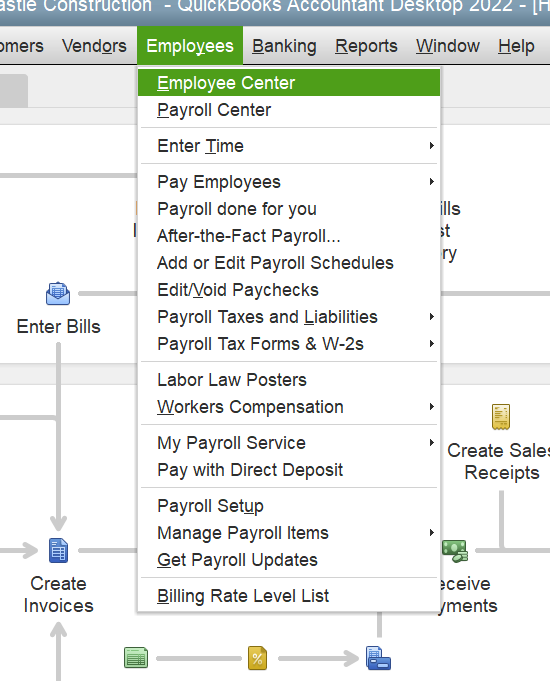
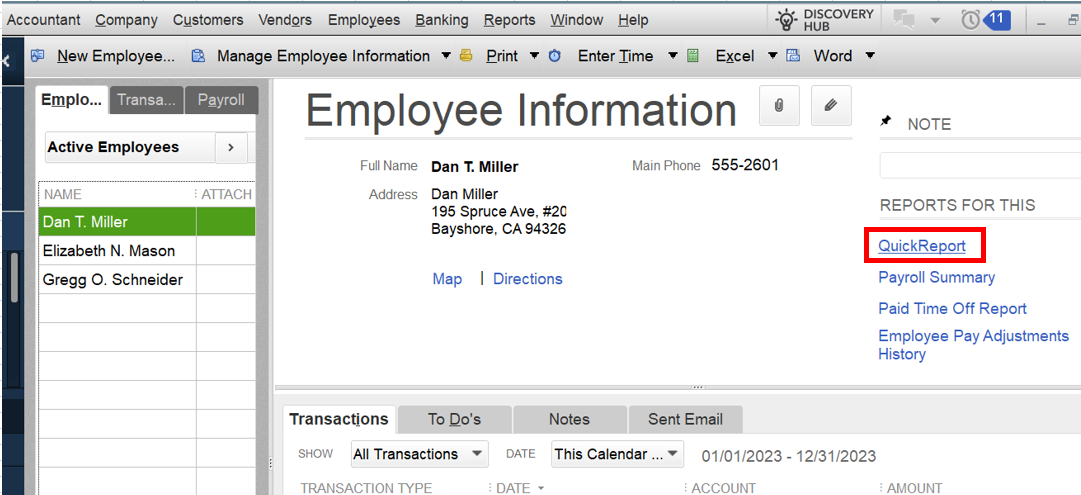
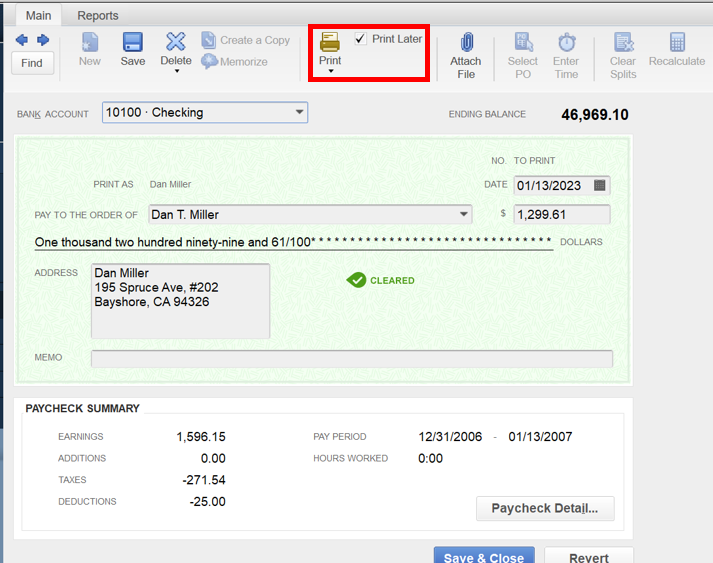
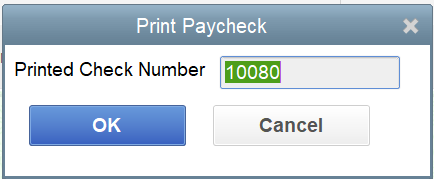
Yet, if the original paycheck is lost, you'll need to reach out to your bank and request a stop payment. Subsequently, create a replacement check to account for the missing check number. I'll guide you on how to do it.
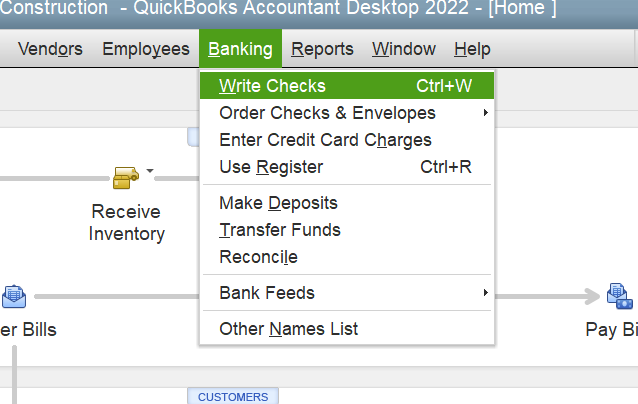
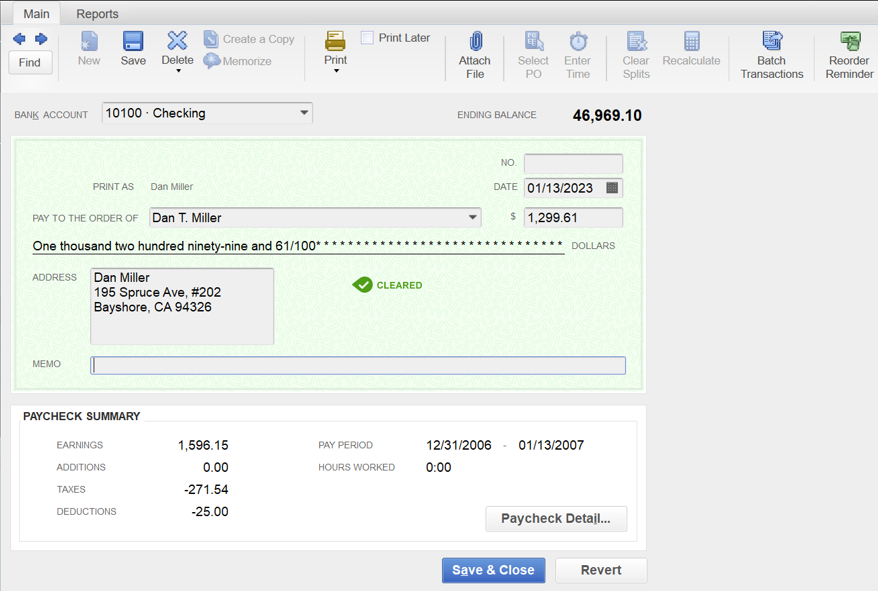
Once done, void the replacement check to balance your register.
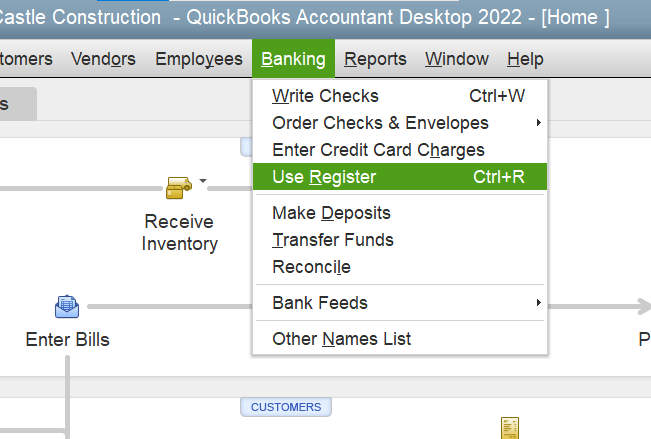
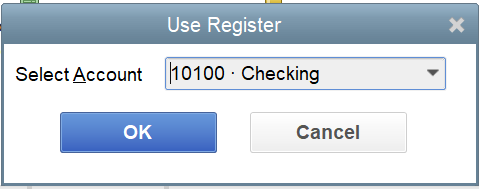
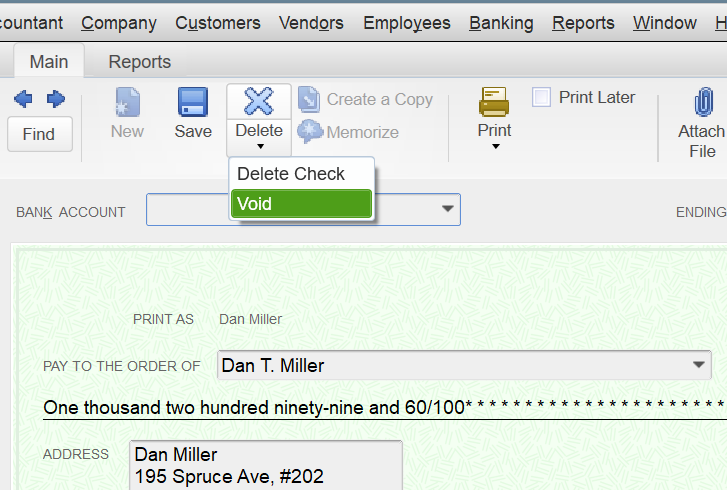
You can send a comment if you have other concerns with payroll. The Community and I are always here to back you up. Take care!
In step # 2, do you change the date on the new check to the current date? Otherwise the employee will not be able to cash. Doies making the date current now effect payroll taxes?
Thank you for this information. In step #2 do I also put the current date on the new check? If not, the check will be too dated for my employee to cash. Will this then effect current payroll taxes?
I'll help and provide clarifications regarding your paycheck concern, shs2009.
There are two ways to handle an employee's lost paycheck. You can reprint the original one if you prefer not to record the missing check number in your bookkeeping. However, if you want to account for it, follow the instructions provided by my colleague above.
With the latter option, you'll have to use the original check number, amount, and date to complete the process, as entering the current date will affect your payroll taxes. For detailed instructions, please see this article: Replace a lost or expired paycheck (QuickBooks Desktop Payroll section).
However, if the paycheck is issued more than 180 days, you'll have to manually write a regular check dated with the current date to enable your employee to cash it. After that, ensure to void it to keep your records accurate.
Furthermore, you can create a summary report to view your employees' totals and other payroll-related data. To guide you through the process, check out this article: Create a payroll summary report in QuickBooks.
Don't hesitate to drop a comment if you have other payroll concerns or questions about managing employee transactions. Know that I'm always ready to assist you further.
Thank you for your reply. I am still confused as either option does not solve the problem. Option 1 I am reprinting check, so it has same stale date on it and employee can not cash. The 2nd option also keeps the same stale date as the original paycheck.
Is there no way to reissue a paycheck with a current date that does not affect the payroll taxes that have already been deducted 2 years ago?
I appreciate you for routing back here, @shs2009. Since the resolutions provided don't resolve your issue about the employee's lost paycheck, I'll direct you to the best help.
To know the best action to take so you can reissue a paycheck that can't affect the payroll taxes from 2 years ago, I recommend contacting QuickBooks Desktop (QBDT) contact support. Their tools are equipped to review your account in a safe environment.
Here's how:
I'll add this article if you want to learn how to modify and customize reports in QBDT: Create, access, and modify memorized reports.
Please don't hesitate to get in touch again whenever you need additional assistance with paycheck issues. We're always around to offer help at any time of the day. Keep safe and have a good one.
Thanks, been trying to do a "chat" for a half hour now but can't get through. Will try again later
Hi, So I did the chat and wanted to share the solution that was given to me.
Issue a new paycheck for the gross wages, printing it with the current date so employee is able to cash. Then go in and change the date of this same check to the original check date. Finally delete the original paycheck.
Do a journal entry to explain.
I have not tried it yet, hopefully this will work!
Hello there, shs2009.
I'm happy that my colleague was able to assist you and I appreciate for sharing the steps here in the Community.
Let us know if you have other concerns in the comments below. We're always here to assist.
@shs2009 This might be the sleep deprivation talking, but having the paycheck dates in your records not match the real world case sounds like 50 shades of income tax fraud to me.
Maybe I'm mistaken, though.
@Rainflurry @BigRedConsulting Thoughts?
@GlinetteC "Rest assured that we will continue to give the best customer service you ever experienced."
I can't put my finger on exactly why, but this sentence almost sounds threatening.
Whoever is designing these scripts, maybe dial it back a bit.
"Issue a new paycheck for the gross wages, printing it with the current date so employee is able to cash. Then go in and change the date of this same check to the original check date. Finally delete the original paycheck."
I'd be concerned this will affect your tax liabilities. If it were me, I would run this through a bank Clearing Account. Set one up in QB if you don't have one. Then, create a deposit to the checking account where the check was issued and for the net amount of the paycheck. Assign the bank Clearing Account to the deposit. Then, issue a new check to your employee for the net amount of the paycheck and assign the bank Clearing Account to the check. The next time you reconcile your bank account, clear the stale check against the deposit. Your employee now has a check, the Clearing Account is zero, and you have not messed with any old tax liabilities. Just my $.02
"This might be the sleep deprivation talking, but having the paycheck dates in your records not match the real world case sounds like 50 shades of income tax fraud to me."
In the end, nothing will have changed in terms of income or expense so there shouldn't be anything to worry about. I agree, I think the reissued check should not have the date changed to a previous period and that's why I'd prefer to run this through a balance sheet account (bank Clearing Account) to eliminate the possibility of messing up tax liabilities from a previous quarter.
Thank you for your suggestions. I will have to look into this further I don't have a bank clearing account, but will research. I don't think doing it the way QB help suggested is fraud since all taxes have already been paid on the paycheck amount, but I am definitely unsure about this.
I sent a message back to QB person who helped me and voiced my concerns over the above responses from Fishing for Answer's. I just get back a generic response thanking me for using the service blah blah blah. So I am still left wondering what the proper way to reissue a very old paycheck would be.
My option is to start another chat with QB and hope they know what they are talking about. I just need to set aside another 2 hours....
If you follow the instructions in my previous post, you will have this resolved in less than 5 mins. I was a corporate controller for almost 20 years and this is the process we followed. Here's the process:
1) Set up a bank account in QB called Clearing Account.
2) Make a bank deposit for the amount of the lost paycheck and assign the bank Clearing Account to the deposit.
3) Issue a new check to the employee and assign the bank Clearing Account to the check.
4) The next time you reconcile the bank account, clear the deposit against the lost check. Clear the new check when it actually clears.
Don't void or delete the old paycheck in QB. You can make the Clearing Account inactive after this if you want. A clearing account comes in very handy when making certain adjustments in QB.
Also, just to confirm, this process will not affect previous payroll liabilities and is accurate whether you're on cash or accrual basis.
Thank you! I have been reading all the suggestions and like yours best. I appreciate the answer regarding how to avoid affecting the taxes! Again, thank you.


You have clicked a link to a site outside of the QuickBooks or ProFile Communities. By clicking "Continue", you will leave the community and be taken to that site instead.
For more information visit our Security Center or to report suspicious websites you can contact us here


