Hi billy37, you can go to the new hire’s employee profile in QuickBooks Online. From there, open Permissions, then click Send invite under their QuickBooks Workforce Access Status. That’s the step that connects them to Workforce.
Ensure the employee's email address is correct, follow the prompts, and then click Send invite again. Once that’s done, the status should update to Invited.
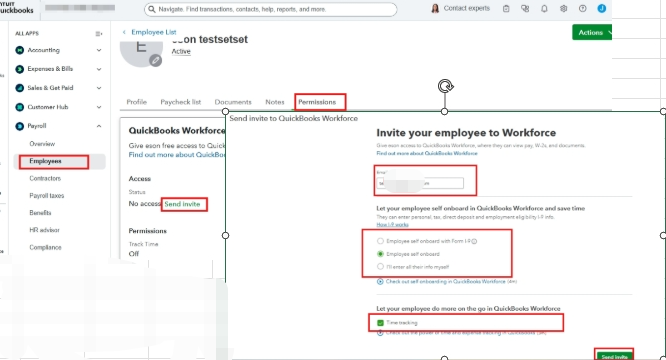
Alternatively, you can also do this from the Employees List by clicking the Invite to Workforce option, entering their email, and clicking Send invite. They will then receive an email to set up their Workforce access and will be able to sign in to view their pay stubs and W-2s.
Feel free to add a reply below if you have other concerns.


