I admire you for using our QuickBooks Online customizing reports feature, @LDO.
In the meantime, saving or memorizing a customized payroll report in QuickBooks Online is unavailable. That said, you may consider submitting this feedback to our Product Development Team. Thus, they can review and determine what features to add for future product enhancements.
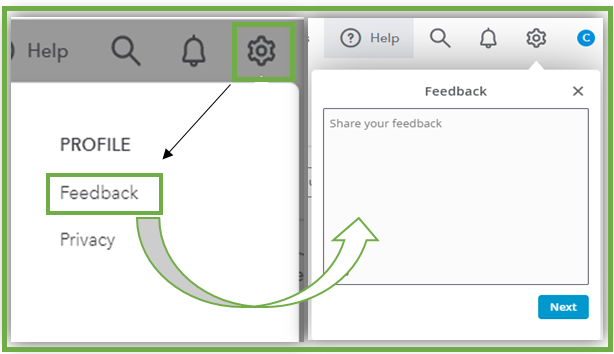
Here’s how:
- Click the Gear icon and choose Feedback.
- Enter your feedback Suggestion.
- Press Next.
Moreover, feel free to visit our Feedback forum to track the progress of your feature request.
We constantly take your suggestions into account while making product updates. The more requests this gets, the more likely it'll be part of future enhancements.
For more tips while running payroll reports in QBO, you can refer to this article: Run payroll reports in QuickBooks Online Payroll. The same resources give you details on how to mark a report as a favorite, customize and print reports.
Let me know how else I can help you with reports in QBO by adding a comment below. I'm more than happy to lend a helping hand. Keep safe!


