Thanks for sharing your detailed concern in the Community, @Cmdermott. I know you’ve spent a lot of time and effort. Let me provide some resolutions to get this settled.
Besides rebuilding your data files and ensuring your QuickBooks Desktop and tax table are updated, you can also run the QuickBooks Payroll Checkup. It's a diagnostic tool that helps eliminate payroll-related issues. I’ll show you how:
- Run QuickBooks as an admin.
- Create a backup of your company file.
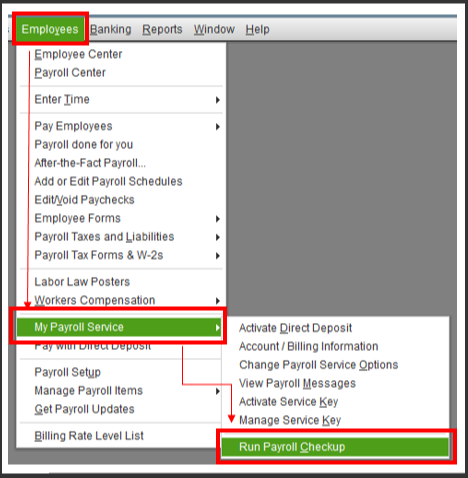
- Navigate to the main menu and click on Employees.
- Select My Payroll Service and then choose Run Payroll Checkup.
- Follow the on-screen instructions to continue.
If you find any calculation errors in your payroll data, you can generate a Payroll Detail Review report to check where the exact issue lies. From there, the program will provide explanations and instructions on how to fix it.
Here’s how:
- Just go to Reports, then Reports Center.
- Click Employees & Payroll.
- Locate the Payroll Detail Review report and run it.

For more information about the tool and its process, check out this reference: Run payroll checkup.
You can also use this guide to correct calculation issues in QuickBooks: Payroll items on a paycheck are not calculating or are calculating incorrectly.
In addition, here’s an article that provides depth information about HSA setup: How to set up the tax tracking type HSA Emp. (Pre-tax) for employee contributions to health savings .... It includes resources to correct previously used HSA employee deductions and set up and pay scheduled or custom liabilities.
Don't hold back to drop a comment below if you need further assistance with your HSA contributions. I’m always here to help. Take care!


