Get 50% OFF QuickBooks for 3 months*

Buy now
cancel
Showing results for 
Search instead for 
Did you mean: 
Announcements
Simplify payday and set payroll to run automatically on QuickBooks. Explore QuickBooks Payroll
susieandphillip
Level 1

I have an employee that has weekly savings deducted from his payroll. Ive got it entered under Payroll Deductions. How do I reimburse him for those monies and it debit

from the account?

1 Comment 1
jenop2
QuickBooks Team

I have an employee that has weekly savings deducted from his payroll. Ive got it entered under Payroll Deductions. How do I reimburse him for those monies and it debit

You can set up a reimbursement item to give it back to the employee, susieandphillip.


Let me show you how:


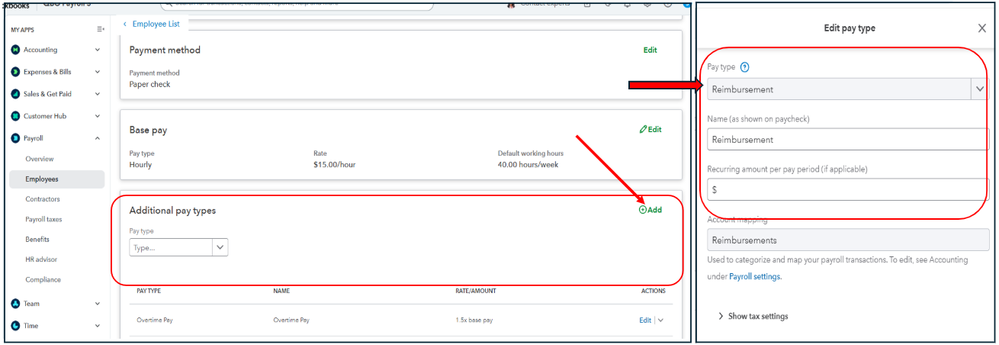
  1. Open the employee's profile and proceed to the Additional pay types section.
  2. Click Add, go to the drop-down list for Pay types, and then choose New pay type.
  3. Type in the name of the item and select Reimbursement.
  4. Click Save.


set up reimbursement.png


Once done, enter the amount in the Reimbursement field when creating a paycheck.


reimburse 2.png


More details about reimbursements are shared in this article: Reimburse your employee.


You can also tap on our QuickBooks Live Expert Assisted Team if you need some extra hands when bookkeeping in QBO.


The Community is open all the time to provide help when needed.

Need QuickBooks guidance?
Log in to access expert advice and community support instantly.

Need to get in touch?

Contact us