Turn on suggestions
Auto-suggest helps you quickly narrow down your search results by suggesting possible matches as you type.
Showing results for
CYBER MONDAY SALE 70% OFF QuickBooks for 3 months* Ends 12/5
Buy now
I appreciate your efforts and time in bringing this concern to us, benny. I'll provide further information about selecting roles.
The custom role feature is only available in QuickBooks Online (QBO) Advanced. If you don't have an option, you may want to consider upgrading your plan. Then, we can add custom roles.
Let me show you how:
Here's an article for more info: Add and manage custom roles in QuickBooks Online Advanced.
I'll add these resources to help you with user management and number of accounts or users you can have within the program:
Let me know if you have additional questions about managing users in QBO. I'll be here to assist.
Thank you Erika for your reply.
Please read my initial post, "I don't have the option "Add role".
I have Online QuickBooks Plus.
Do I need to change my plan?
Thank you.
You're welcome, bennyslabo. It's our pleasure to help.
I can share additional information about adding custom roles in QuickBooks Online.
The option to create a new role in QuickBooks Online is only available for QuickBooks Online Advanced subscribers. If you wish to access this feature, we recommend upgrading your subscription to QuickBooks Online Advanced. To learn more about upgrading your subscription, you can check out this article: Upgrade or downgrade your QuickBooks Online edition.
After upgrading your subscription, you can go to the Manage users section from the Gear icon and selecting Add Role to start creating a new role. You can find a screenshot of this below: 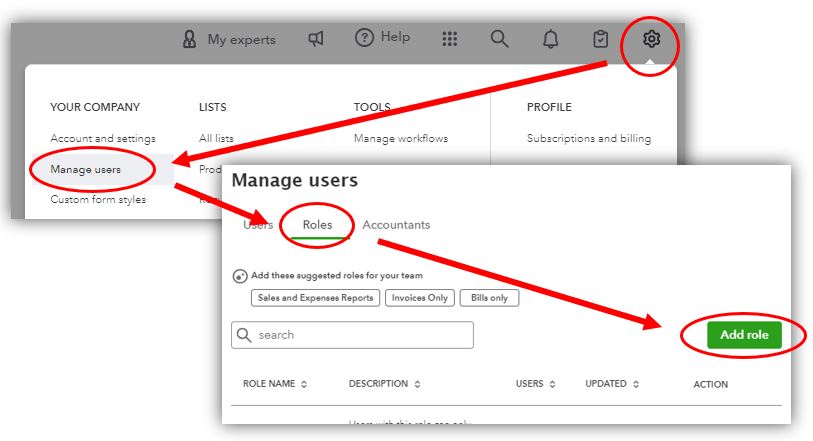
Once you have upgraded to QuickBooks Online Advanced, you can create a new role and assign it to a new user. You can find more information on how to do this in this article: Add and manage custom roles in QuickBooks Online Advanced.
You can also use the audit log to track the activities of your users. To learn more about this feature, you can read this article: Use the audit log in QuickBooks Online.
If you have any further questions or concerns about adding a custom role in QuickBooks Online, please let us know by leaving a reply below. We're always here to help. Stay safe and have a great day!
Hello MJoy_D
Thank you very much for reply.
I upgraded my subscription to advanced and am able to create a new roll.
The option to create a new roll was needed because I want to have a user that can "ONLY SEE" my QB and not be able to edit anything, sadly from my research yesterday it is not an option.
If you know otherwise, please let me know.
Thank you
Ben
Hello MJoy_D
Thank you very much for reply.
I upgraded my subscription to advanced and am able to create a new roll.
The option to create a new roll was needed because I want to have a user that can "ONLY SEE" my QB and not be able to edit anything, sadly from my research yesterday it is not an option.
If you know otherwise, please let me know.
Thank you
Ben
Thanks for coming back here in the thread, Benny. Let me help you further customize roles for users using QuickBooks Online Advanced. (QBO).
You can assign roles to users who access your business data in QBO. By customizing their role to "View only" access, you can restrict their ability to edit. However, it's important to note that only certain features will permit users to have view-only access, and other features will allow them to modify or create, depending on the access role you assign to them. To begin, follow the steps below on how:
On the other hand, you may also visit this link to guide you on changing the primary admin user in the future: Change the primary admin user in QuickBooks Online.
Let me know if you have additional questions about managing your roles and access for your users inside QBO. I'm more than happy to assist. Have a good one!
Thank you for your reply.
I know how to set a new roll, and I saw that SOME fields can viewed only and not edited, however, I need an option that ALL fields and account be "VIEW ONLY"
Thank you
Thanks for coming back to this thread, Benny.
I see how this feature can be beneficial to your business and we appreciate your opinions and recommendations for enhancing our program. However, the option to create a role allowing a user to only view your QuickBooks Online company isn't available. Therefore, I suggest sending a feature request through the feedback section. This way, our product developers can take note of the need for this feature and consider it for future updates.
Here's how:
For your reference, you can check out this article on managing user profiles in QuickBooks Online: Add and manage users in QuickBooks Online.
In case you need to grant access to your accountant, please refer to this article for guidance: Add accountant users in QuickBooks Online.
Let me know if you have other questions about managing users. The Community is always here to help you out.


You have clicked a link to a site outside of the QuickBooks or ProFile Communities. By clicking "Continue", you will leave the community and be taken to that site instead.
For more information visit our Security Center or to report suspicious websites you can contact us here


