Hi there, @justin102. The most common cause is that the specific alert was toggled off, either accidentally or during a software update.
To assist in identifying the cause of the issue, the initial step is to review your notification preferences and verify that you are designated to receive these alerts alongside other managers or administrators. This will help ensure you're included in the notification process and can promptly address any concerns related to late clock-ins.
Here's how to confirm:
- Go to the Gear icon, then choose Time.
- From the Notifications section, click on the Pencil icon to edit.
- Confirm that the Email box is ticked to be notified.
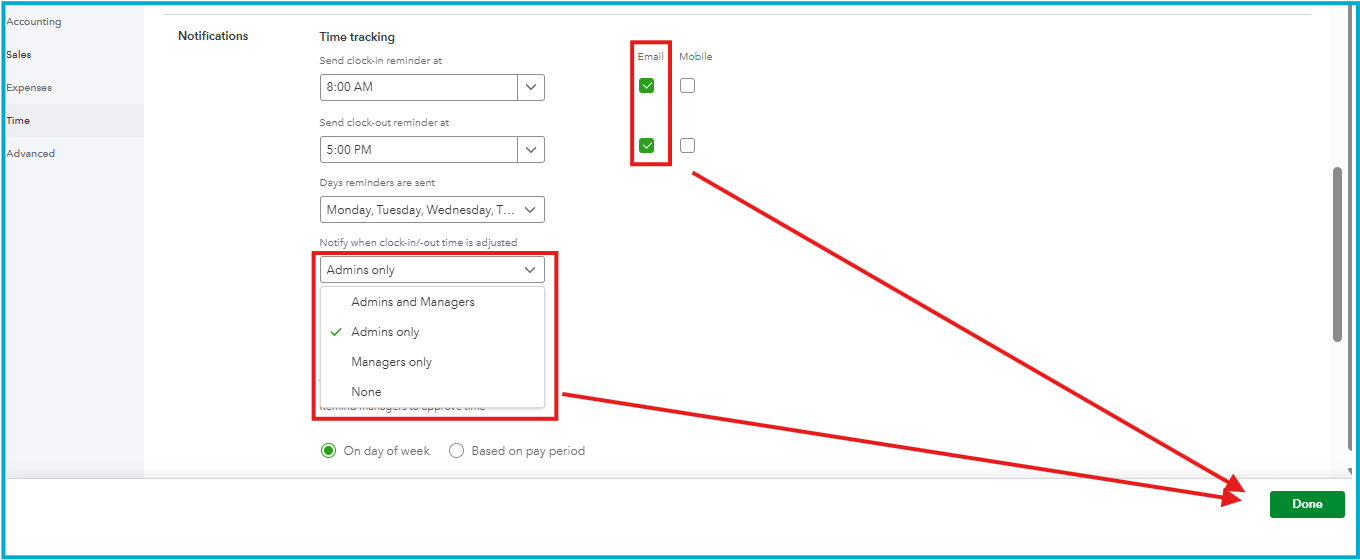
- Ensure to select the users to receive alerts when clock-in/out times are adjusted.
- Hit Done.
I also recommend reviewing your spam or junk email folders for any messages originating from the domains @intuit.com or @tsheets.com. These emails are important for the proper functioning of QuickBooks Time. If you find any relevant emails there, please mark them as not spam to ensure future communications reach your inbox.
I hope this helps get those alerts back in your inbox. Keeping these settings aligned ensures you stay informed and your schedule stays on track without any manual monitoring. For any QuickBooks concerns, please reach out again. We're here to help you.


