Turn on suggestions
Auto-suggest helps you quickly narrow down your search results by suggesting possible matches as you type.
Showing results for
Get 50% OFF QuickBooks for 3 months*
Buy nowIf I want to start paying myself and a helper through quickbooks, what category do I use? None of them seem to fit. I am new to this so all the help I can get would be greatly appreciated!

Good morning, @Melissa Love.
Welcome to the QuickBooks Community! I'd be more than happy to point you in the right direction to understand which category would be best when paying yourself and your helper.
QuickBooks Solopreneur is designed for one-person businesses, who may or may not use 1099 contractors. It includes easy to use organization, tax, and growth-focused tools to help drive financial stability. The tax filing capabilities included in QuickBooks Solopreneur are designed for ‘Schedule C’ (form 1040) filers, most commonly applicable to sole proprietors or single-member LLCs.
After linking your bank or credit card account, QuickBooks Solopreneur automatically categorizes transactions into predefined categories for easy review. To categorize bank transactions, please use this guide for the steps.
When categorizing transactions, if you're unsure which would be best, we recommend consulting with your accountant. They'll be able to give you advice based on how your business in ran. If you don't have one, you can find one near you using this link.
Feel free to reach back out if you have any other questions. I'm only a post away. Take care!
I am self-employed. So where do I enter it when I pay someone to help me at events?
Thanks for coming back to the thread, Melissa. Since QuickBooks Solopreneur doesn't have a payroll feature, a great way to handle this is by simply logging it as an expense on your Transactions page.
To get started, navigate to the Transactions and click New Transaction. Set the type to Expense, add the info, and the amount. Then, toggle it to Business or Personal. To make sure you're using the right category, I recommend consulting a tax professional to keep your financial records accurate.
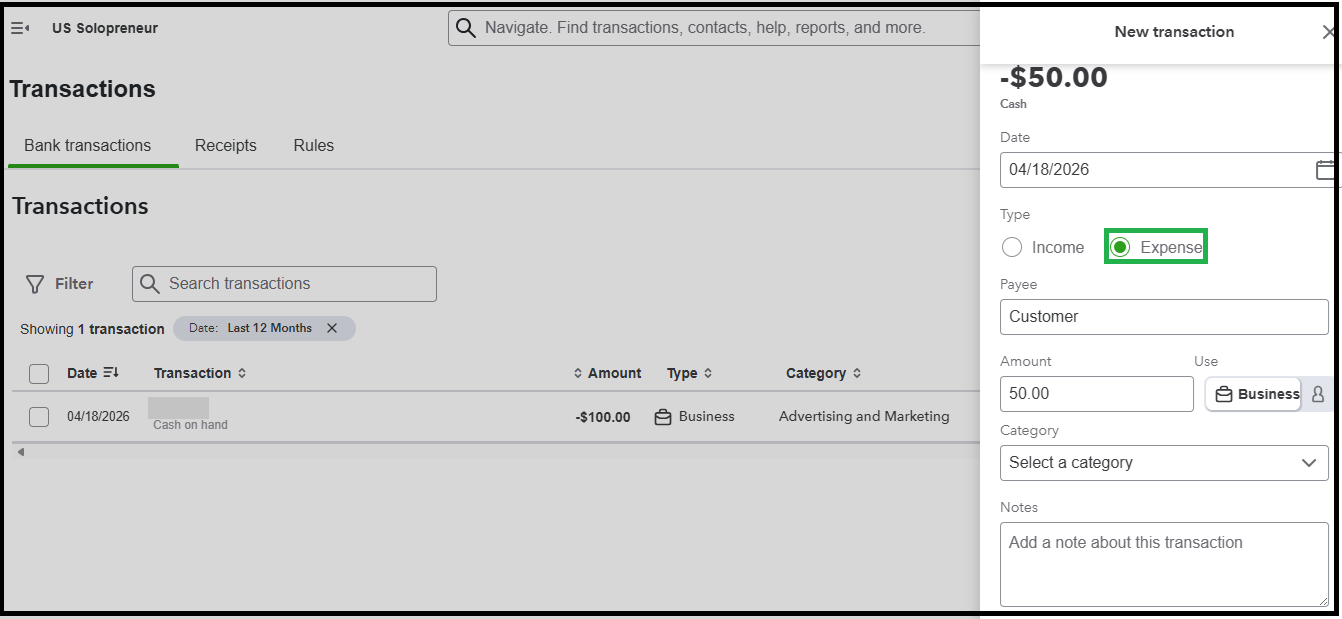
Please reach out to us if you need further guidance. We’re more than happy to assist you.


You have clicked a link to a site outside of the QuickBooks or ProFile Communities. By clicking "Continue", you will leave the community and be taken to that site instead.
For more information visit our Security Center or to report suspicious websites you can contact us here


