Turn on suggestions
Auto-suggest helps you quickly narrow down your search results by suggesting possible matches as you type.
Showing results for
Get 50% OFF QuickBooks for 3 months*
Buy now
Let's make sure your tax rates are updated, Sarky75.
Are you getting an error when downloading payroll updates? If so, please follow the steps in the articles below depending on the error code that you're getting:
Though, if you're given a new rate for SUI and trying to change it in QuickBooks, this article will guide you through the steps: Change State Unemployment Insurance (SUI) Rate .
Keep me posted if you need more guidance with payroll. I'll get back here to offer additional help.
I have verified that my account is active, I have switched my default internet to internet explorer, I have run the reboot, I have restarted my computer, and when I tried to update after all that, it still gives me an error 15270.
Please help me! I can't process a paycheck.
Still not working
Thank you for sharing the steps you've tried, Sarky75.
I'm here to take care of you. Let's fix the error 15270 so you can process payroll for your employees.
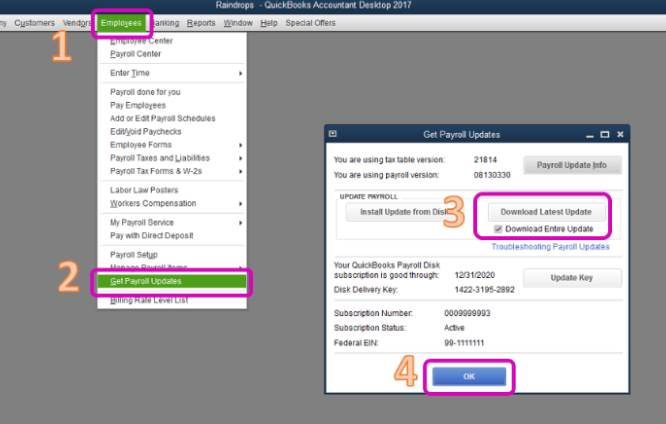
Updating QuickBooks Desktop to the latest release and downloading the latest payroll updates can usually resolve this error.
To update QuickBooks Desktop:
To download the latest payroll tax table:
For more troubleshooting steps, please check this article: Error 15270.
If you're still unable to download the payroll updates, you can try repairing your QuickBooks Desktop. Repairing an existing QuickBooks installation helps resolve program-related issues or errors.
Lastly, please try creating a paycheck.
I'd appreciate if you can update me on how it goes. I'll be here if there's anything else you need. Have a good one.
These links take you to a page that says the info has moved. Do you have new links? I am having same issue with the payroll update not installing.
I'm here to fix the Error 15270, Deanna13.
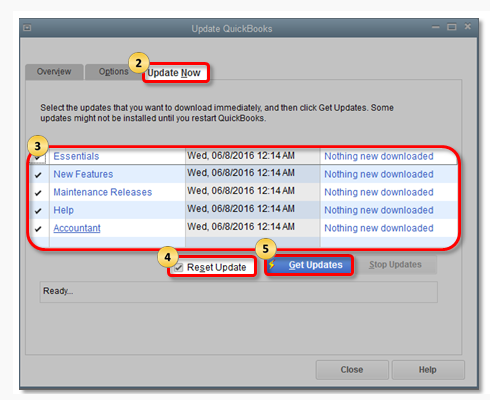
I'll show you the steps instead in resolving this error. We'll encounter this if the recent update is missing some files. Let's reset it so we can update it again. Please restart first your QuickBooks and follow these steps:
Once the reset update is done, please restart your QuickBooks Desktop. When you reopen it and the QuickBooks Update Service appears, click the Install Now. Let's update now your tax table.
Make sure also that you have entered your Service Key and the correct employer identification numbers (EINs). Go to the Company menu and select My Company. From there, verify if the EIN is correct. Update it if needed.
For Service Key, go to Employees menu > My Payroll Service > Manage Service Key.
If the same thing happens, you can download and run the QuickBooks Tool Hub.
Comment again if you have additional concerns. I'll be glad to assist you.


You have clicked a link to a site outside of the QuickBooks or ProFile Communities. By clicking "Continue", you will leave the community and be taken to that site instead.
For more information visit our Security Center or to report suspicious websites you can contact us here