Turn on suggestions
Auto-suggest helps you quickly narrow down your search results by suggesting possible matches as you type.
Showing results for
Get 50% OFF QuickBooks for 3 months*
Buy nowOur previous bookkeeper did not have scheduled payroll set up in quickbooks. Should I change it to scheduled, does it matter?

Let me share some details about the scheduled payroll, FLH1.
QuickBooks Desktop (QBDT) allows you to use pay schedules to run payroll and pay your employees. It helps manage your payroll and makes processing more efficient.
Here are the types of pay schedules you can assign your employees to:
Once you've decided which schedule to use, you can set it up in QBDT.
After that, you can use a scheduled or unscheduled payroll when creating your paychecks. The Scheduled payroll is paychecks you give your employees regularly. You can also add bonuses or other pay to these paychecks. While you select Unscheduled payroll when you may need to pay your employees bonuses, commissions, a final paycheck, or report fringe benefits outside your regular payroll schedule.
Here's how to create a scheduled payroll:
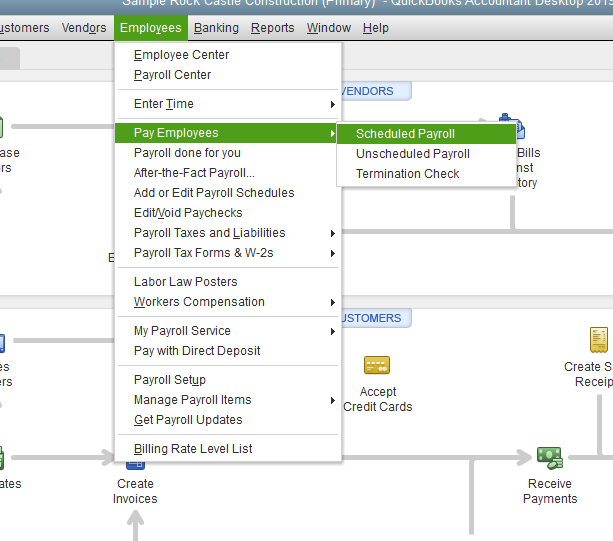
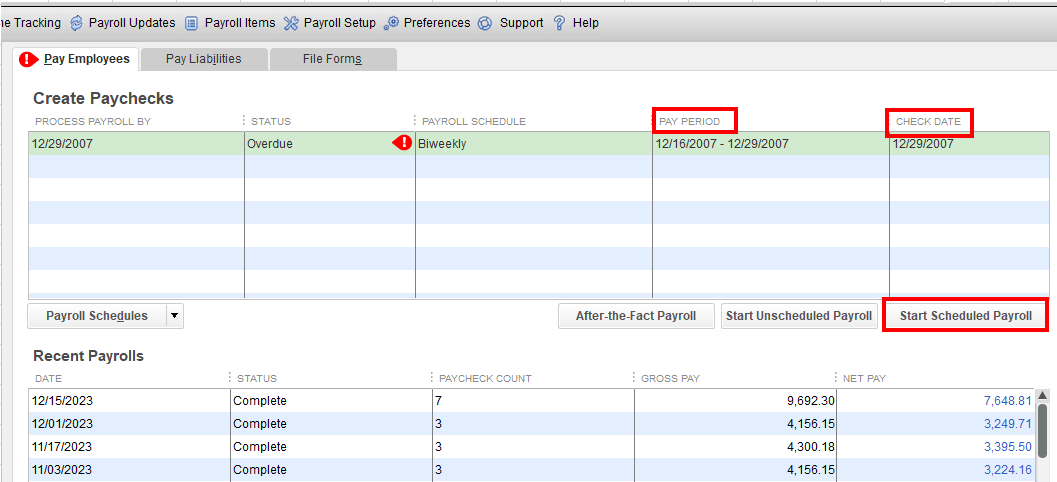

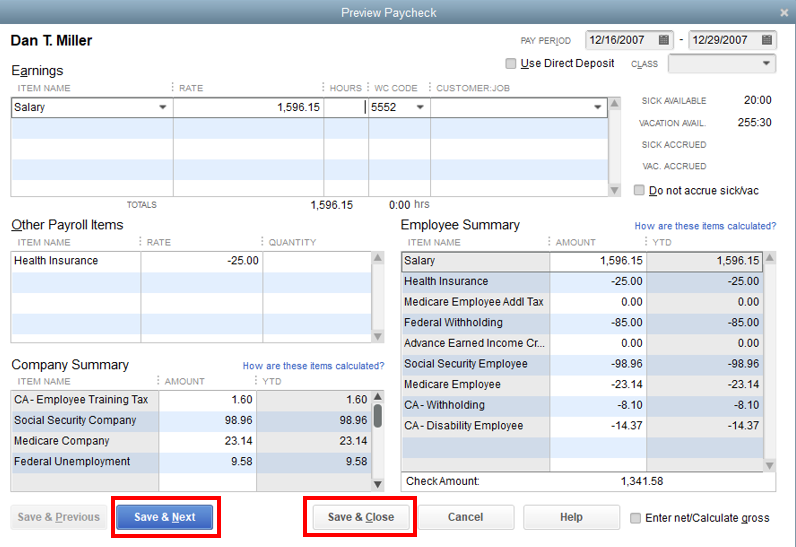
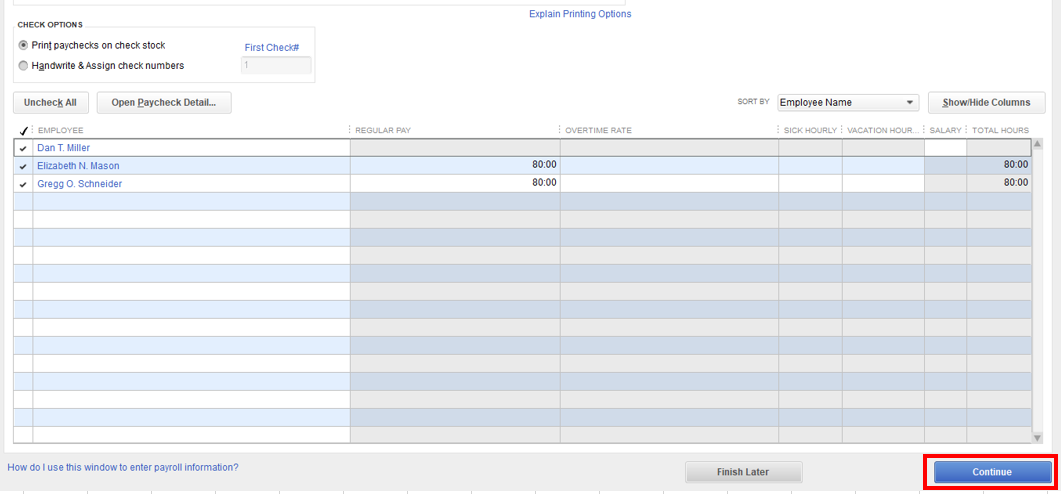
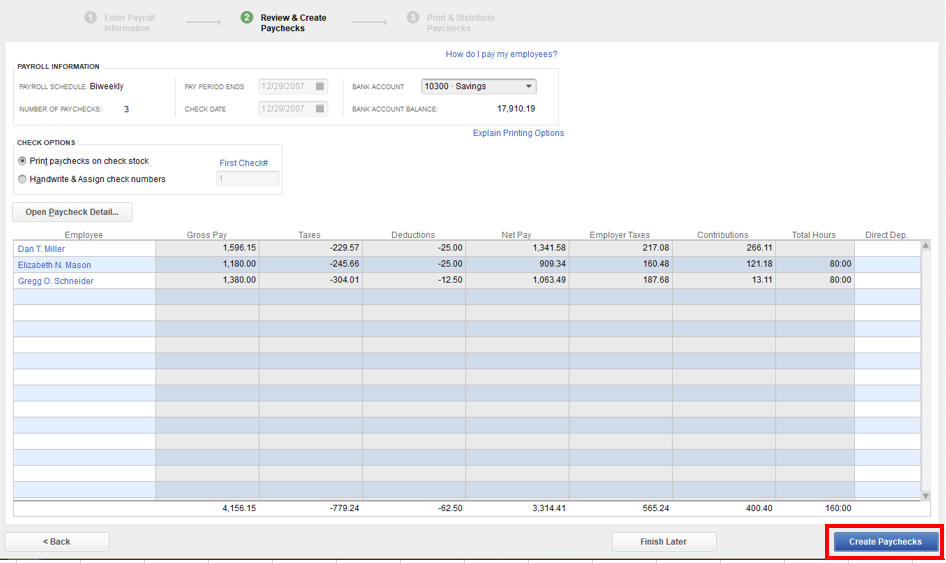
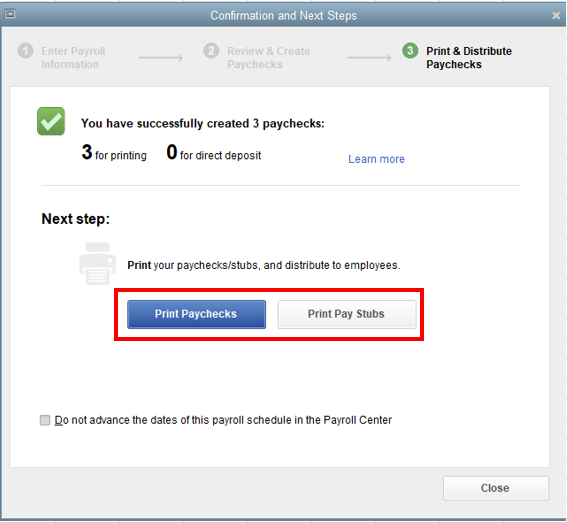
Additionally, if you have QuickBooks Desktop Payroll Assisted or direct deposit paychecks, send your payroll information and direct deposit paychecks to Intuit.
Let me know if you have other questions about payroll in QBDT. We're always here to help. Have a wonderful day!
Thanks for your reply. I already know how to do scheduled payroll; I was just wondering if there was a reason to not use it. Our previous payroll person wasn't using it.
I appreciate you getting back to us here in the Community, FLH1. Let me chime in and provide some information about your payroll concern in QuickBooks Desktop.
If you have a regular payroll schedule and want to streamline your payroll process, switching to scheduled payroll in QBDT can be beneficial. This allows you to automate your payroll runs and ensure that your employees are paid on time without having to manually enter payroll information each time.
However, if you have a more flexible payroll schedule or frequently make one-time payments, unscheduled payroll may be a better fit for your business. This allows you to easily enter payroll information as needed without being tied to a specific schedule.
Ultimately, the decision to switch from unscheduled to scheduled payroll in QBDT should be based on your business needs and preferences. If you're unsure which option is best for you, it may be helpful to consult with a payroll expert or accountant.
I'm just around the corner if you have any other payroll concerns in QBDT. Simply leave a reply below and I'll circle back to help you out. Keep safe always and have a great day ahead.
Already processed. Paid. Direct deposit. How do I fix?
Thanks for joining the thread, @AliceP1.
Since the unscheduled payroll has been processed and paid, it cannot be changed to a scheduled payroll. However, we can get things back on track by updating your payroll schedule to ensure the correct pay dates moving forward, without including the mistakenly processed pay period.
Before proceeding, I recommend editing the unscheduled payroll you processed and adding a note in the memo to clarify that this corresponds to the specified pay schedule. It will help prevent confusion when reviewing the paycheck history in the future.
Once completed, you can now update the pay schedule. Here's how:
Please let us know if you have additional questions. We're here to help.


You have clicked a link to a site outside of the QuickBooks or ProFile Communities. By clicking "Continue", you will leave the community and be taken to that site instead.
For more information visit our Security Center or to report suspicious websites you can contact us here


