Turn on suggestions
Auto-suggest helps you quickly narrow down your search results by suggesting possible matches as you type.
Showing results for
Get 50% OFF QuickBooks for 3 months*
Buy nowWe have a new client that is using Quickbooks Online only for invoicing his customers. He was paying for a separate payroll and accounting service, but now wants it all in QBO. Since we are starting with an August paycheck in QBO, how do I get each prior paycheck entered so that I can reconcile the bank account for the year. From what I have seen, it looks like I can only enter the YTD amounts per employee, which will not tie to any bank withdrawal. Surely there is an easy way to make this transition somewhat painless.

It's great to see you in the Community today, GingerTexas.
Let's input your payroll data via journal entry so you can reconcile it in QuickBooks Online (QBO). I'd be delighted to walk you through the steps.
To start, you'll have to set up manual tracking accounts. Here's how:
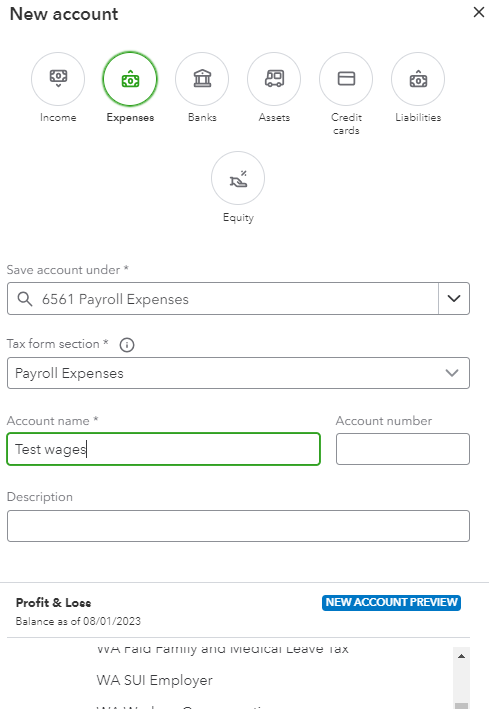
Next, create the following liability accounts and make sure to select Liabilities as the account type:
Once done, perform the solution found in Step 2 in this article: Manually enter payroll paychecks in QuickBooks Online.
If you paid multiple employees for the pay period, combine all of their paycheck totals into one transaction. Also, enter separate journal entries for each employee if you need to break out the details.
After setting up everything, you can start reconciling the account. To learn more about how payroll reconciliation works, check this guide: Payroll reconciliation: A how-to guide for 2023.
If you wish to record the year-to-date data through the payroll service, I recommend contacting our Payroll Support Team for further assistance. To obtain the support details:
Here's a handy guide and videos to help you accomplish your payroll tasks: Get started.
In addition, this link contains various topics about processing payroll forms, handling tax notices, and managing workers' information to name a few: Online resources.
Feel free to visit the Community again if you have other payroll concerns or questions about reconciling your account. I'll jump right back in to respond to them.
So is there no way to enter historical paychecks, with paycheck numbers, that will match the bank feeds once we set up automatic bank downloads? Not all employees cash their paychecks each month, so entering a batch is not helpful with reconciliation. I know desktop has the feature about entering after the fact payroll checks. I would like to do the same to avoid double work...this would post to employees properly so that my W-2 will be correct AND I can reconcile the bank accounts. Please tell me there is an option in QBO.
Yes, you're right, Ginger.
QuickBooks Online and QuickBooks Desktop are distinct software applications that offer separate approaches for inputting after-the-fact payroll.
When entering historical paychecks into QuickBooks Online, we can only add them as journal entries per employee to match your bank feeds. Otherwise, you'll want to contact our payroll support to enter the data.
Here's how to create a journal entry:
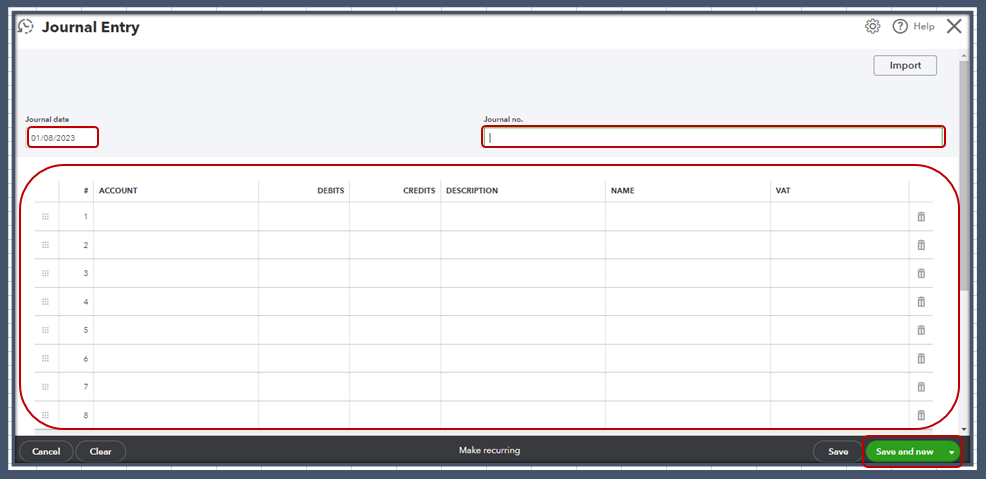
For more details, I recommend following the steps shared with my colleague. You can also browse this article for reference: Manually Enter Payroll Paychecks.
Moreover, I recommend running payroll reports from time to time. It'll help you verify the employee wages, deductions, and taxes have been calculated correctly to prevent issues.
Please keep us posted if you have additional questions about recording payroll data in the Online version. We want to ensure your books are accurate.
How do I edit the yearend W-2's to include wages and taxes that were paid in prior quarters, before we started using QBO to run live payroll? I have the wage and tax expense from Q1 and Q2 entered into the P&L, however, I need to get those numbers onto the W-2's that will be filed and issued to employees.
Hello there, @adrumm.
I understand you want to add prior payroll before you started using QuickBooks Online Payroll to W2.
I recommend reaching out to our Payroll Customer Care team. This way, they can guide you in the detailed steps to add prior payroll in QuickBooks.
Here's how:
For future reference, you can read these articles about running reports in QuickBooks Online:
Let me know if you have questions about adding prior payroll in QuickBooks Online. I'm always here to help. Have a great day.


You have clicked a link to a site outside of the QuickBooks or ProFile Communities. By clicking "Continue", you will leave the community and be taken to that site instead.
For more information visit our Security Center or to report suspicious websites you can contact us here


