
Get 50% OFF QuickBooks for 3 months*

Buy now
cancel
Showing results for 
Search instead for 
Did you mean: 
Announcements
Simplify payday and set payroll to run automatically on QuickBooks. Explore QuickBooks Payroll
Joanie R
New Member

Workers Comp Experience Modification rate

I am using QB desktop version 24.0.   My workers comp experience modification rate has changed.  I am on the workers compensation setup screen that states "enter your experience modification factor" but the radio button for "yes, I use an exp mod factor" is not bold.  I cannot choose it.  It has my exp mod from last year listed and the date I entered but it is not allowing to change it.   Anyone else having this issue 
Solved
Best answer Thursday

Best Answers
EvethC
QuickBooks Team

Workers Comp Experience Modification rate

Hi there, Joanie.

Thank you for reaching out for help with updating your experience modification factor. I’m happy to assist.


Before we start, I’d recommend backing up your company file to ensure that you have a secure copy of your data in case anything unexpected happens during the process.


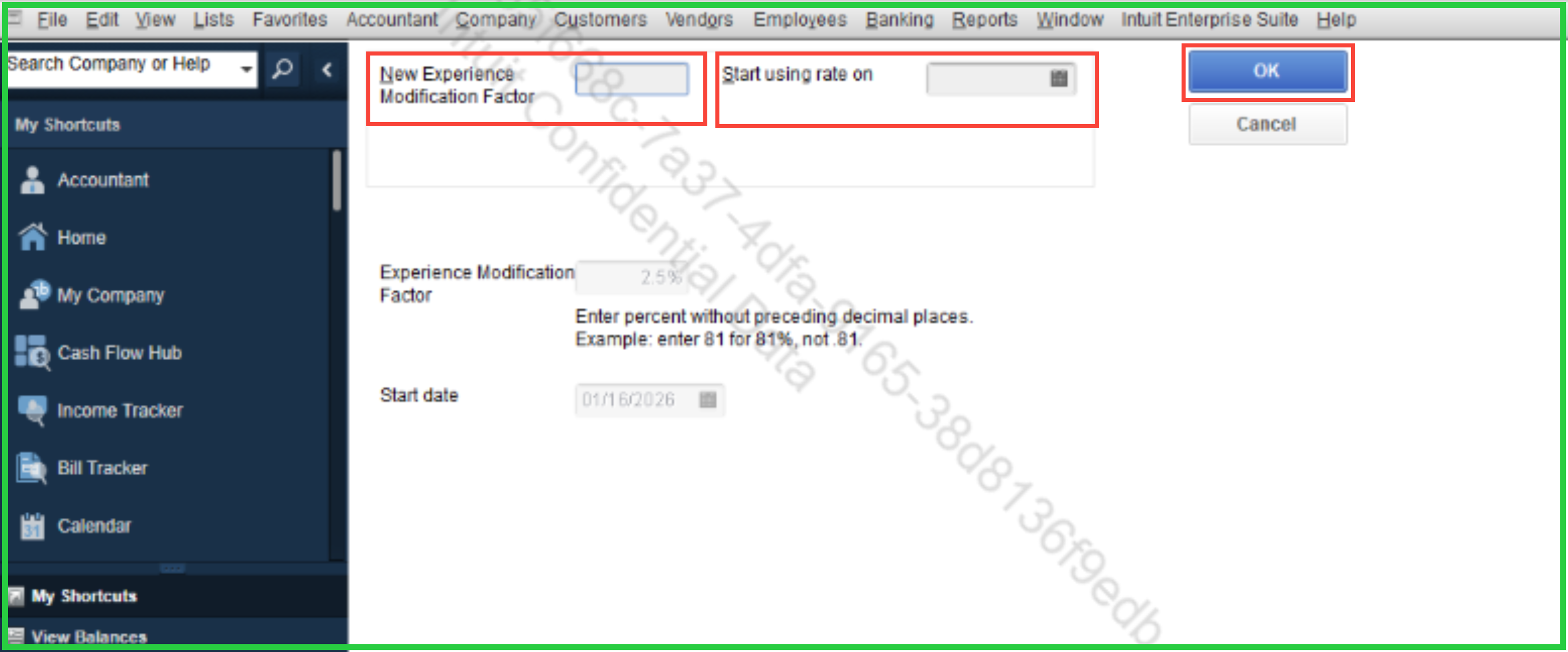
To reflect the change, all you need to do is enter the new rate in the New Experience Modification Factor field, input the effective date into the Start Using Rate On field, and click OK. That should save the changes and apply the new rate moving forward.

Please note that previous paychecks will not be impacted in this change, as the adjustment applies only to paychecks processed from the date you set.


Let me know if you're able to follow or if you have any other questions. Take care and have a great day.

View solution in original post

2 Comments 2
EvethC
QuickBooks Team

Workers Comp Experience Modification rate

Hi there, Joanie.

Thank you for reaching out for help with updating your experience modification factor. I’m happy to assist.


Before we start, I’d recommend backing up your company file to ensure that you have a secure copy of your data in case anything unexpected happens during the process.


To reflect the change, all you need to do is enter the new rate in the New Experience Modification Factor field, input the effective date into the Start Using Rate On field, and click OK. That should save the changes and apply the new rate moving forward.

Please note that previous paychecks will not be impacted in this change, as the adjustment applies only to paychecks processed from the date you set.


Let me know if you're able to follow or if you have any other questions. Take care and have a great day.

EvethC
QuickBooks Team

Workers Comp Experience Modification rate

Hello there, Joanie.
 

I just wanted to follow up to check if the resolution we provided helped resolve your issue.
 
Please let us know if everything is now working as expected or if you're still experiencing any problems.

We'll be glad to assist further if needed.

Need QuickBooks guidance?
Log in to access expert advice and community support instantly.

Need to get in touch?

Contact us