Turn on suggestions
Auto-suggest helps you quickly narrow down your search results by suggesting possible matches as you type.
Showing results for
Get 50% OFF QuickBooks for 3 months*
Buy nowI am using QB desktop version 24.0. My workers comp experience modification rate has changed. I am on the workers compensation setup screen that states "enter your experience modification factor" but the radio button for "yes, I use an exp mod factor" is not bold. I cannot choose it. It has my exp mod from last year listed and the date I entered but it is not allowing to change it. Anyone else having this issue
Solved! Go to Solution.

Hi there, Joanie.
Thank you for reaching out for help with updating your experience modification factor. I’m happy to assist.
Before we start, I’d recommend backing up your company file to ensure that you have a secure copy of your data in case anything unexpected happens during the process.
To reflect the change, all you need to do is enter the new rate in the New Experience Modification Factor field, input the effective date into the Start Using Rate On field, and click OK. That should save the changes and apply the new rate moving forward.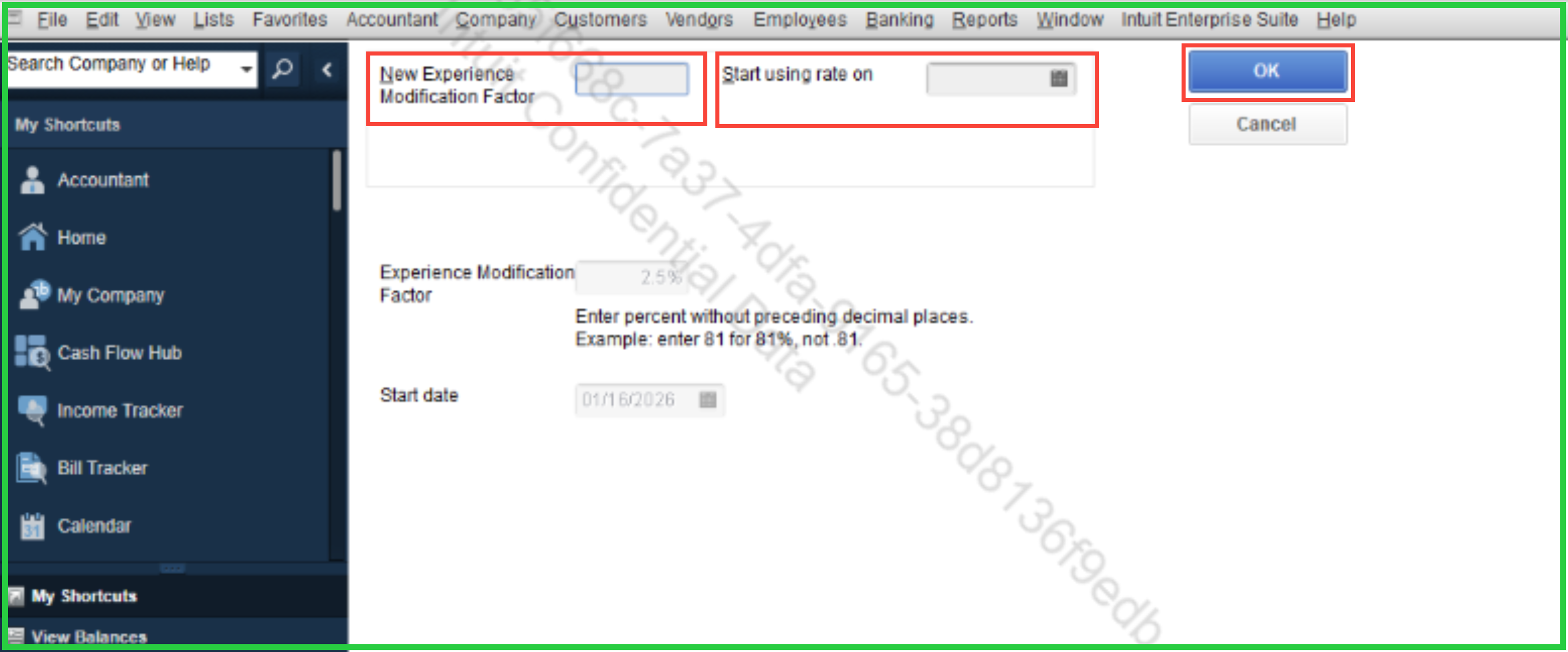
Please note that previous paychecks will not be impacted in this change, as the adjustment applies only to paychecks processed from the date you set.
Let me know if you're able to follow or if you have any other questions. Take care and have a great day.
Hi, Joanie.
Thanks for that clarification, that helps me understand what's happening. It seems like you might be on a different screen than the one shown in the screenshot. Let me walk you through the exact path to get there.
Here's how to reach the correct screen:
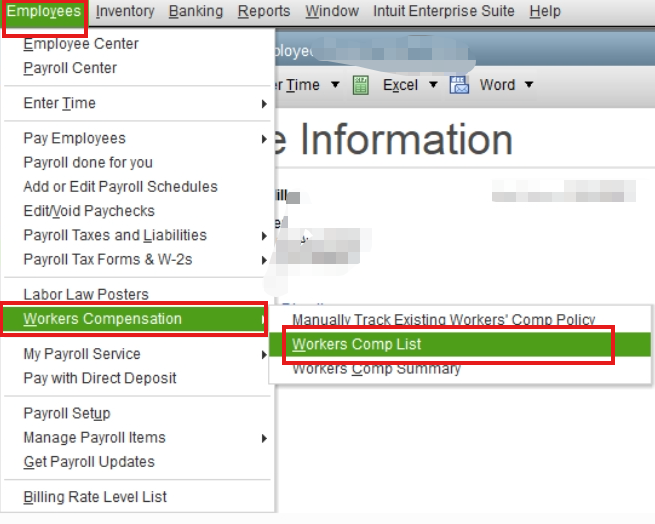

Once you save it, the new rate will automatically apply to any paychecks you process from that date forward.
If you have further concerns, please don't hesitate to reach out.
Hi there, Joanie.
Thank you for reaching out for help with updating your experience modification factor. I’m happy to assist.
Before we start, I’d recommend backing up your company file to ensure that you have a secure copy of your data in case anything unexpected happens during the process.
To reflect the change, all you need to do is enter the new rate in the New Experience Modification Factor field, input the effective date into the Start Using Rate On field, and click OK. That should save the changes and apply the new rate moving forward.
Please note that previous paychecks will not be impacted in this change, as the adjustment applies only to paychecks processed from the date you set.
Let me know if you're able to follow or if you have any other questions. Take care and have a great day.
Hello there, Joanie.
I just wanted to follow up to check if the resolution we provided helped resolve your issue.
Please let us know if everything is now working as expected or if you're still experiencing any problems.
We'll be glad to assist further if needed.
Thank you but I cannot select the modification rate. My screen does not look like the picture you provided. There be another area within QB to make the change but on my program, I cannot tab, select, or choose the field that contains the EMR. It is faint in color and cannot be selected. Please tell me how you got to the screen shot you are showing in your reply.
Hi, Joanie.
Thanks for that clarification, that helps me understand what's happening. It seems like you might be on a different screen than the one shown in the screenshot. Let me walk you through the exact path to get there.
Here's how to reach the correct screen:
Once you save it, the new rate will automatically apply to any paychecks you process from that date forward.
If you have further concerns, please don't hesitate to reach out.
Thank you. The error was mine. I was not looking at the bottom of the screen for the tabs to select the EM tab to make the change. I appreciate the Community page.
Hey there, @Joanie R.
I'm glad we were able to help you get the details you needed to get this resolved.
If you have any other questions, don't hesitate to ask. We're always here to help. Take care!


You have clicked a link to a site outside of the QuickBooks or ProFile Communities. By clicking "Continue", you will leave the community and be taken to that site instead.
For more information visit our Security Center or to report suspicious websites you can contact us here


