Get 50% OFF QuickBooks for 3 months*

Buy now
cancel
Showing results for 
Search instead for 
Did you mean: 
Announcements
Simplify payday and set payroll to run automatically on QuickBooks. Explore QuickBooks Payroll
swinncraft
Level 1

Am I able to delete my address from an invoice? I don't want customers seeing my home address.

 
1 Comment 1
KayePe
QuickBooks Team

Am I able to delete my address from an invoice? I don't want customers seeing my home address.

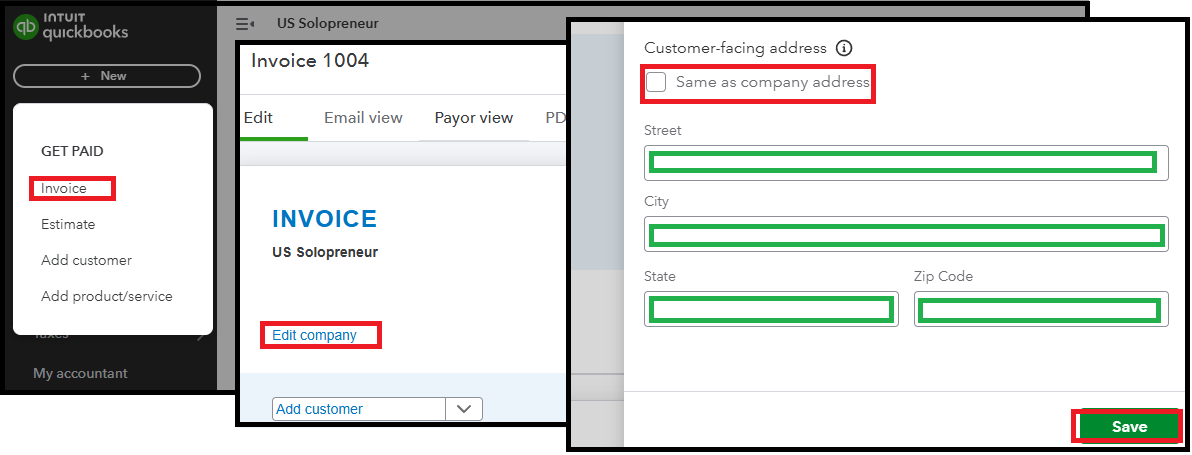
Yes, you can delete your home location by removing the Customer-facing address when managing an invoice, @swinncraft.


Here's how:
 

  1. Click the +New button, then select Invoice.
  2. In the Header section, click Edit company.
  3. Locate the Customer-facing address field and delete the existing address to ensure it does not appear on the invoice.
  4. Uncheck the Same as company address box.
  5. Click Save to confirm the changes.


If you have additional inquiries or questions related to managing an invoice, you can hit the Reply button below. We're here to assist you in any way we can.

Need QuickBooks guidance?
Log in to access expert advice and community support instantly.

Need to get in touch?

Contact us