Turn on suggestions
Auto-suggest helps you quickly narrow down your search results by suggesting possible matches as you type.
Showing results for
Get 50% OFF QuickBooks for 3 months*
Buy nowHello
So I started a side business. and in July realized I needed something stronger fro bookkeeping and inventory management and went with QBO. so I started doing business in may but didn't get started till July with QBO.
The other thing to note is I went with starting QBO with invoicing knowing I would catch up later, So I put in inventory items and all my ld invoices from square by hands to start moving forward in July. I did get banking sync, deposits matched up ect. now it's time to enter the bills for all the inventory I purchased. and yes it took me till this weekend to get to it.
so now I go to put my first bill from 4/17/25 that has 6 machines I bought to resell in. and I get the "As of Date" error. so through all my research I can do I have figure out that it won't let me enter a inventory item before the date it was first sold.
when I look at some inventory it shows me -6, other inventory not really show me that the main thing I sell should show like -50 but it shows zero. all my items should be showing a negative number until I put my purchase of inventory in.
any how the only fix I can seem to find is to make new inventory item, then do a journal entry to put that cost if item to that invoice.
right now at 176 invoices it would almost seem easier to erase everything and start over. any help? or is it really that just the way it is.
Thanks in advance for any help or advise.
Solved! Go to Solution.

I appreciate you sharing the details about your current inventory tracking situation, livepilot. Let me clarify the things with the As-of-date error you're encountering.
The error occurs because the inventory start date you entered (01/31/2026) is after the dates on the invoices (starting 05/30/2025) where you used those items. QuickBooks won't allow you to record a purchase or sale for an item before its official As-of-date.
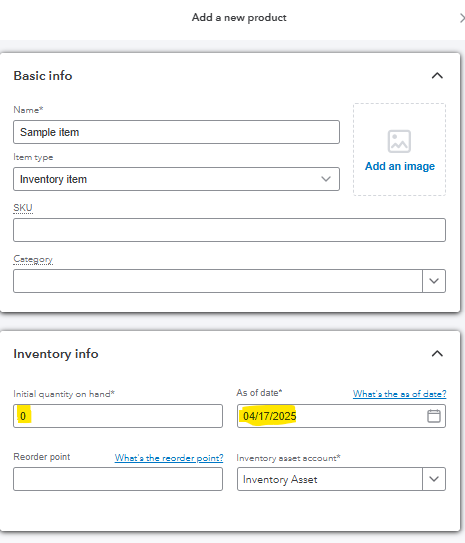
To fix this, you'll need to create a new inventory item dated 04/17/2025, set the quantity to 0. This way, you can enter a bill of your desired quantity, and it will be added to the quantity of the newly added inventory item.
You can check out the screenshots below as a reference:
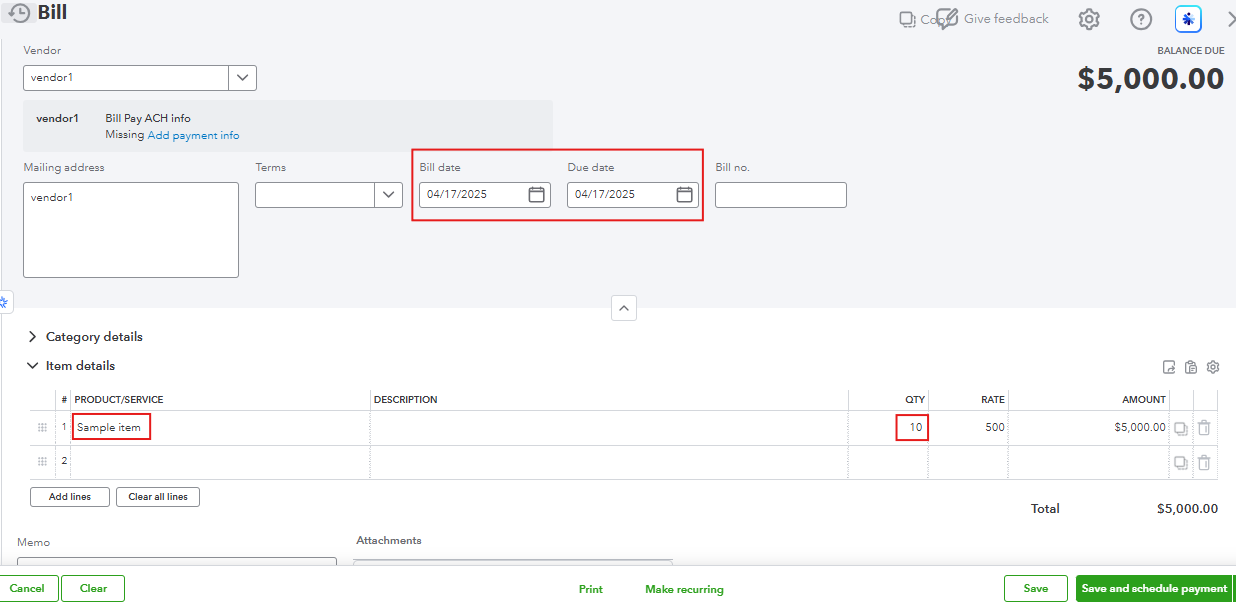
After creating a bill, edit the invoices from 05/30/2025 and replace the old service/non-inventory items with this new inventory item. Here's how:
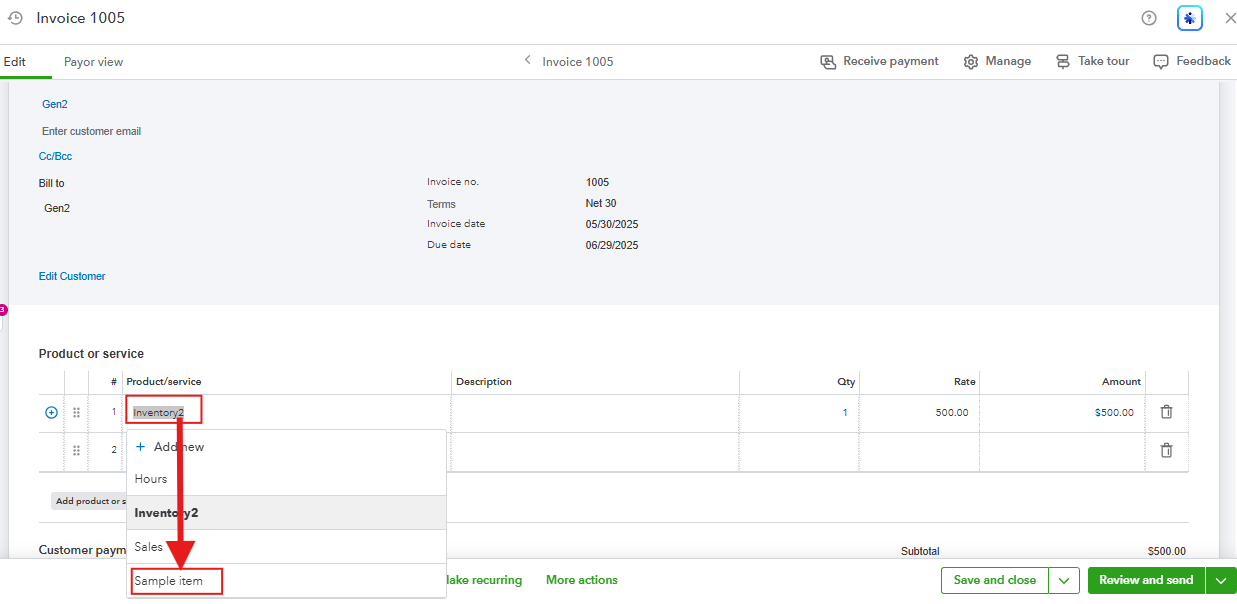
Once the history is moved, you can safely remove or inactivate the original item dated 01/31/2026 to avoid future confusion.
Moving forward, it is best to check the starting date of your inventory item before creating any transaction associated with that item to avoid errors and conflicts.
Feel free to go back to this thread if you have more questions. We're always here to help.
Hi there @livepilot, Welcome to the Community.
You can adjust the As of date for the machine in Products and Services to an earlier date to resolve the error. This works because your bill date must be on or after the date you started tracking the quantity on hand of an inventory item in QuickBooks Online (QBO).
The reason some show negative and some show zero is likely due to how the items were created in QBO. Inventory items are tracked and selling more than you have results in a negative balance because the system monitors exact counts. On the other hand, non-inventory items are not tracked and so the quantity remains at zero regardless of how many you sell, as the system does not maintain a running tally.
Here's how to adjust the As of date:
1. Go to All apps.
2. Under Sales & Get Paid, select Products & services.
3. Find the inventory item, and in the Action column, click Edit.
4. Click the Starting value link, then adjust the As of date.
5. Hit Save and close.
If you have any further questions, don’t hesitate to leave a message.
Hi EduardA
yes I did find this solution., how ever I followed you instructions since it took me there slightly different. but I get the same error. I try and put my date as 3/1/2025, with first sale 5/25/2025 and it give me the out of date it gives me that until I select the today date.
wanted to show a screen shot of what I have maybe you'll see something. but also shows the error
Hi there, livepilot.
We appreciate you sharing the screenshot and providing detailed information about the issue. Let's work together to resolve this.
Based on the error message, it appears that the As of date you’ve entered conflicts with one or more transaction dates. This error occurs when the As of date is set to a date later than one or more transaction dates in the system.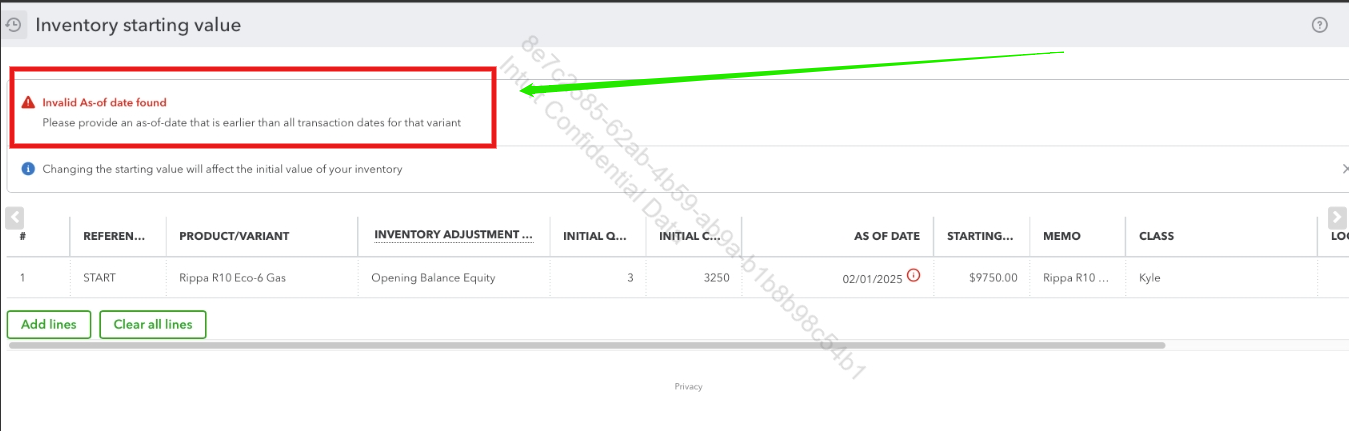
To resolve this issue, we recommend checking the earliest transaction date associated with the variant or record. Ensure the As of date is set to before or equal to this earliest transaction date. Modify this accordingly to ensure it aligns with all existing transactions.
You can also consider setting up reorder points to receive notifications when your products are running low or out of stock.
For additional questions or concerns, feel free to leave a reply below.
Yes I tried that here is a screen shot of my sales. is I try and put the date I purchased the good as 4/17/25, my first sale is 5/25/25 and it gives me the as of date error. there must be be something else that is wrong.
thanks for the reply!
Thanks for the reply
Here is a screen shot of one of the items I am having trouble with. as you can see date of first sale is 5/25/25. im am trying to input 4/17/25 as when I paid and got the inventory and it wont let me do that date the earliest date is the one on the top where it says start. I must have something wrong.
Thank you for providing additional details and a screenshot of the affected inventory, livepilot. I have reviewed your previous conversation and now understand the situation.
You’re attempting to enter a bill dated 4/17/2025, but you have encountered the error: Select a date that's after the date you started tracking this inventory item. In response, you tried to update the inventory item's starting value date and encountered another error: Please provide an as-of-date that is earlier than all transaction dates for that variant.
When managing inventory items and their related transactions, keep in mind the following:
To enter the bill dated 4/17/2025, you need to delete the first sales transaction linked to the affected inventory item. Based on the report, the first sales transaction is an invoice dated 5/30/2025. Here’s how to delete it:
Once the invoice is deleted, go back to the affected inventory item. You can change the AS OF DATE for the starting value to 02/01/2025 (based on your screenshot) or another date, as long as it is on or before 4/17/2025.
After updating the AS OF DATE, you can then enter the bill dated 4/17/2025 using the inventory item. Be sure to re-enter the deleted invoice dated 5/30/2025, as well as any other sales transactions (such as the one dated 5/25/2025, if they are separate). You can use the Audit log to see the details of the deleted invoice.
I also recommend consulting with your accountant to review your inventory report and ensure there are no discrepancies.
Additionally, I’d like to clarify a few details regarding your latest screenshot, which shows an Inventory Starting Value dated 01/31/2026:
Feel free to provide additional details or let us know if you need further assistance. We’re here to help.
Hi @livepilot,
I just wanted to follow up to check if the resolution we provided helped resolve your issue.
Please let us know if everything is now working as expected or if you're still experiencing any problems.
We'll be glad to assist further if needed.
I appreciate you sharing the details about your current inventory tracking situation, livepilot. Let me clarify the things with the As-of-date error you're encountering.
The error occurs because the inventory start date you entered (01/31/2026) is after the dates on the invoices (starting 05/30/2025) where you used those items. QuickBooks won't allow you to record a purchase or sale for an item before its official As-of-date.
To fix this, you'll need to create a new inventory item dated 04/17/2025, set the quantity to 0. This way, you can enter a bill of your desired quantity, and it will be added to the quantity of the newly added inventory item.
You can check out the screenshots below as a reference:
After creating a bill, edit the invoices from 05/30/2025 and replace the old service/non-inventory items with this new inventory item. Here's how:
Once the history is moved, you can safely remove or inactivate the original item dated 01/31/2026 to avoid future confusion.
Moving forward, it is best to check the starting date of your inventory item before creating any transaction associated with that item to avoid errors and conflicts.
Feel free to go back to this thread if you have more questions. We're always here to help.
Thank you this is a solve I understand and can work with about half way through he fix and tedious as it is it didn't require me to delete invoices and re enter them which is what I was trying to avoid and other sources had said was only way.
thanks!
Thanks!
this is a solution I can manage! tedious but very doable half way through and its going great.
We're glad that everything has worked for you, livepilot.
It's our utmost priority to provide precise assistance to help you manage your QuickBooks tasks seamlessly. We are pleased that our colleague GenmarieM's solution and explanation helped you address your concerns.
If you require further assistance, please don't hesitate to contact the Community team again. We're always here to help!


You have clicked a link to a site outside of the QuickBooks or ProFile Communities. By clicking "Continue", you will leave the community and be taken to that site instead.
For more information visit our Security Center or to report suspicious websites you can contact us here


