Hi there, Amilo.
Certain features are available to you based on your designated user role. I'll explain how these work in QuickBooks (QB).
Your default view is based on how the primary or company admin set up the account. Switching views depends on the role they set up for you. The accountant role has specific feature limitations, such as switching views. This also explains why the Tasks widget isn't visible on your end.
In this case, you can reach out to your admin so they can verify your permission and edit it if necessary.
To learn more about the different types of user roles and permissions, as well as how to manage users, visit these articles:
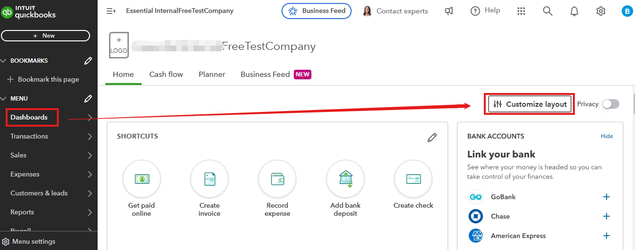
You can also personalize your dashboard by clicking the Customize layout at the top right corner of the dashboard to add, remove, or relocate the widgets.
For added security to your account, you can refer to this article: Secure your Intuit Account and prevent lockout with extra verification methods.
Our QuickBooks Live Expert Assisted service is available anytime if you require further assistance customizing your display preferences in QB or other business tasks.
Need more direction with your display options or task management? Just hit the Reply button, and we'll quickly assist you.


