Turn on suggestions
Auto-suggest helps you quickly narrow down your search results by suggesting possible matches as you type.
Showing results for
Get 50% OFF QuickBooks for 3 months*
Buy nowI imported a web connect file for a credit card. QBDT says the file has been imported but the imported transactions are not reported in the bank feeds in the recognized or unrecognized area. The balance reported for the account is correct.
Where are the transactions? The account numbers are correct. I did have to use a incorrect bank FID to create the QBO file as my bank was not listed.
When I access the bank feeds center I get a screen that has two boxes. The top box is Items to Send and has a check mark next to Download Bank Data for account: xx. The second box is Items Received From Financial Institution with xx Bank Data. The second box reports the correct balance.
When I click View in the second box, I am directed to a screen whose upper portion is the register. The lower portion reports unmatched transactions. When I try to match a transaction already in the register I get a message that says the transaction must have the same amount and number.
How do I find the transactions? I would like to delete the transactions or at least get them into my register.
When I tried to deactivate bank feeds, I get a message says that I can't because transactions are pending.
How do I match the transactions, if they have a match? How do I get the downloaded transactions to appear in the bank feeds so I can approve or confirm them.
I created the qbo files from pdf statements using Moneythumb if that makes a difference. The account numbers on the statement match the account numbers I used to create the account.
I am using QB Accountant Desktop 2024.
Please help. Thanks.

Hi there, FLBill.
I appreciate you taking the time to share the details of your experience. Possible reasons why imported transactions are not reported on the bank feeds it's because, transactions may have been downloaded from a wrong bank account or the date period filtered isn't the same to your imported transactions. To resolve this, ensure that you're reviewing the correct bank account where the transactions were imported and make sure the date is filtered correctly. I’ve attached screenshots to guide you in locating and verifying the accounts.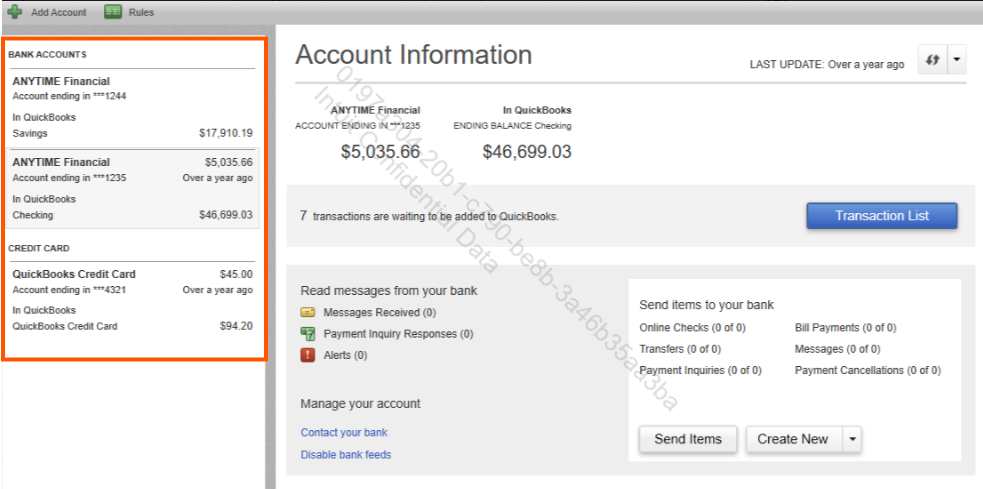
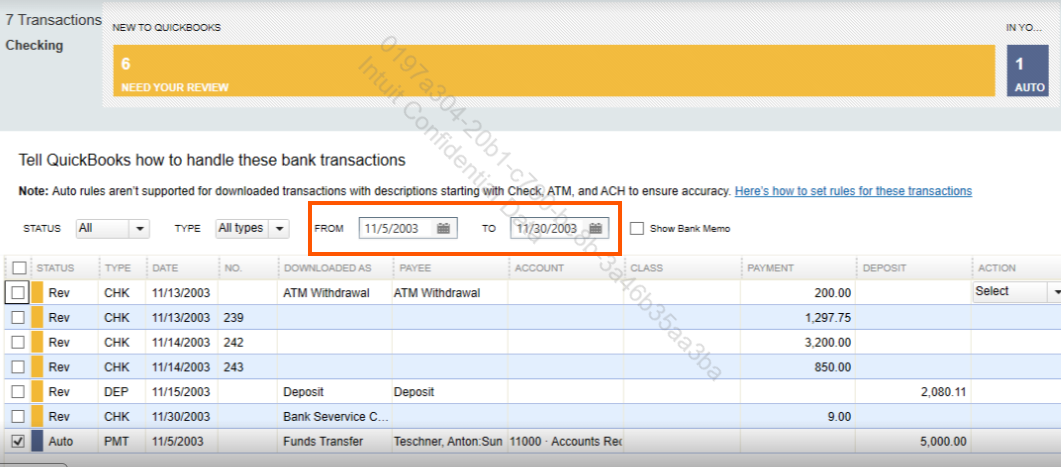
If you've confirmed that the transactions are still not appearing in the correct bank account, you can update the account ID in the QBO file. Keep in mind that the account ID is designed to prevent duplicate entries during the import process. Editing the account ID should only be one time action, and it's necessary if a previously downloaded transaction was deleted. You can follow the Solution 3 in this article: Edit the QuickBooks Web Connect (.qbo) file.
For more information on how to match bank feeds in QuickBooks Desktop, check out this article: Add and match Bank Feed transactions in QuickBooks Desktop.
If you have any other concerns or additional questions when importing your files let us know. We're always here to assist you further.
Hello there, FLBill.
I think the information is going to the correct account as it shows up as unmatched in the box as I described above. It does not show up in the bank feed uncategorized or or categorized tabs when download the qbo file.
I created new qbo files. The new qbo files did not upload properly.
I did not set up the bank feeds for the problematic account. Do I need to do this in order to upload web connect files manually?
Thank you.
Hi FL,
Thank you for updating us in this thread. Let me provide clarification on why the transactions are not in your bank feeds after the importing process.
In your initial post, you mentioned that the imported transactions do not appear in either the recognized or unrecognized areas of your bank feeds. Could you confirm if you are currently using Advanced Mode?
You also referred to a screen with two boxes: Items to Send and Items to Receive from Financial Institution. Please note that this screen is part of Classic Mode, which means that your bank feeds may have been switched from Advanced Mode to Classic Mode.
I recommend switching back to Advanced Mode for a more detailed view, which may help ensure the imported file reflects correctly.
Please follow the steps below to switch banking feed modes:

If the transactions are still not showing, you can also try using the Express Mode.
However, if the imported transactions do not appear in any of the banking modes, I suggest requesting a .qbo file directly from your financial institution. Once you have the file, you can proceed with importing it to QuickBooks.
If they're unable to provide the correct file format, you might consider using a different file converter. The file you imported may have an issue, which could be why the transactions are not showing in QuickBooks.
I hope this helps you successfully import your transactions into QuickBooks. Please don’t hesitate to click the Reply button below to let me know how it goes or if you need any further assistance. The Community team is here and always ready to help!


You have clicked a link to a site outside of the QuickBooks or ProFile Communities. By clicking "Continue", you will leave the community and be taken to that site instead.
For more information visit our Security Center or to report suspicious websites you can contact us here


