Turn on suggestions
Auto-suggest helps you quickly narrow down your search results by suggesting possible matches as you type.
Showing results for
Get 50% OFF QuickBooks for 3 months*
Buy nowI have a customer account that does not sync with the customer balance. The customer balance in the customer list is correct at $179.50 credit. However, if you add the credits in each of the accounts for that customer, the credit totals to $213.90 giving the customer an additional $34.40 in credit. I ran the utility fix hoping that would fix the error, but it did not. Are there other suggestions I can do to correct this discrepancy.

I appreciate your effort to resolve the discrepancy issue, vsbell206. I'll share additional steps to fix the problem.
To ensure accuracy, I recommend running a report that allows you to review all credits of the customer's account. This will help you double-check and verify the credit information.
Once verified and the same results, let's run the QuickBooks Desktop Tool Hub to fix common issues. Here's how:
Moreover, you have the ability to personalize your report by adding specific details that are of utmost importance to you. For detailed guidance, please consult this article: Customize reports in QuickBooks Desktop.
If you require further assistance managing customer credits or related matters, reply to this thread. I am here to support you at any time.
I followed your instructions but it did not fix the problem. Is there a way to see past transactions using existing credits. I am thinking this has something to do with telling the system to use credits and perhaps there was a glitch somehow.
I followed your instructions but it did not correct my problem. Is there a report that details how the credits were applied? I am thinking that there must a glitch or something when I applied the credits to his account.
Thanks for reaching back @vsbell206, and I appreciate you for performing the steps shared by my peer above. Allow me to share additional information to check the credits of your customer's account.
We can run the Customer Balance Detail report and utilize the customize feature to set up the details you want to appear. I'll guide you on how:
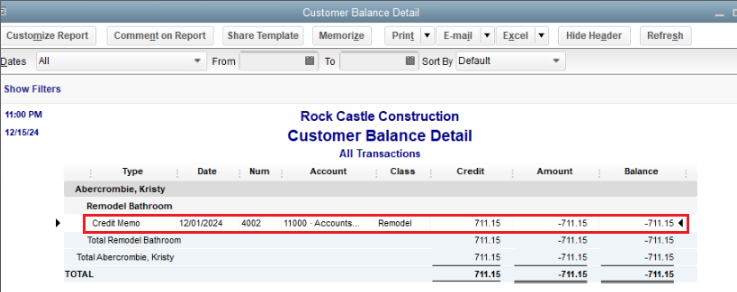
From there, you can click the transaction to see how the credits were applied. In the Credit Memo screen, press CTRL+H together to see the transaction history. See the screenshot below for visual reference.
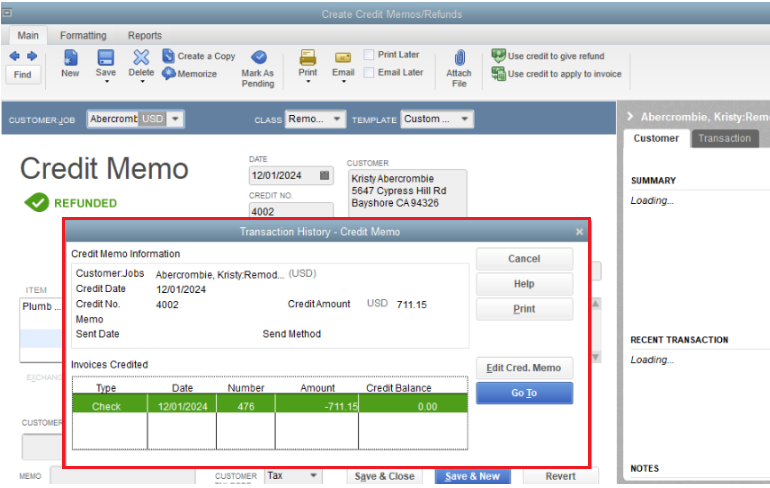
If you notice mistakes in how you apply the credit, you can make necessary changes to it. However, if it's all good but there are still discrepancies, I recommend reaching out to our QuickBooks Support team. They have all the necessary tools to pull up your account securely and further investigate the root cause of your issue. Here's how:
Be sure to review their support hours so you'll know when agents are available. In the event you're unable to reach out to Intuit through your books, you can get in touch through our website.
You can also seek self-help articles on our QuickBooks help articles page, to get your QuickBooks task done in no time.
Let me know how this goes and post a reply below. I'll be around if you have any other QuickBooks-related concerns.


You have clicked a link to a site outside of the QuickBooks or ProFile Communities. By clicking "Continue", you will leave the community and be taken to that site instead.
For more information visit our Security Center or to report suspicious websites you can contact us here


