You'll have to go to the Subscriptions and billing menu in QuickBooks Online (QBO) to deactivate your account, Jack.
Before doing so, I highly recommend exporting your data, reports, and lists to ensure you have the information you might need in the future.
The process varies based on how you purchased your plan, either directly from Intuit or through an app store. If you signed up online through Intuit, please follow these steps to complete the cancellation:
- Open a web browser on your computer, not a mobile device.
- Sign in to QuickBooks Online as the primary or company admin.
- Go to the Gear icon and select Subscriptions and billing.

- In the QuickBooks section, hit Cancel, Cancel subscription, or Cancel online. If you're cancelling a trial, pick Cancel your trial.
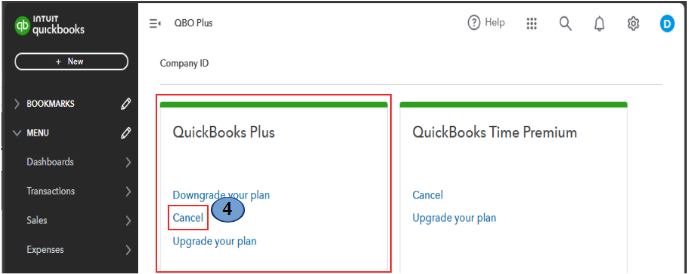
- Follow the on-screen steps to proceed.
If you acquired your account through the Apple App Store (iOS, iPhone, iPad) or Google Play Store (Android phones and tablets), follow the official steps to cancel by checking out this article: Cancel your subscription.
Feel free to comment below if you need further assistance!


