This is a reported issue, RustyN. Our engineers are already working for a fix.
In the meantime, you can try these steps as a workaround:
- Close QuickBooks.
- Delete QBW.ini. You can find this in the following locations:
- C:\ProgramData\Intuit\QuickBooks[Version] where [Version] is your version of QuickBooks Desktop.
- C:\Documents and Settings\All Users\Application Data\Intuit\QuickBooks [Version] where [Version] is your version of QuickBooks
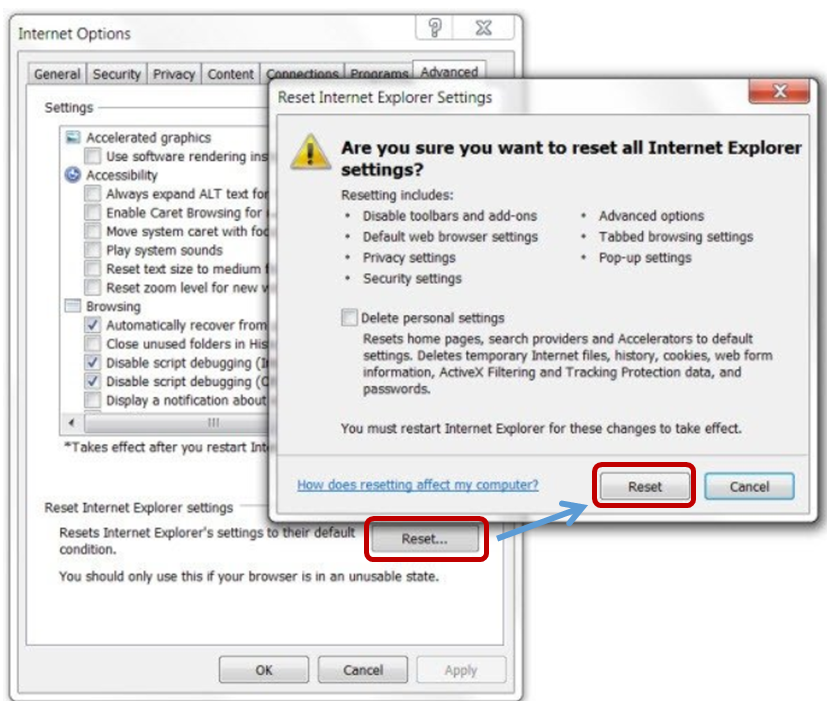
- Reset internet Explorer Settings including Personal Settings.
- Restart the computer.
- Open QuickBooks, then press F1 on your keyboard to open the Help window.
If you're still encountering the same issue, I'd suggest reaching out to our customer care support. We're taking notes of the users who are affected by the issue. Here's how:
- Visit our website.
- Select QuickBooks Desktop.
- Click Continue as a guest.
- Select your QuickBooks Desktop version.
- On the Contact Us page, click Solving Issues & Error Messages, then click Common Errors.
- Click Start a Message.
You can always visit us if you have other questions or concerns.


