Hello there, @houtxgutters2. Hope you're doing well.
I would like to confirm if this email confirmation you're referring to is an invoice. If so, you can check the invoice status of your customer, including if the email you've sent to them. QuickBooks gives us an option where you can view the invoicing activity.
The steps below will walk you through confirming if the person read the email.
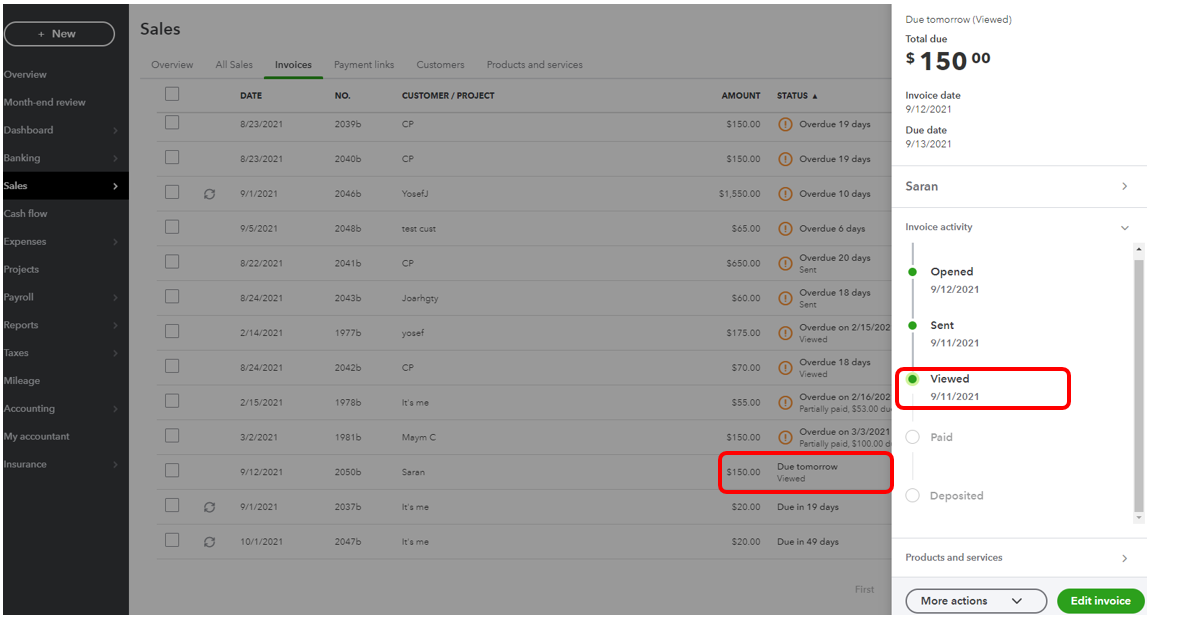
- Go to Sales on the left panel.
- Within the Invoices tab, find the transaction you've sent. You can filter the Date field to find it easily.
- Click the transaction to view the invoicing activity. You'll see Viewed if your customer viewed or read the email you've sent.
You can check the articles below to help you more managing your sales transactions in the program.
If you have follow-up questions or referring to something else, please let me know by commenting. I'm here to continue to provide you the information you need with QuickBooks. Take care and stay safe always.


