Turn on suggestions
Auto-suggest helps you quickly narrow down your search results by suggesting possible matches as you type.
Showing results for
Get 50% OFF QuickBooks for 3 months*
Buy nowEmail template changed after restarting QB Enterprise multi-user.
Sent out invoices at 1:00PM - QB crashed - restarted QB - Continued to send out invoices and a new email template happened. How do I get the old email template back.
Now all users have the same issue.
See attached.

Hi there, DOA.
Thank you for reaching out to us about your email template concern.
When the email template is missing or unable to be modified after the QuickBooks Desktop (QBDT) crash, it is a result of underlying data damage from the crash, which impacted your configurations, including email templates.
To fix this, you'll have to log out and log in to your QBDT account. This clears any temporary glitches or corrupted session data, ensuring a clean workspace.
If the issue still persists, you can do a verify and rebuild data process. This troubleshoots and identifies potential data integrity issues within the program and the company file.
Here's how to verify:
If the verify tool finds data damage, use the rebuild tool to repair your company file. A backup is required before you can rebuild. Here's how:
For more details about the verify and rebuild tool, feel free to visit this article: Verify and Rebuild data in QuickBooks Desktop.
If you have other questions, leave a comment down below.
Thank you for that information, however, that did NOT solve the problem.
Hi there, @DOA. I appreciate your update and the effort you put into performing the troubleshooting steps provided by my colleague. I know your time is precious, and fixing this issue would be a great help in finishing your invoicing tasks on time.
I can only think of one reason why you are experiencing this issue with the invoice email template. After restarting your QuickBooks Desktop (QBDT) Enterprise twice because of the system issue you encountered, the template was automatically changed to the standard one.
To return it to your customized invoice email form, you will need to set it as the default template again in your Send Forms section. Here's how:
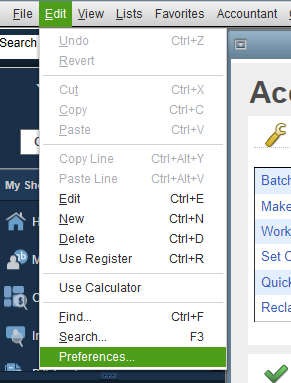
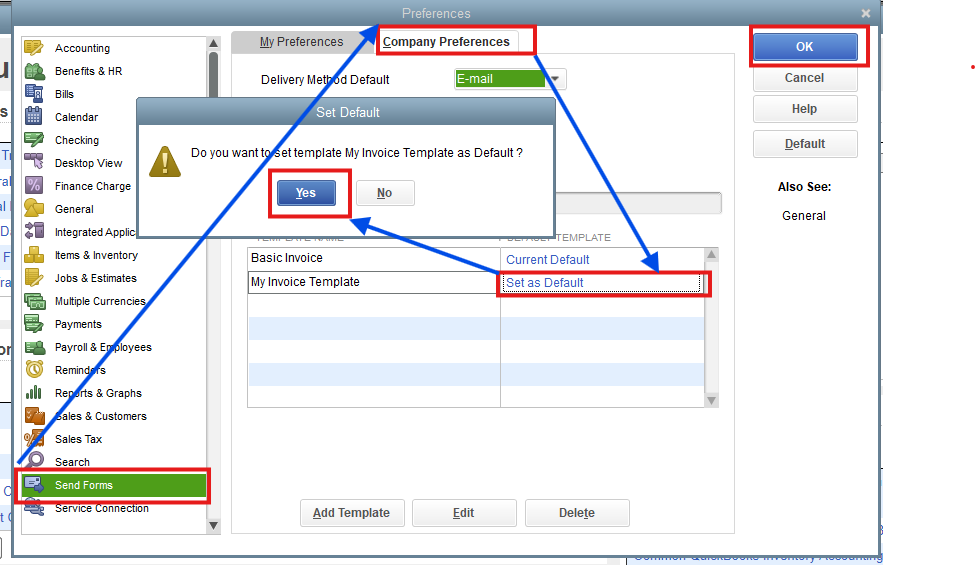
If the customized invoice email template is already the default, I recommend running a quick fix for your program from the QuickBooks Tools Hub. This will help resolve some common invoice email template errors.
Let me know if you have additional questions. We're here to assist you promptly.
Thank you. However, that did not solve the concern.
Thanks for trying out the steps recommended by my colleagues above, DOA.
Since the problem is persisting, I recommend reaching out to a member of the QuickBooks Desktop Support Team. Agents have specialized tools, like the ability to share your screen, to take a closer look to determine what's causing the issue. They will also be able to get you added to the list of affected users if this happens to be a larger spread occurrence. Here's how to get in touch with the team:
The following article provides these steps if you ever need them again in the future: Get help with QuickBooks products and services.
Please don't hesitate to drop a comment below if you have any other questions. I'll be here to help in any way that I can.
I have exactly the same problem - I think the support staff responding here are not looking at your PDF image. I have a feeling that Intuit updated its base email template on which our email templates are built and I also DO NOT LIKE IT. If anyone at Intuit is still working on this case, please look at the OP's PDF attachment and let us know if this is an intentional thing on Intuit's part and how we overcome it.
I just ran into this issue as well with Quickbooks Desktop Pro Plus 2024, but my issue is slightly different. The OP's screenshots are dead on, but out of 5 concurrent logged in users, only 1 is experiencing this template problem. The other 4 are still utilizing the old template. I have also localized it to the actual computer and not a user or the database. No matter what user I log into as on the "broken QB" machine, the template is the same. No matter what user I log in as on a "working QB" machine, the template is the correct one. So, it has to do with the QB installation itself.
Update: I just ran the QB updates on one of the working users, and there was an update for "critical fixes". After that update installed and QB rebooted, the new template took over. This is definitely a QB programming change.
I just ran into this issue as well with Quickbooks Desktop Pro Plus 2024, but my issue is slightly different. The OP's screenshots are dead on, but out of 5 concurrent logged in users, only 1 is experiencing this template problem. The other 4 are still utilizing the old template. I have also localized it to the actual computer and not a user or the database. No matter what user I log into as on the "broken QB" machine, the template is the same. No matter what user I log in as on a "working QB" machine, the template is the correct one. So, it has to do with the QB installation itself.
While I was typing this, I just ran the QB updates on one of the working users, and there was an update for "critical fixes". After that update installed and QB rebooted, the new template took over. This is definitely an Intuit change.
Update to my update: I was able to revert QB back to the old template by running a repair of QB and not running the updates afterward. I hope Intuit provides an option to go back to the old template.


You have clicked a link to a site outside of the QuickBooks or ProFile Communities. By clicking "Continue", you will leave the community and be taken to that site instead.
For more information visit our Security Center or to report suspicious websites you can contact us here


