Turn on suggestions
Auto-suggest helps you quickly narrow down your search results by suggesting possible matches as you type.
Showing results for
Get 50% OFF QuickBooks for 3 months*
Buy nowIs anybody else having trouble with empty line items not printing a space in the pdf. They show on the screen but when I create a pdf they will not show?
Good afternoon, @RC125.
Thanks for reaching out to the QuickBooks Community. How are you today? I hope all is well.
I ran a couple of tests in my test account and saw that the empty lines are showing in my pdf preview. You can reference my screenshot below to ensure this is what you mean exactly.
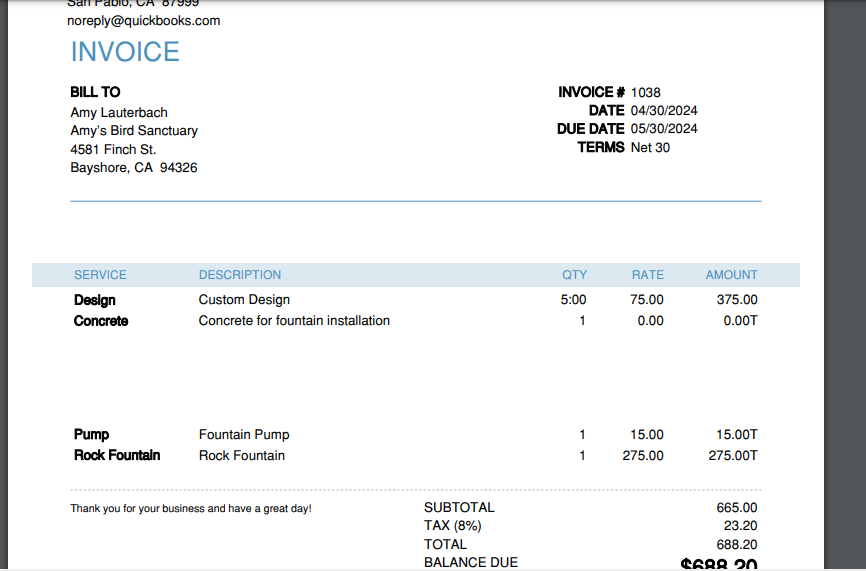
If this is what you're referring to, I recommend trying some basic troubleshooting steps, such as clearing the cache from your browser. Web browsers collect cache to save time when loading repetitive data and images. Over time these files can become outdated and corrupted, causing issues like the one with your empty lines not showing. I'm including the links for all supported browsers that contain the steps to clear the cache below.
After clearing the cache, please make sure to restart your browser so the changes can take effect.
Let me know how it goes. I'm here if you have any additional questions or concerns. Have a good one!
Thank you for sharing that.
Are you using new layout?
Maybe it is template related issue - my empty lines will not show up like that. Only if I had a previous invoice or quote with empty lines they will be in the pdf but any new empty lines they will not.
What template are your using? I will change to that template.
Thanks for getting back to us, RC125. Allow me to share insights about the templates that you can use in QuickBooks.
My colleague used the old layout for invoices on their screenshot. If you have the new version of invoicing and estimates, you can update and personalize your forms in QuickBooks as you create them.
You can also click on the Design tab in your invoice to select the template you want to use. It will look like a new layout, but it will be based on the template you customize when you send it to your customer. However, most of our customers use the Airy new for their templates.
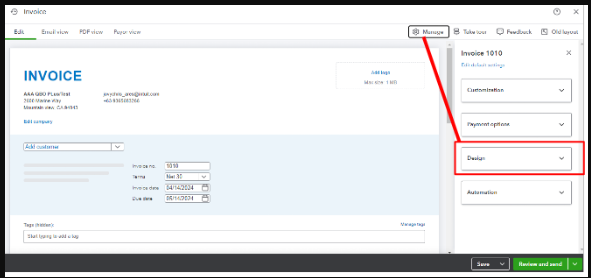
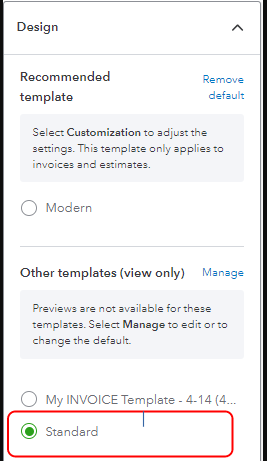
Also, it would be helpful if you could send a screenshot of the empty lines that are not printing space in the PDF. It can help us get on the same page and provide you with an accurate solution.
For more details, on how to personalize your sales forms and use the new layout, open these links:
I'll be adding these resources that will guide you in recording payments when a customer pays their invoices:
If you have further questions about managing invoice layout in QuickBooks, feel free to get back here. I'm here to assist you. Have a good day.


You have clicked a link to a site outside of the QuickBooks or ProFile Communities. By clicking "Continue", you will leave the community and be taken to that site instead.
For more information visit our Security Center or to report suspicious websites you can contact us here


