Hi there, Katie.
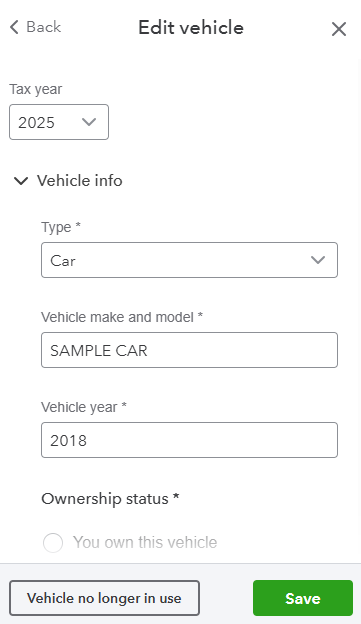
Currently, QuickBooks Self-Employed doesn't allow users to remove vehicles from an account, but you can mark it as inactive.
Before we proceed, please know that you can't deactivate your primary vehicle. Also, any existing trips linked to the vehicle will remain even after deactivation. To do so, follow the steps below:
- Open your QuickBooks account.
- Go to the Gear icon, then select Vehicle info.
- Once done, select the vehicles you want to remove.
- On the Edit vehicle page, click the Vehicle no longer in use button.
To ensure you won't have to mark those vehicles zero whenever preparing taxes, I suggest contacting TurboTax support for assistance in deleting the vehicles from your account so they won’t appear in your records.
If you have other concerns, feel free to comment them below.


