Welcome to the community, officemanager21. It’s definitely puzzling when an old deposit reappears, especially from way back in 2016. Since your bank balances are correct, it’s possible this deposit became unreconciled by mistake. Let’s work through some steps to clear things up.
First, let’s review the Reconciliation Discrepancy Report for the period where this deposit belongs. Here’s how you can find it:
- Type Reconciliation Discrepancy Report directly into the search bar at the top of your screen.
- Open the report and adjust the date range to include the 2016 period for the deposit.
- Look for any discrepancies that match the deposit amount that reappeared.
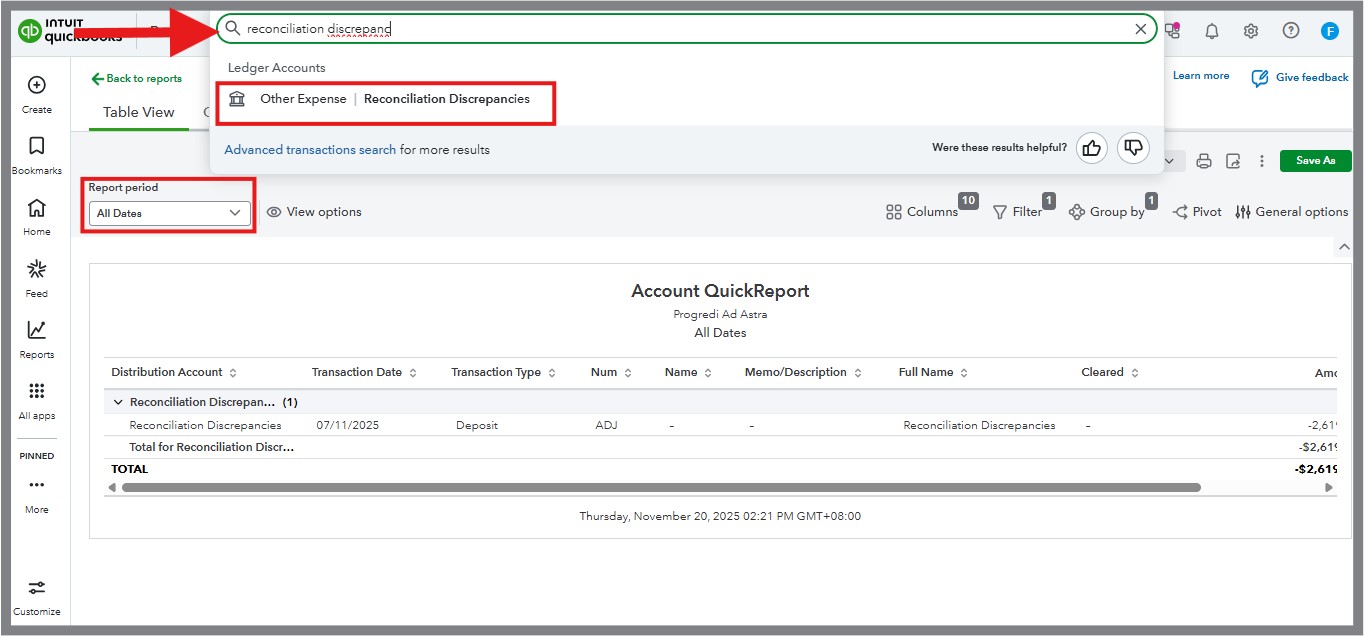
Here’s how you can fix it if a discrepancy exists:
- Go to Settings ( icon) and select Chart of Accounts.
- Find your Bank Register connected to the deposit.
- Search the register for the deposit in question, either by date or amount.
- Once located, check its status in the reconciliation column:
- If the status shows blank or C (Cleared), update it to R (Reconciled).
- Save your changes.
This process will ensure the deposit is properly reconciled and excluded from current-year records, without impacting your correct bank balances.
Let me know how it goes, or if there’s anything else you’d like help with. You can always reach out with more questions or for additional support in the comment section. I’d love to make sure everything’s straightened out.


