Turn on suggestions
Auto-suggest helps you quickly narrow down your search results by suggesting possible matches as you type.
Showing results for
Get 50% OFF QuickBooks for 3 months*
Buy nowSee the option to add vehicles or edit vehicles, but not seeing any option anywhere to delete my only managed vehicle.
You can only make your managed vehicle inactive, @720tax. Below, I’ll guide you through the steps to do this.
To begin, please note that the option to delete your managed vehicle directly is unavailable. Instead, you'll need to mark it as inactive to remove it from your list of active vehicles. Here are some important points to consider:
To make your vehicle inactive, follow these steps:
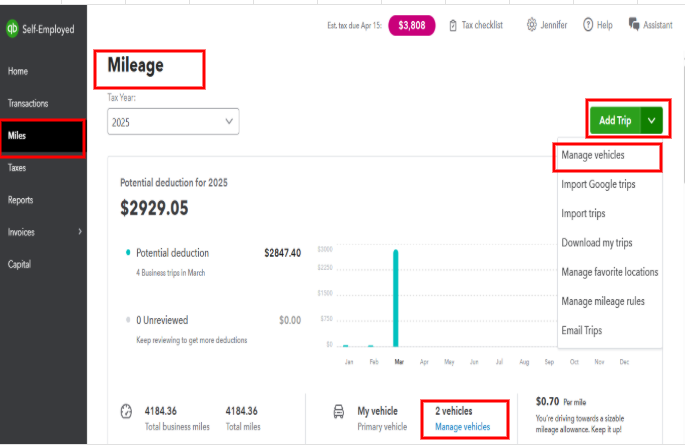
If the option Vehicle no longer in use is not visible, you’ll need to assign a different vehicle as the primary first. 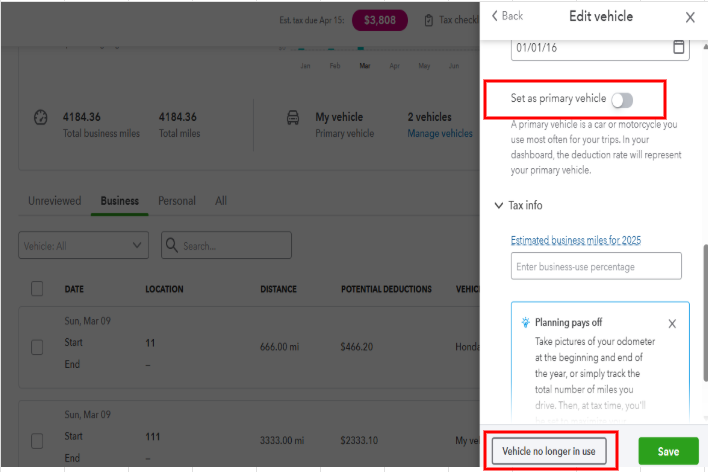
For more detailed information about vehicles and mileage tracking, refer to this article: Set up vehicles and mileage tracking in the QuickBooks Online mobile app.
Additionally, you can use the QBSE mobile app to automatically track your business miles and categorize your trips: Automatically track mileage in QuickBooks Self-Employed.
These steps should assist you in making your vehicle inactive. If you need further assistance with mileage or vehicle, feel free to click the Reply button, @720tax. We're here to ensure your experience is smooth and satisfactory.
Thanks for the info @720tax. It's unfortunate there's no way to remove the only managed vehicle. Pointless having a managed vehicle if no miles are tracked. And then have to be sure to delete it once data is imported into TurboTax each year.


You have clicked a link to a site outside of the QuickBooks or ProFile Communities. By clicking "Continue", you will leave the community and be taken to that site instead.
For more information visit our Security Center or to report suspicious websites you can contact us here


