Get 50% OFF QuickBooks for 3 months*

Buy now
cancel
Showing results for 
Search instead for 
Did you mean: 
Announcements
Simplify payday and set payroll to run automatically on QuickBooks.Explore QuickBooks Payroll
mybchw
Level 1

how do you change the email cover letter for invoices

 
3 Comments 3
Rusimyhr
QuickBooks Team

how do you change the email cover letter for invoices

Hey there, @mybchw!


To clarify, are you referring to the email view when sending an invoice? 


Here's a sample visual reference below:


2025-08-02 130446.jpg


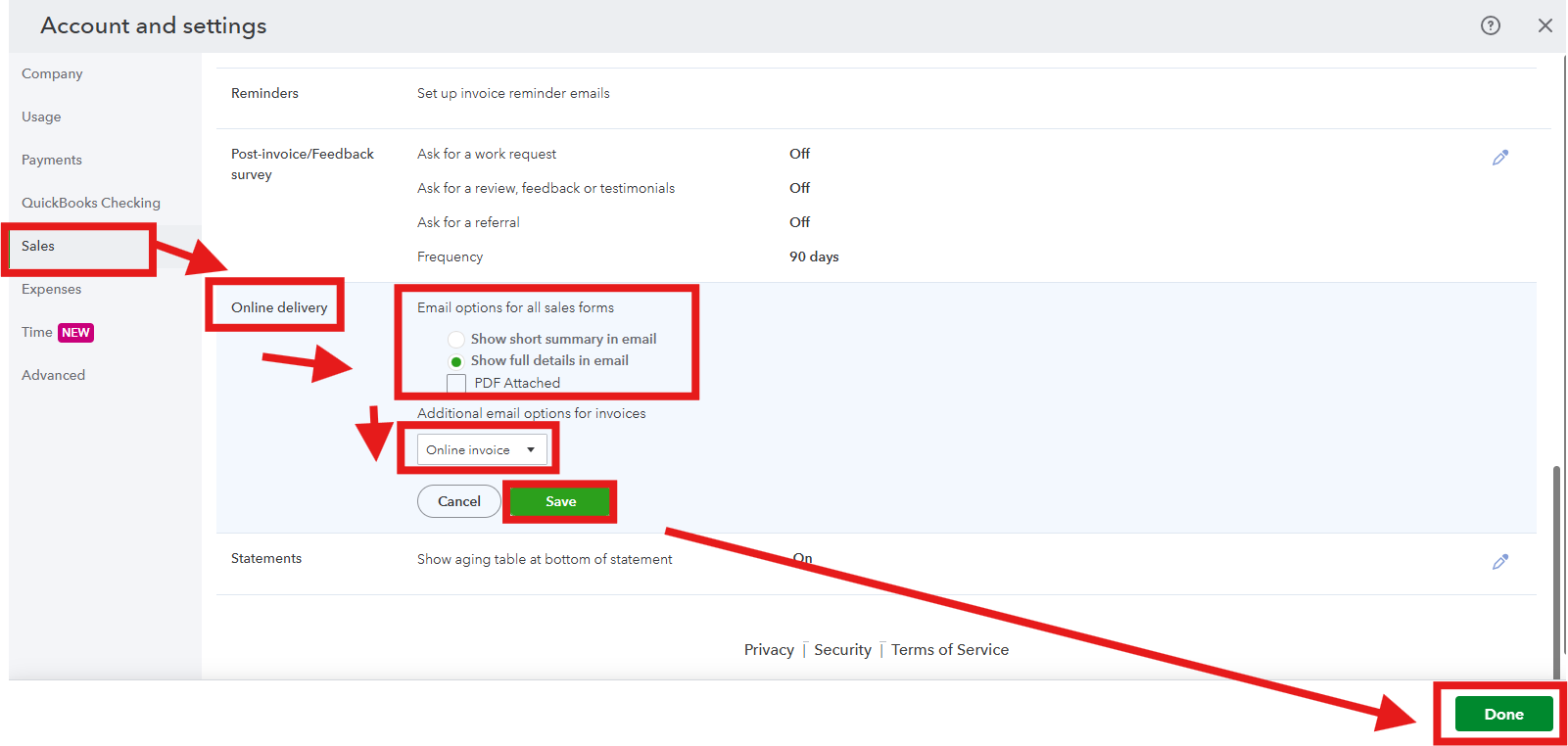
if yes, we can edit this on the Sales section under the Account and Settings. Here's how:


  1. Click the Gear Icon at the top-right corner of QuickBooks Online.
  2. Select Account and Settings under the Your Company section.
  3. Click Sales from the left-hand menu.
  4. Scroll to Online delivery and click the pencil icon.
  5. Choose the options that suit your needs.
  6. Select Save, then click Done.


However, if you are referring to something else, can you please provide a screenshot for us to give you accurate solution.


Please don't hesitate to utilize the Reply button bellow. The Community space is available 24/7.

Glazing
Level 1

how do you change the email cover letter for invoices

With the latest QB Enterprise 23.0 update we lost our saved email cover letter for invoices. How do I change back to the previous letter. The new one is not professional looking.

BonJulius_G
QuickBooks Team

how do you change the email cover letter for invoices

Hi, @Glazing.


I fully get wanting your email cover letter to look professional, especially if the previous version was perfectly tailored to your specific needs.


With the latest QuickBooks Enterprise 23.0 update, the functionality around saved email cover letters has changed, and the system now uses updated email templates. We encourage you to share your suggestions with our Product Development Team by submitting feedback through QBDT. This will help our product engineers gain clearer insight into how you’d like the program to work.


Here’s how:


  1. In the top menu bar, go to Help, then Send Feedback Online.
  2. Choose Product Suggestion.
  3. Enter your feedback suggestion.
  4. Select Send Feedback.


If you have any additional questions, just click the Reply button below. We’re here to help.

Need QuickBooks guidance?
Log in to access expert advice and community support instantly.

Need to get in touch?

Contact us