You can use the filter option in the Transactions menu to get the entries you want to see, @narleefilms. Let me show you how to do this.
To begin with, if your Self-Employed subscription has expired for over a year, you will no longer be able to view your transaction history. QuickBooks automatically deletes this data one year after the subscription expires. However, if your subscription has expired for less than a year, you can still see the transaction history you want to view.
Here's how:
- Sign in to your QBSE account.
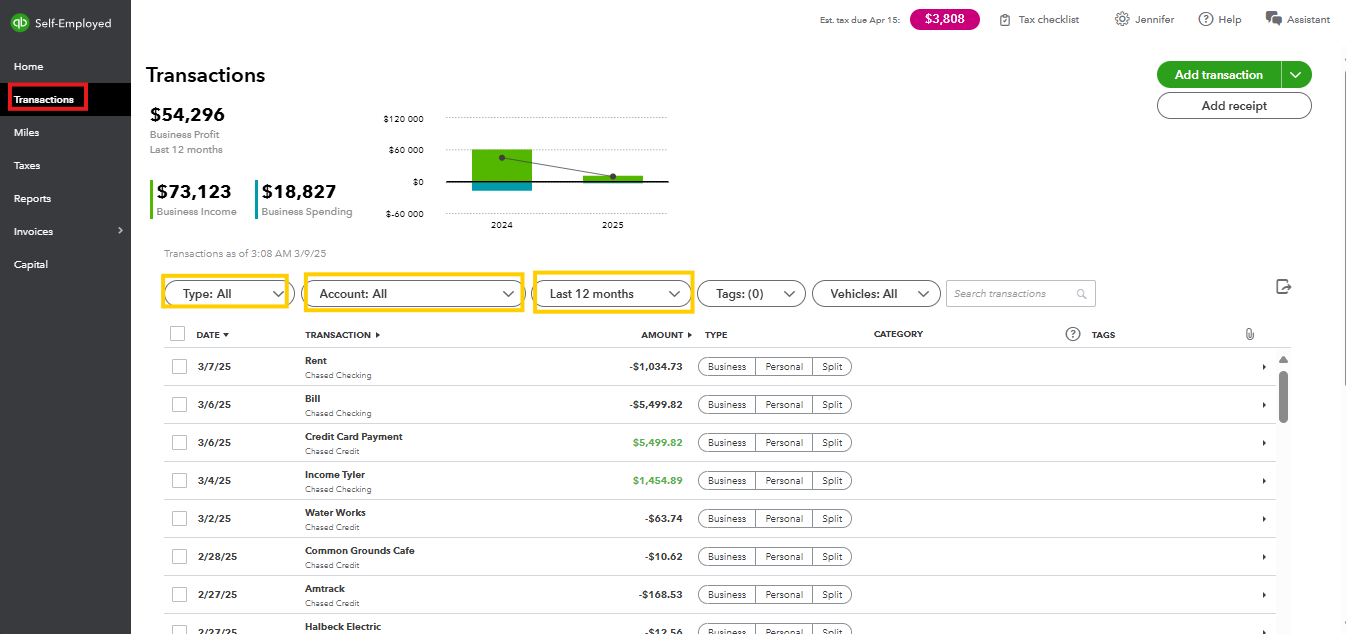
- Navigate to the Transactions menu on the left-hand side.
- Filter your transactions by selecting the appropriate options for Type, Account, and Period to filter the transaction you want to see.
I'll leave this article for you in case you want to resubscribe to QBSE: Resubscribe to QuickBooks Self-Employed. It provides detailed, step-by-step instructions on how to resubscribe using a web browser, iPhone or iPad (iOS), and Android phone or tablet.
You can hit the comment button below if you have any other concerns about pulling up transactions in your QBSE. We're always here to help. Have a great day ahead, narleefilms.


