Hello, Amanda! I'm glad you're learning QuickBooks and reaching out for help. Let me provide details about the Receive payments feature in QuickBooks Online (QBO).
Receive payments in QBO is used to record when a customer has paid an outstanding invoice, essentially updating your financial records to reflect the money you have received from a sale allowing you to track your cash flow and accurately monitor your accounts receivable balance.
In your case, if these payments aren't included in your actual bank statement, you have the option to delete them directly or use batch delete if you've entered a lot of these.
Here's how:
- Go to the Sales tab, then click All Sales.
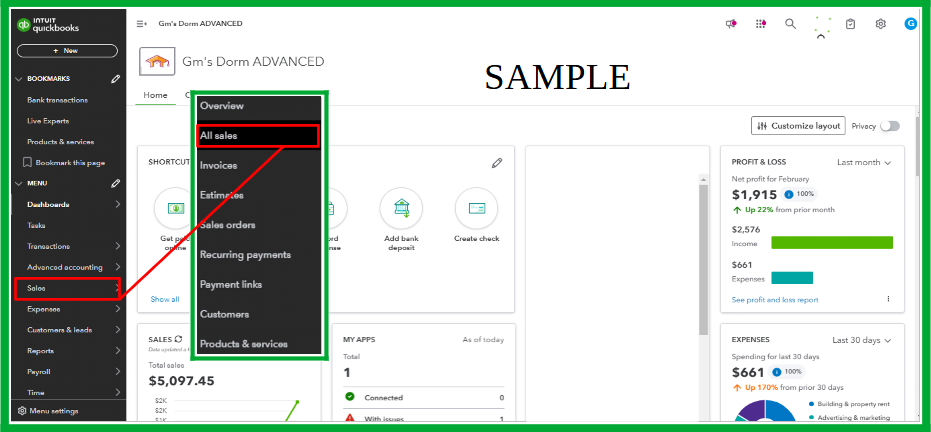
- Choose Money received under the Transaction Type.
- Choose the name of your customer under the Customer dropdown.
- Put checkmarks on all the mistaken payments.
- Click Batch actions and select Delete.

Moreover, I suggest reaching out to your accountant for further help fixing your account and ensuring the accuracy of your financial records in QuickBooks. If you don't currently have an accountant, you can find one specifically trained in QuickBooks in your area by searching here: Find a ProAdvisor.
Lastly, we have specialists ready to help you streamline various tasks in QuickBooks, including the invoicing process. Our QuickBooks Live Expert Assisted service offers personalized guidance to ensure you stay organized and effectively manage your business finances.
Let us know if you have other concerns about receiving payments in QuickBooks Online. We'll get back to lend a helping hand.


