Get 50% OFF QuickBooks for 3 months*

Buy now
cancel
Showing results for 
Search instead for 
Did you mean: 
Announcements
Simplify payday and set payroll to run automatically on QuickBooks. Explore QuickBooks Payroll
marcodaccarett
Level 1

I don't have SOCIAL SECURITY NUMBER... I only have the ITIN number and I'm the owner of the company but it doens't let me use my ITIN. help please =)

 
2 Comments 2
Clark_B
QuickBooks Team

I don't have SOCIAL SECURITY NUMBER... I only have the ITIN number and I'm the owner of the company but it doens't let me use my ITIN. help please =)

Hi there, Marco.


In QuickBooks Self-Employed (QBSE), please note that a Social Security Number (SSN) is required to process your application when setting up your account or applying for payments.


If you're interested, I recommend applying for an SSN online or at a Social Security Administration (SSA) office.


Once you've obtained your SSN and are ready to set up payments, here’s how you can do it:


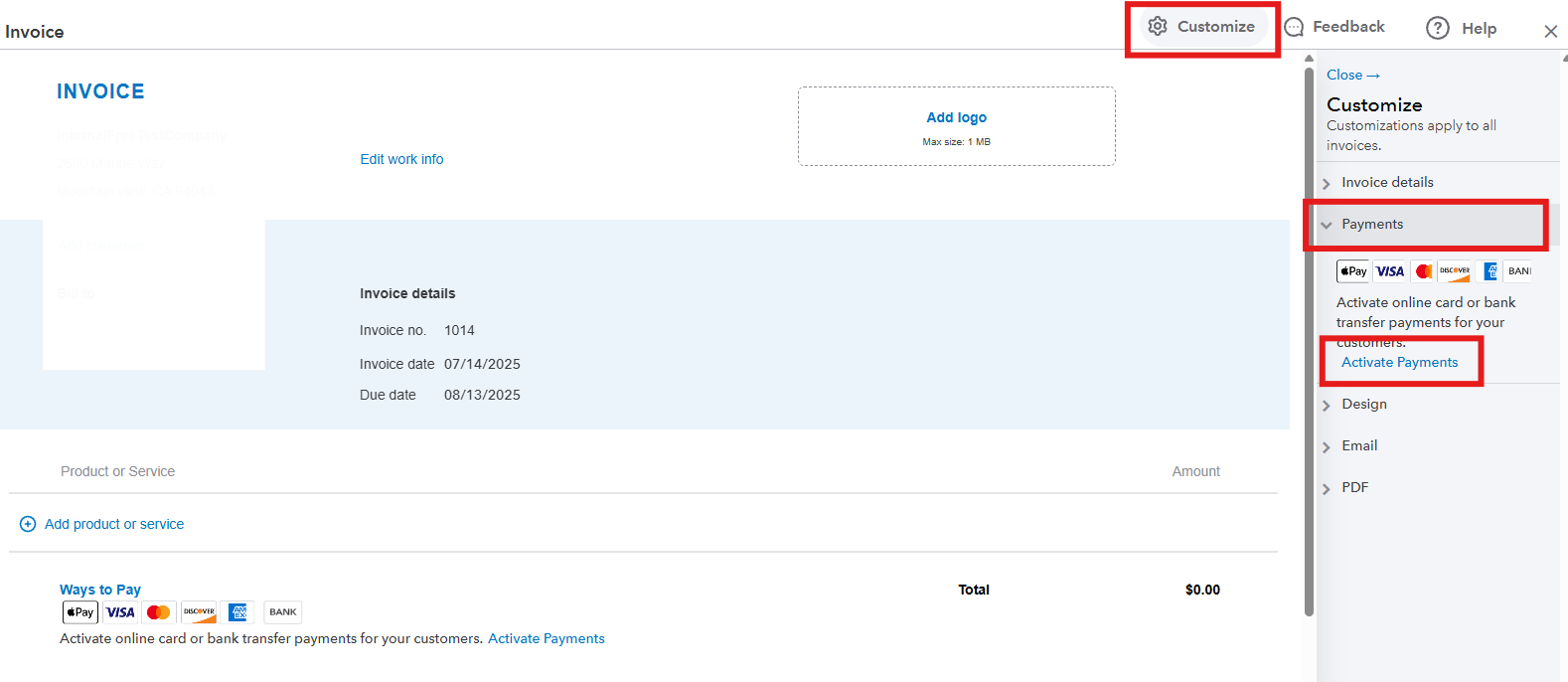
  1. Go to the Invoices menu and select Create Invoice.
  2. Click the Customize option and choose Payments.
  3. Select Activate Payments and follow the onscreen instructions.


We'll be around to help you if you have any other concerns about SSN.

SIAB
Level 7

I don't have SOCIAL SECURITY NUMBER... I only have the ITIN number and I'm the owner of the company but it doens't let me use my ITIN. help please =)

@marcodaccarett 

Do you need to accept online payments? Are you B2B?

Need QuickBooks guidance?
Log in to access expert advice and community support instantly.

Need to get in touch?

Contact us