Turn on suggestions
Auto-suggest helps you quickly narrow down your search results by suggesting possible matches as you type.
Showing results for
Get 50% OFF QuickBooks for 3 months*
Buy now
Let's go through some troubleshooting steps so you can access your QuickBooks Online account successfully, @Cherri2. I want to ensure you can manage your business accounting activities without interruption.
First, let's make sure your internet connection is stable. Connectivity issues can often disrupt access to the platform. After that, please verify that you're using the correct login credentials.
Once you've confirmed your login credentials are accurate, we can proceed with some troubleshooting steps to resolve the issue. An accumulation of historical data can lead to unexpected behavior within the system.
Here are the following keyboard shortcuts:
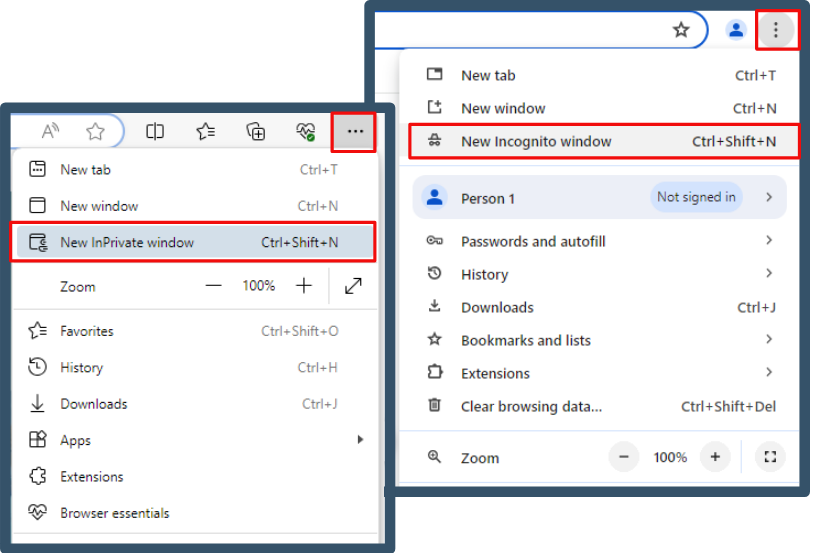
Return to your regular browser once you're logged in using incognito mode. Then, clear your cache to start afresh. You can also consider switching to other supported browsers installed on your system if the issue persists.
If you've forgotten your user ID or password but still have access to your registered phone or email, you can regain access to your account.
Here's the step-by-step process to follow:
If you have lost access to your registered phone or email, you can submit a request through the Account Recovery Form. We will process your request within one business day during our operating hours, from Monday through Friday, 8 AM to 5 PM PT.
For security purposes, please be aware that only you can change your Intuit Account details. We are unable to access or alter your information. Here are the steps to follow:
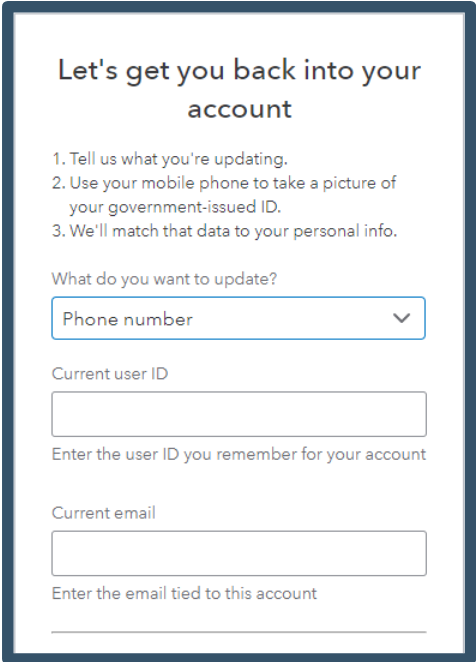
For more information, refer to this article: Recover your Intuit Account if you can't sign in.
Moreover, if you want to update your email address or any other details later on, follow the steps outlined in this article: Update or change your Intuit Account sign-in information.
My top priority is ensuring you can access your account successfully, @Cherri2. Take your time with these troubleshooting steps. If you run into any challenges or have questions along the way, I'm here for you.
when i tried to login to quickbooks it says we didn't find any companies for this account... Though my subscription is uptodate
This error usually happens due to a credential mismatch or cached browser data. To resolve this, manually retype the specific User ID or email address you used when creating the subscription, as your active company is tied directly to that unique account profile.
If the issue persists, try signing in to QuickBooks Online using an incognito window or a different browser. Accumulated cache and cookies can often disrupt functionality, causing it to display the no companies found for this account error.
I’ll keep this thread open in case you have any updates or follow-up questions.


You have clicked a link to a site outside of the QuickBooks or ProFile Communities. By clicking "Continue", you will leave the community and be taken to that site instead.
For more information visit our Security Center or to report suspicious websites you can contact us here


