Let's go through some troubleshooting steps so you can access your QuickBooks Online account successfully, @Cherri2. I want to ensure you can manage your business accounting activities without interruption.
First, let's make sure your internet connection is stable. Connectivity issues can often disrupt access to the platform. After that, please verify that you're using the correct login credentials.
Once you've confirmed your login credentials are accurate, we can proceed with some troubleshooting steps to resolve the issue. An accumulation of historical data can lead to unexpected behavior within the system.
Here are the following keyboard shortcuts:
- Google Chrome and Microsoft Edge: Ctrl+ Shift + N
- Mozilla Firefox: Ctrl + Shift + P
- Safari: Command + Option + P
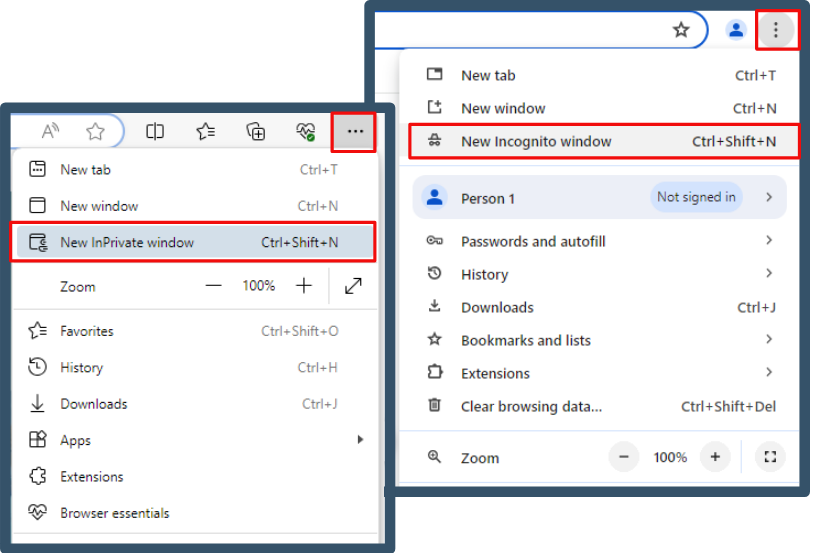
Return to your regular browser once you're logged in using incognito mode. Then, clear your cache to start afresh. You can also consider switching to other supported browsers installed on your system if the issue persists.
If you've forgotten your user ID or password but still have access to your registered phone or email, you can regain access to your account.
Here's the step-by-step process to follow:
- Visit our sign-in help page.
- Please enter the phone number, email address, or user ID linked to your account.
- If you enter a phone number or email address, we will send you a text or email with a verification code. If you enter a user ID, please select your preferred method of receiving the code.
- Enter the verification code we sent, or follow the instructions in the message. We may ask you for a little more info to make sure it's really you.
- When prompted, reset your password. Or, you can select Skip.
If you have lost access to your registered phone or email, you can submit a request through the Account Recovery Form. We will process your request within one business day during our operating hours, from Monday through Friday, 8 AM to 5 PM PT.
For security purposes, please be aware that only you can change your Intuit Account details. We are unable to access or alter your information. Here are the steps to follow:
- Please ensure to take a high-quality photo or scan your identification using your mobile device. It can be a driver's license, state ID, passport, or notarized document.
- Provide what you need to update, all the necessary information tied to your account, and upload your ID or document in the Account Recovery Form.
- Look for an email containing the follow-up steps, which will be sent to you from no_response@intuit.com within one business day. You'll receive a password reset link if your request is approved.
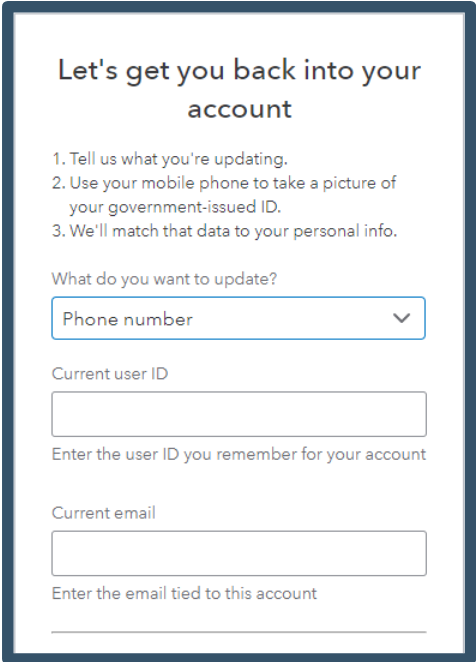
For more information, refer to this article: Recover your Intuit Account if you can't sign in.
Moreover, if you want to update your email address or any other details later on, follow the steps outlined in this article: Update or change your Intuit Account sign-in information.
My top priority is ensuring you can access your account successfully, @Cherri2. Take your time with these troubleshooting steps. If you run into any challenges or have questions along the way, I'm here for you.


