Turn on suggestions
Auto-suggest helps you quickly narrow down your search results by suggesting possible matches as you type.
Showing results for
Get 50% OFF QuickBooks for 3 months*
Buy now
-Has anyone imported IIF Files to Enterprise 2023? How does it work with Classes?

Classes generally work fine with 2023, just like older QB versions.
I’m not familiar with iif files. Are you saying classes are part of these files?
Yes, IIF files do support the class field on transactions.
What transaction type do you need to import with Class? Invoices, Bills, Sales Receipts, or else?
You can use a 3rd party solution to do so.
Could someone explain how it works?
Thank you
The IFF files allow for the import and export of data, while Classes are functionalities that enable you to monitor various segments of your business in QuickBooks Desktop (QBDT). I will provide additional information below and guide you through the process to help you integrate it into your business operations.
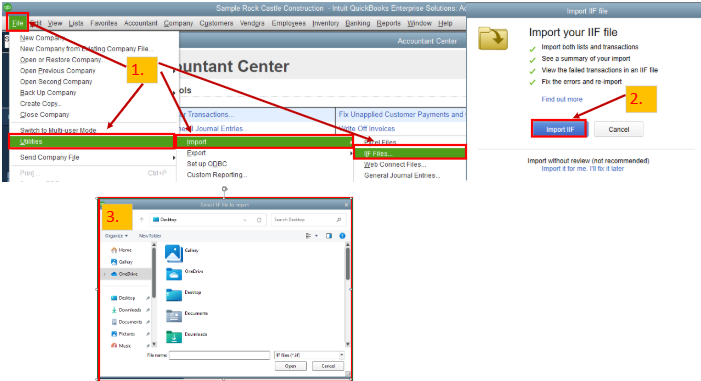
Intuit Interchange Format (.IIF) files are ASCII text files that utilize a Tab-Separated Value (TSV) format. These are files that you can use to import or export lists or transactions in or out of your company. To import this in QBDT, these are the steps:
You'll need to follow the on-screen instructions, and once the import is successful, you'll see the numbers of lists and transactions imported, and you can press Done. Feel free to review the image below for seamless navigation.
To export the files out of your company, you can visit this page for more details: IIF Overview: import kit, sample files, and headers.
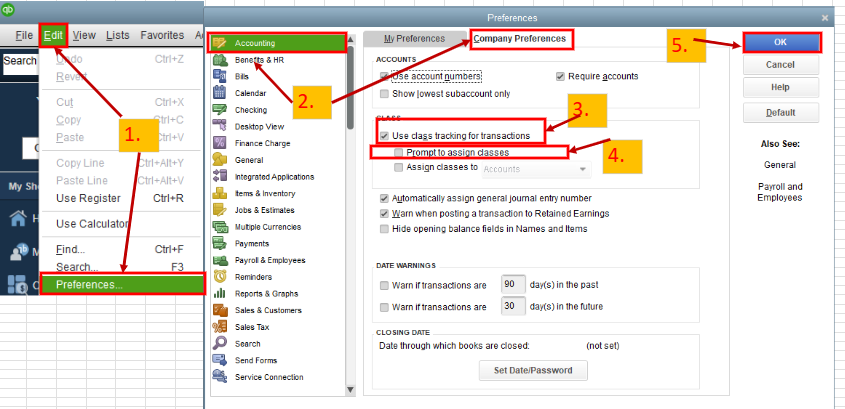
On the other hand, you'll need to turn on the Class feature from your company file and set it up before using it. To enable this option, these are the steps:
I've added a screenshot for visual reference.
For more information and further guidelines on how to use it, please see this article: Set up and use class tracking in QuickBooks Desktop.
In addition, here's an article to give you insights on what data can be exported or imported: Export, import, and edit IIF files.
Are you looking for assistance monitoring various aspects of your business through reports, or do you have additional inquiries related to QuickBooks? I'll be here to lend you a hand anytime. Feel free to click the Reply button below, and I will respond to your questions as soon as possible. Take care.
If you don't familiar with IIF, you should consider using an importer tool instead. It's a $199 one time license + you can get $200 cashback to purchase it from a partner.
https://get.transactionpro.com/qbd
Could you explain that?
Thank you
If you are interested in getting a free TP Importer license, you can contact @Fiat Lux - ASIA for details.


You have clicked a link to a site outside of the QuickBooks or ProFile Communities. By clicking "Continue", you will leave the community and be taken to that site instead.
For more information visit our Security Center or to report suspicious websites you can contact us here


