Turn on suggestions
Auto-suggest helps you quickly narrow down your search results by suggesting possible matches as you type.
Showing results for
Hi
I have entered physical items in inventory, however, I want to delete them as they have changed - I belive you cant do that but can only make them inactive - when you do that they stay on the balance sheet which is very confusing - is there a way to remove them from the balance sheet?

I'll share some input about removing inactive inventory items in the Balance Sheet report in QuickBooks Online, 3290C. This way, I can guide you accordingly.
I agree that you can make the inventory item inactive in QuickBooks, and it will show in your Balance Sheet report. We cannot delete them to ensure your books will stay accurate.
The unsold inventory at the period end is an asset to the company and is therefore included on the balance sheet. As inventory is expected to be sold within a year, it is reported on the balance sheet as a current asset.
The total cost of all the inventory that remains at period end, reported as inventory on the balance sheet, plus the total cost of the inventory that was sold or otherwise removed (through shrinkage, theft, or other loss), reported as cost of goods sold on the income statement represent the entirety of the inventory that the business had to work with during the period, or goods available for sale.
Therefore, removing them from the report is currently unavailable. However, when you open the transaction, you will see a deleted status beside the item. This way, we can quickly determine that inventory is already deleted. See the sample screenshot below for reference:
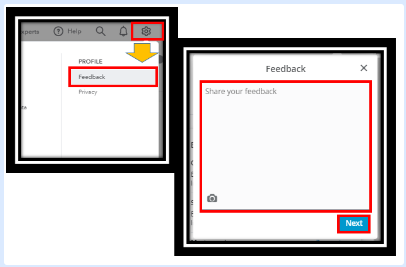
With this, I suggest sending feedback to our product engineers. They can evaluate this and possibly incorporate it into the subsequent release. Let me guide you on how:
QuickBooks has a website where you can vote and give feedback for all future suggestions. For more details, visit this link: Customer Feedback for QuickBooks Online.
Visit these articles below on how to adjust inventory quantity and run reports to see your best sellers, what's on hand, the cost of goods, and more:
Be bold and buzz me if you need further help with your customer transactions and inventory in QuickBooks again. I'm well-trained, and I can lend you a hand. Take care, @3290C.
Thanks for the feedback. Actually the ones I made inactive have no value so it would not affect the balance sheet. In any event, I wasn't able to find the same list showing deleted items next to the name of the inventory. Can you tell me how to do that please so I can take a look?
In addition can tell me if I can make the ones inactive active again?


You have clicked a link to a site outside of the QuickBooks or ProFile Communities. By clicking "Continue", you will leave the community and be taken to that site instead.
For more information visit our Security Center or to report suspicious websites you can contact us here