Turn on suggestions
Auto-suggest helps you quickly narrow down your search results by suggesting possible matches as you type.
Showing results for
Get 50% OFF QuickBooks for 3 months*
Buy nowOur invoice numbers are jumping around and I have to create a fake invoice with a proper invoice number and save it then delete it to get the "auto" invoice number back on track.
We get off-track because members of our team change an invoice number intentionally or accidentally and then the new sequence restarts from that number. Is there a way to allow over-rides for individual invoices or estimates, for example, but resumes the next number in the primary sequence with the invoice that follows?
For example if our invoice numbers are sequentially 567, 568, 569 but one of our team members saves an invoice as 570s because they want to label that one differently, then the next invoice number is 571s, 572s, etc. until we save a dummy invoice as 573, then delete it and the following invoice will auto-populate as 574. So, we skipped one but we are back on track with auto-sequential invoice numbers.
Is it possible to set the program so that if someone saves a random invoice number that is different, like 570s, that the next auto-generated invoice number would be 570 (what would have been expected after 569)?
Thank you!
Solved! Go to Solution.

Hello, DanBu. Prioritizing the sequence of your invoice numbers is necessary to keep track of your sales transactions effectively.
QuickBooks allows us to enter a different invoice number. However, the next time we create a transaction, particularly an invoice, it will generate a number next to the last number used. Thus, keeping the original sequence isn't a direct option in the system.
We'll need to utilize that invoice number again to start a new sequence that follows the number you desired.
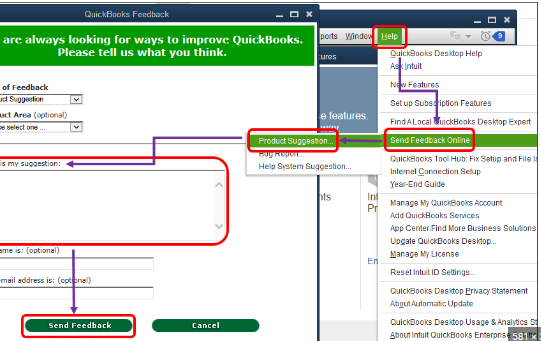
I understand and see how having this potential help you and your business. Let's send direct feedback straight to our product developer. They will evaluate your suggestion. Here's how you can share your ideas and other insights about QuickBooks features:
Here's an article that tackles about customing form templates: Use and customize form templates. Feel free to visit for more tips.
I always aim to help you manage your sales transactions, DanBu. So, please don't hesitate if you have other questions or suggestions. I'll be around to help and provide accurate details in the time you need.
Hello, DanBu. Prioritizing the sequence of your invoice numbers is necessary to keep track of your sales transactions effectively.
QuickBooks allows us to enter a different invoice number. However, the next time we create a transaction, particularly an invoice, it will generate a number next to the last number used. Thus, keeping the original sequence isn't a direct option in the system.
We'll need to utilize that invoice number again to start a new sequence that follows the number you desired.
I understand and see how having this potential help you and your business. Let's send direct feedback straight to our product developer. They will evaluate your suggestion. Here's how you can share your ideas and other insights about QuickBooks features:
Here's an article that tackles about customing form templates: Use and customize form templates. Feel free to visit for more tips.
I always aim to help you manage your sales transactions, DanBu. So, please don't hesitate if you have other questions or suggestions. I'll be around to help and provide accurate details in the time you need.


You have clicked a link to a site outside of the QuickBooks or ProFile Communities. By clicking "Continue", you will leave the community and be taken to that site instead.
For more information visit our Security Center or to report suspicious websites you can contact us here


