Hi there, @STM Admin.
Thanks for posting here in the Community! I'd be happy to assist you today.
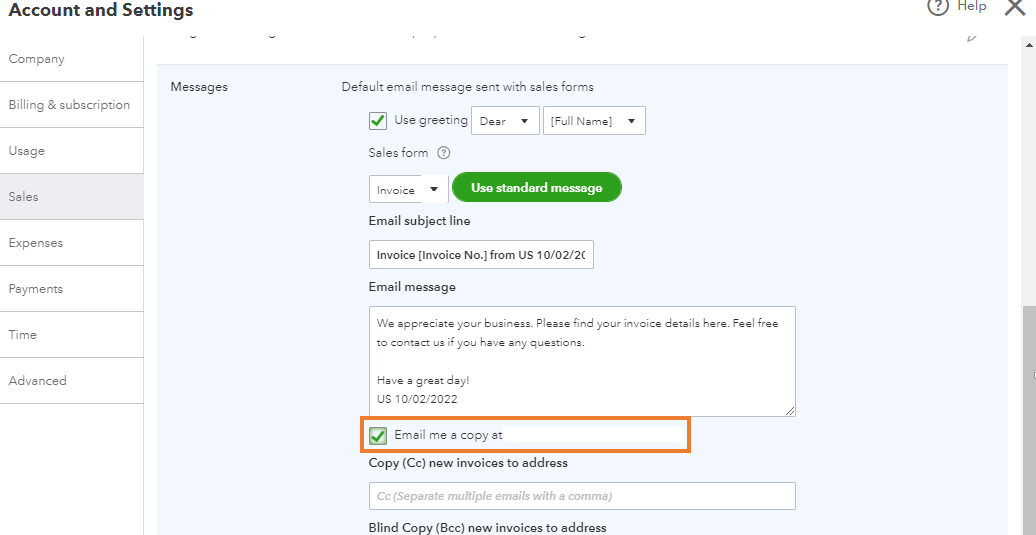
To clarify, did you send the customer's invoice or estimate to your email by separating it with a comma in the Customer email field? I suggest activating the Email me a copy feature to receive a copy of the transaction. This way, it won't mark as viewed when you open the link.
Here's how:
- Click the Gear icon in the upper right corner.
- From the Your Company column, choose Account and Settings.
- Select the Sales tab on the left.
- In the Messages section, click the Edit icon (pencil image).
- Put a check mark in the Email me a copy at [your email address] box.
- Click Save and Done once you're through.
Having the ability to mark an invoice as unread would be a great option. I encourage you to add your vote for this one by sending a feature request in the Feedback section within QuickBooks. Our product development team reviews all the feedback we receive to ensure we’re meeting the needs of our customers.
Here's how:
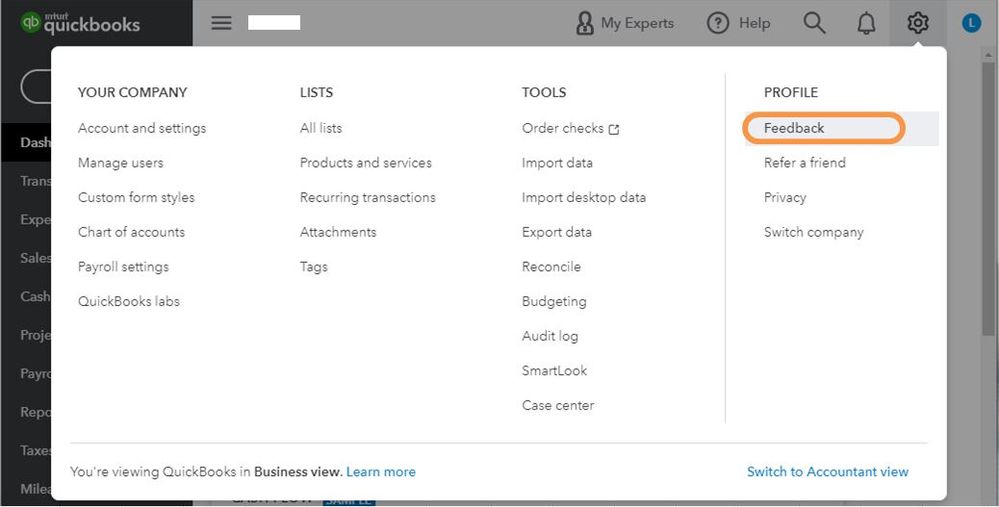
- Select the Gear icon at the top, then Feedback.
- Enter your comments or product suggestions then select Next.
- You'll be provided a list of suggested Help articles related to your comment. You can read through them or select Skip and send message.
- From the drop-down, choose the appropriate category, then select Send message.
For your reference, check out this link: How to Submit Feedback.
Please update me on how it goes or leave a comment below if you have any other questions concerning invoice status. I'll be keeping an eye out for your response.


