Welcome to the Community space, @Andrea132. I'm here to help you resolve this so you can see the total and sub-total lines when you create your invoices.
In QuickBooks Online, the total and sub-total can be seen at the bottom of your invoices. Please see the attached screenshot for reference:
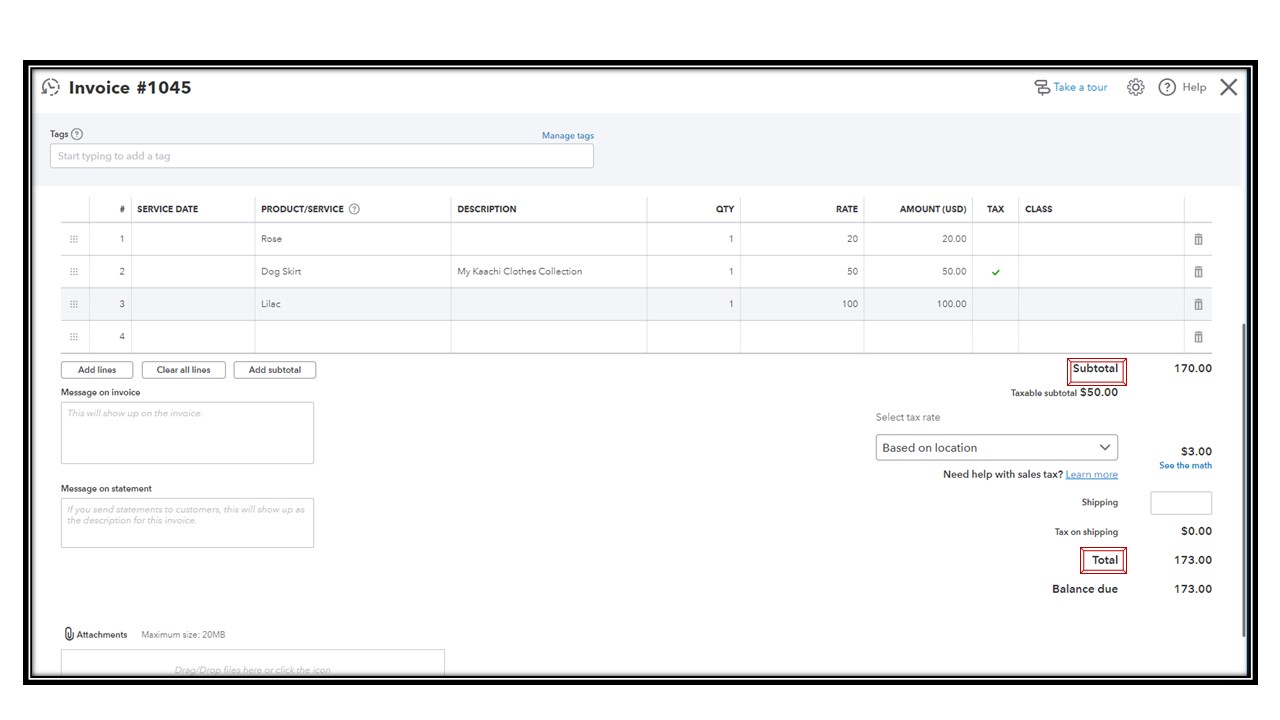
Since the total lines did not show up, let's use a private window. Sometimes, QuickBooks may be poorly configured due to locally stored internet cache files, which can contribute to the software's unusual behavior.
Here are the keyboard shortcuts:
- Google Chrome and Microsoft Edge: Ctrl+ Shift + N
- Mozilla Firefox: Ctrl + Shift + P
- Safari: Command + Option + P
If it's a success, return to your regular browser. Then, clear your cache to refresh website preferences and remove temporary files that may interfere with QuickBooks. On the other hand, you may also use other supported web browsers.
Once you've successfully created the invoices and received your customer's payment, you can record it in QuickBooks to mark the invoices as paid.
You're always welcome to reach out again if you require further assistance managing your invoices. Click the reply button below to enter your comments.


