Turn on suggestions
Auto-suggest helps you quickly narrow down your search results by suggesting possible matches as you type.
Showing results for
Get 50% OFF QuickBooks for 3 months*
Buy nowWhen I select Chat which says 0 wait, no contact is made.

Hi there, @Playawest45.
Yes, Chat support is working. The reason you're not getting connected, even though it shows a 0 wait, is due to the support hours for our live expert team. You'll be able to reach an expert once you contact them during their available hours.
Here is the support availability:
QuickBooks Online Solopreneur, Simple Start, Essentials, Plus
QuickBooks Online Advanced
You can also check support availability anytime through this article: Get help with QuickBooks products and services.
If you have any follow-up questions, feel free to get back to us here in the Community. We're always here to help.
No, I posted during the chat hours. I posted this question during time when there was no chat.
Thank you for getting back to the thread, Playawest45.
I would like to confirm if you're still unable to connect with our chat support team. If so, you can refresh your browser, sign out of QuickBooks Online (QBO), and then sign back in. This process can help clear any unusual behavior and refresh your QBO account.
If the same thing happens, here's another way to reach out to our Live Support team:
To ensure timely assistance, please check our support hours and select a time that works for you.
I also encourage you to post your concern in our Community forum, where experts and other users can provide helpful guidance.
Feel free to create a new post or reply with your specific concern. We'd be happy to help.
I requested chat at 4:45pm pacific
At 5:50pm signed out of Quickbooks Online and signed back on again.
Selected Help menu by selecting the question mark icon. See Search with magnifying glass. Selected Search and not see Contact us button,
Hi there, Playawest45.
I appreciate you getting back to the Community regarding how to contact our Live Support team.
While in the Search tab, type your concern in the search bar and press enter. The Contact Us button will then appear below. Please see the screenshot for your reference.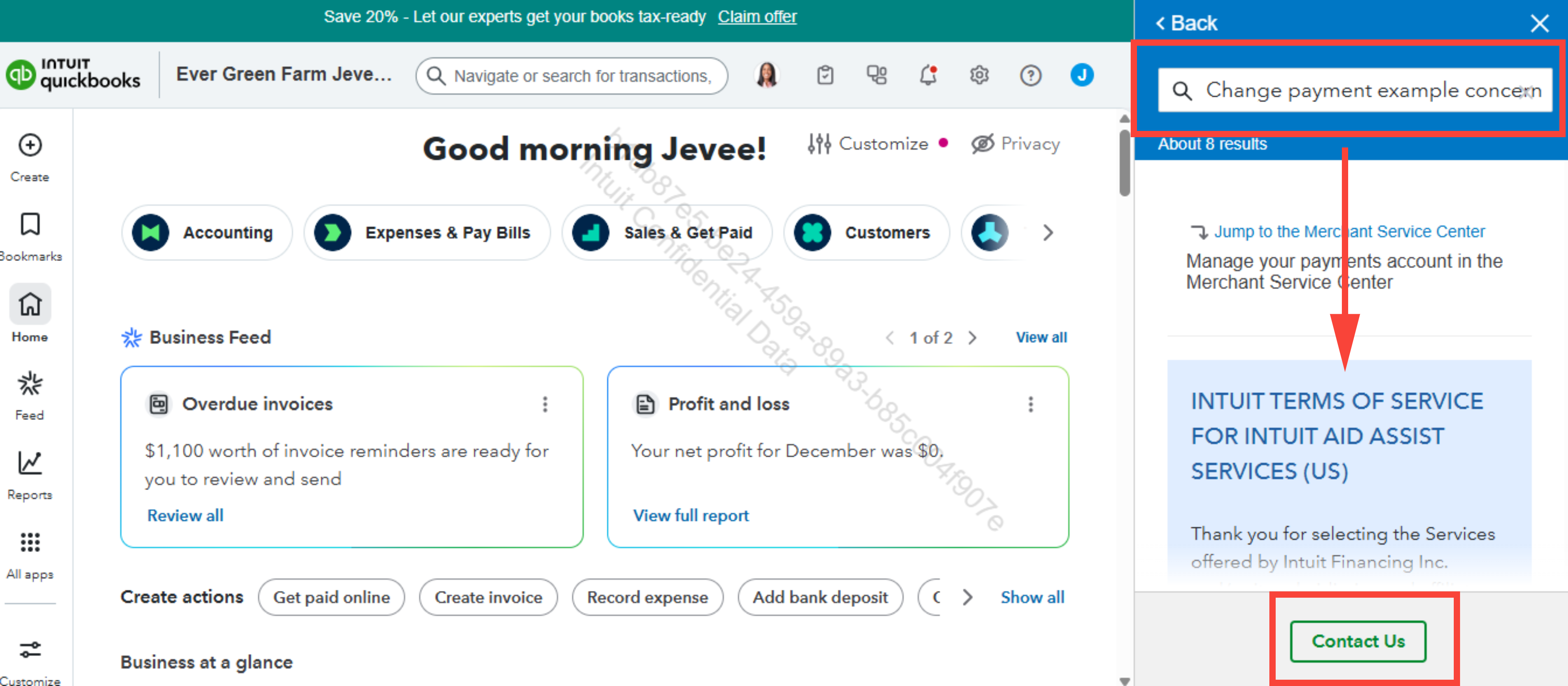
Let us know if you require any additional assistance.


You have clicked a link to a site outside of the QuickBooks or ProFile Communities. By clicking "Continue", you will leave the community and be taken to that site instead.
For more information visit our Security Center or to report suspicious websites you can contact us here


