You can opt out using the Switch Back to old banking page for the Banking experience, @marissa11.
Here's how:
- Go to Accounting and select Bank Transactions.
- On the Banking page, click the drop-down menu next to Provide Feedback.
- Select Switch back to the old banking page.
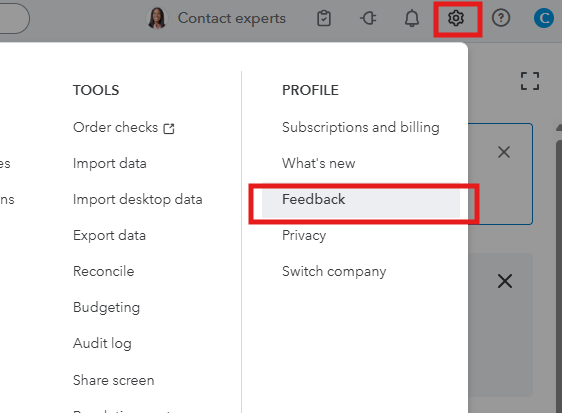
Although there’s currently no option to completely disable the AI interface, you can share your feedback directly with our product engineers for consideration as we strive to enhance our software and explore new features. Here’s how:
- Select the Gear icon and choose Feedback.
- Fill in your suggestions in the Feedback field.
- Select Next to send it.
You can check this article about the new QBO experience with AI agents: Get to know your new navigation menu.
We're always here to help if you have any other concerns about AI.



