It's possible that there's a data issue with your company file, @WYChen.
This can be the reason why the item cost shows zero.
Let's run some basic troubleshooting steps to fix this right away. You can start by updating QuickBooks Desktop its latest release. Doing this can help you fix some minor issues in your company file.
Here's how:
- Go to the Help menu and click Update QuickBooks Desktop.
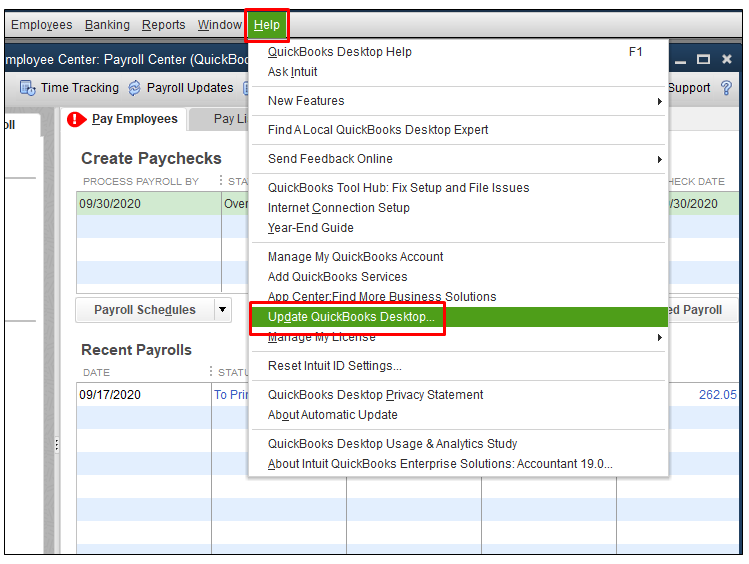
- In the Update Now tab and select Get Updates to start the download.
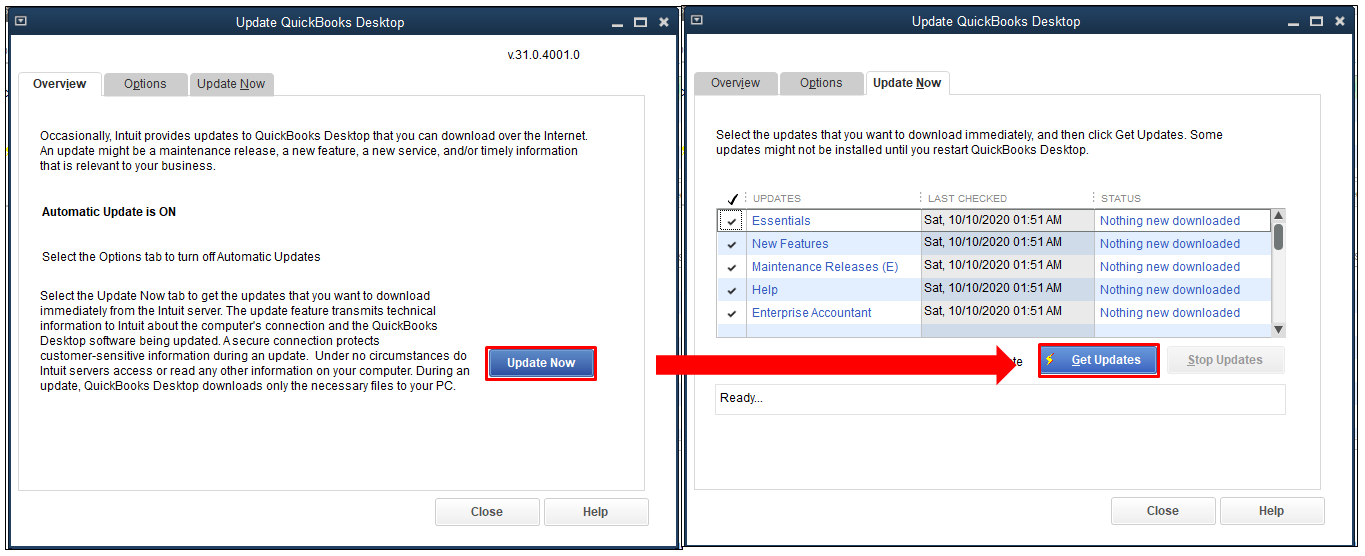
- When the download finishes, restart QuickBooks.
- When prompted, accept the option to install the new release.
If you're still getting the same result, I recommend running the Verify and Rebuild Data tools. The Verify Data self-identifies the most commonly known data issues within a company file while Rebuild Data self-resolves most data integrity issues.
If the issue persists, you can reach out to customer support. This way, they can check your company file and run some tools to diagnose the cause of the issue.
Just tag my name in the comment section if you have any other concerns or questions. I'll get back to you as soon as I can. Stay safe.


