Turn on suggestions
Auto-suggest helps you quickly narrow down your search results by suggesting possible matches as you type.
Showing results for
Get 50% OFF QuickBooks for 3 months*
Buy now
With this new layout, my item titles are showing up on estimates. I do not want this to happen! Is there a way to just have the description of the item showing? Right now I went back to the old format, but I want to figure this out, once I'm forced to use the new layout.

I hear your sentiments, Valpo. You'd be glad to know that you can customize your estimate templates in QuickBooks Online (QBO) to remove item names.
To do that, we can uncheck the Product/Service option from the estimate template. Here's how:
Moreover, you can also run reports in QBO to get a complete picture of your business's various transactions, including sales.
Please don't hesitate to reach out whenever you have additional questions concerning estimates. We're available 24/7 on this platform to provide further assistance. Keep safe, and have a good one.
That is what I currently have set up. I am wondering what happens when I am forced to use the new layout. How do I fix that with the new layout?

Thank you for coming back to the Community, Valpo. Let me shed some light on how your estimates would look after switching to the new layout in QuickBooks Online (QBO).
Once in the new experience of your estimates, the information displayed would be the same as what you have on your old layout. Although it will default from showing the Item title on your transactions, you can follow the steps outlined by peer, JaeAnnC, to create a customized template and remove them.
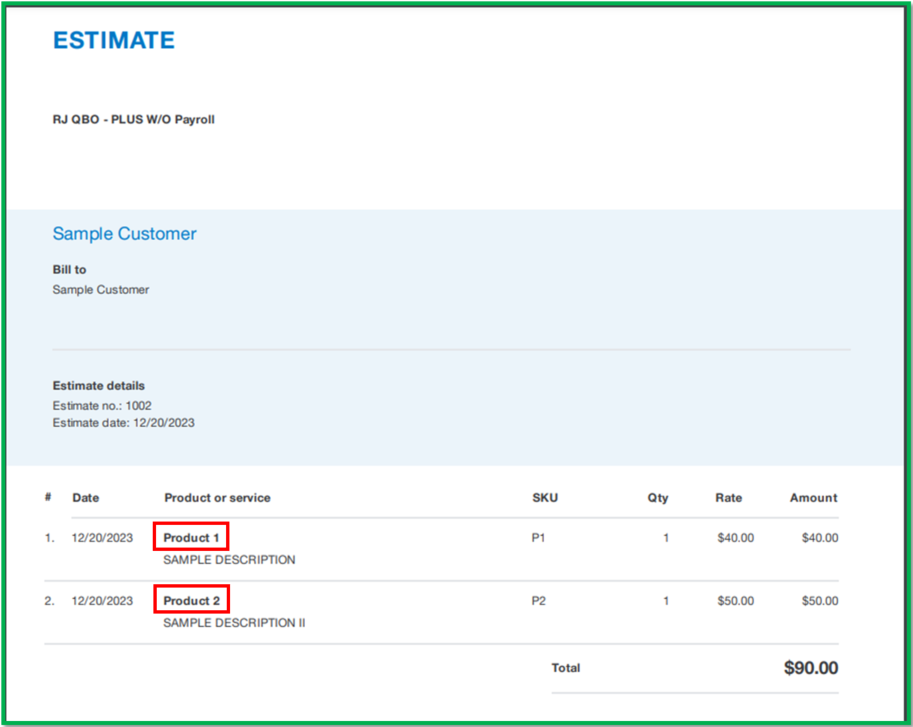
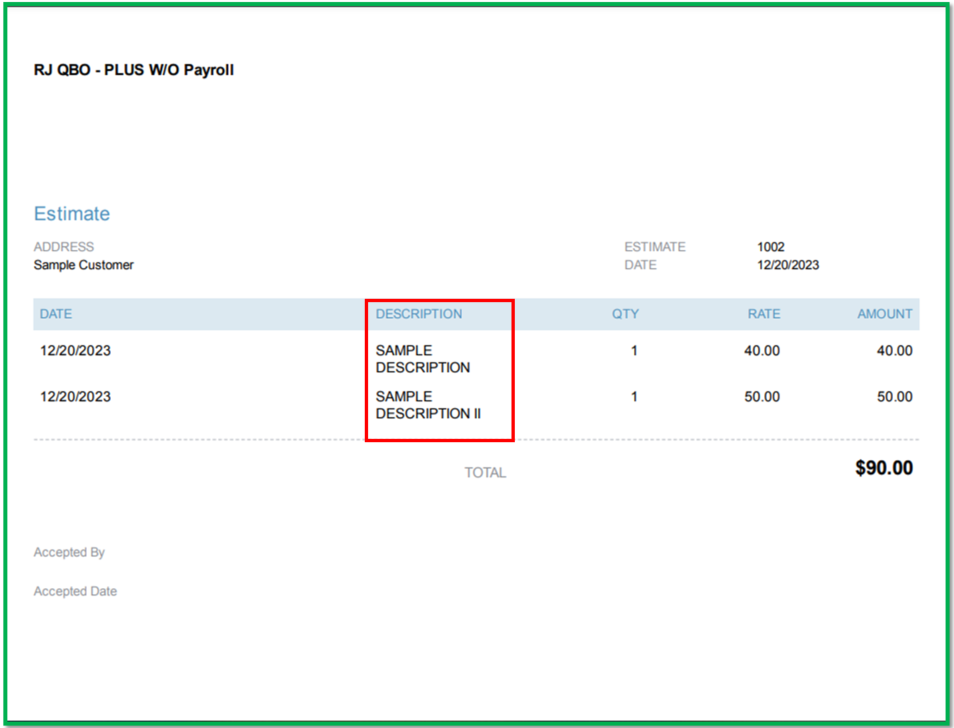
Moreover, I can share some snapshots for your visual reference of the estimates using the new layout.
With Item Titles:
Without the Item Titles:
In addition, once a customer approves the estimate you provided, you have the option to effortlessly convert the estimate into an invoice, saving you time and ensuring that your invoicing process is streamlined and efficient.: Convert an estimate into an invoice in QuickBooks Online.
Fill me in if you have further queries about managing templates in QBO. I'm always available whenever you need assistance. Hoping for your business to prosper. Take care!


You have clicked a link to a site outside of the QuickBooks or ProFile Communities. By clicking "Continue", you will leave the community and be taken to that site instead.
For more information visit our Security Center or to report suspicious websites you can contact us here

