Turn on suggestions
Auto-suggest helps you quickly narrow down your search results by suggesting possible matches as you type.
Showing results for
Get 50% OFF QuickBooks for 3 months*
Buy nowI wasted 2 hours of my time between doing my own research trying to find it and using online support. When I went to support live chat, that person spent over 30 minutes before "transferring me" to advance support which was just to put me back into the que for another person to try the same stuff the other person did. I am trying not to be mad but I am.
I am trying to add request deposit on my estimate so when the client receives it they can pay the deposit if they want to move forward. I followed the below instructions and there is no request a deposit under the product/service. I have deposit's active under my settings. Yes I can switch it to an invoice and then email the invoice to get the deposit but those are extra steps and time.
There is no option to email customer support to discuss this so I am putting it to the community.

Hello there, CBAssociates.
Thank you for posting your concern here in the Community. I'm here to help you request a deposit on an estimate in QuickBooks Online (QBO).
Once your customer accepts the estimate, you can request a deposit. However, you need to convert the estimate to an invoice so it becomes a valid transaction in QuickBooks Online.
To convert an estimate to an invoice:
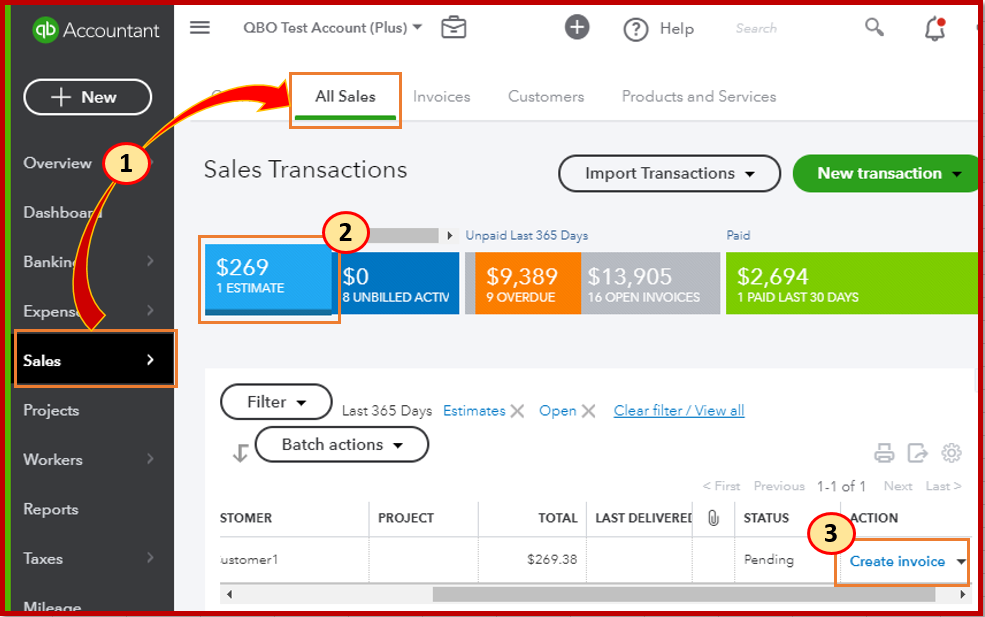
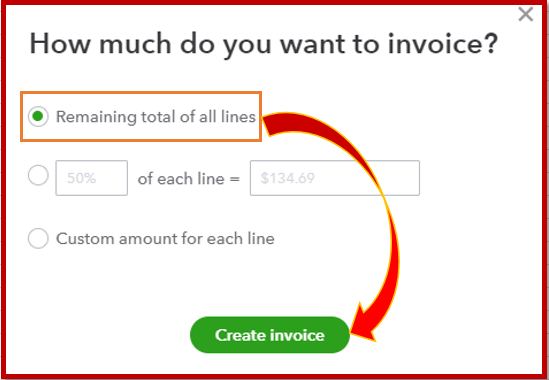
Also, you can only invoice an estimate with Accepted or Pending status. To update the status of the estimate, click the drop-down under the customer's name.
Additionally, check out these articles below on how to reconcile your upfront deposit account and other customer topics:
Remember that you can regularly ask me if you have additional questions about requesting a deposit to an estimate. I'm always ready to work with you again. Stay safe and healthy.
This feature appears to still be missing from estimates in QBO.
Hi, jmh2199.
The Request Deposit feature is available for QuickBooks Simple Start, Essentials, Plus, and Advanced subscriptions, whether you have QuickBooks Payments or not.
If you are unable to locate this feature in your account, we recommend contacting our live support team for further assistance. They can help troubleshoot the issue and ensure you can access and utilize this functionality effectively.
To contact our live support, here’s how:
1. Click Help in the upper right-hand corner.
2. Go to the Search tab.
3. Type in your concern (e.g., "request deposit under estimates") and press Enter.
4. Select Contact Us.
5. Choose between Chat with us or Have us call you.
Our live support team for Plus, Essentials, and Simple Start is available Monday to Friday, 6 AM–6 PM PT, and Saturday, 6 AM–3 PM PT. QuickBooks Advanced offers 24/7 support.
Feel free to reply below if you have further questions.


You have clicked a link to a site outside of the QuickBooks or ProFile Communities. By clicking "Continue", you will leave the community and be taken to that site instead.
For more information visit our Security Center or to report suspicious websites you can contact us here


