Turn on suggestions
Auto-suggest helps you quickly narrow down your search results by suggesting possible matches as you type.
Showing results for
Get 50% OFF QuickBooks for 3 months*
Buy now

Thank you for posting here, eliz.
Let me ensure you will be routed to the appropriate support in QuickBooks Online (QBO).
Beforehand, do you have any specific concerns with QuickBooks? You can surely post them here in the Community forum to get an answer and I’ll be delighted to address them accordingly.
Moreover, if you still want to connect with our phone support there are various ways to connect with them. First, you can do that within your company file. Here’s how:
Otherwise, you can refer to this article to get their contact information and support hours. You can scroll down to the bottom to get their contact number: QuickBooks Online Support.
Feel free to add a reply to notify me if you have more questions about QuickBooks. I’m just a few clicks away. Have a good one!
The charges that occurred on January 4, 2023 $710.13 and charges that occurred on April 14, 2023!
I want to talk to a person not a computer!
Call my phone [Removed] between 10 am and 3 pm Friday, June 8, 2023!!
It's nice to see you here in the Community, @wlambert1953. I'll route you to the right support that can help check the charges you get in QuickBooks.
The safest and most secure way to interact with a live support agent is by going through the Help menu. This channel ensures you're able to connect to our specialists promptly.
For the security of your account, I can't display your details here on the Community forum. I recommend reaching out to our Support Team for further assistance. A live agent can access your account securely and be able to discuss the charge.
Please note, that we remove your phone number since Community is a public space, and everyone can see your contact details. To reach them, follow the steps below:
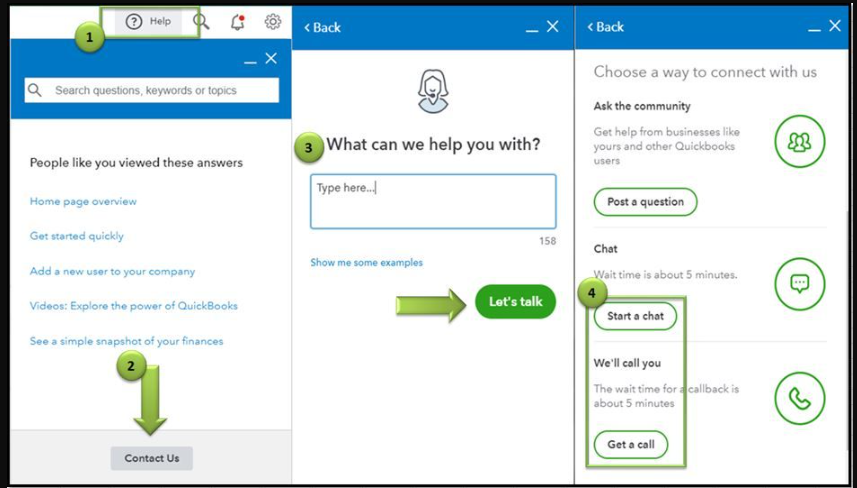
To ensure they assist you on time, please check their support hours: QuickBooks Online Support.
Let me also share this article to get more details about Intuit charges to your credit card or bank account: Understand Intuit charges on your credit card or bank statement.
Please feel welcome to reach out to me with any other questions or concerns you may have with the charges. Looking forward to helping you out in the Community space.


You have clicked a link to a site outside of the QuickBooks or ProFile Communities. By clicking "Continue", you will leave the community and be taken to that site instead.
For more information visit our Security Center or to report suspicious websites you can contact us here


