SALE EXTENDED 70% OFF QuickBooks for 3 months*   Ends 12/8

Buy now
cancel
Showing results for 
Search instead for 
Did you mean: 
Announcements
Simplify payday and set payroll to run automatically on QuickBooks. Explore QuickBooks Payroll
anita40
Level 1

Once you set up a recurring check where do you find it?

 
2 Comments 2
RheaMaeH
QuickBooks Team

Once you set up a recurring check where do you find it?

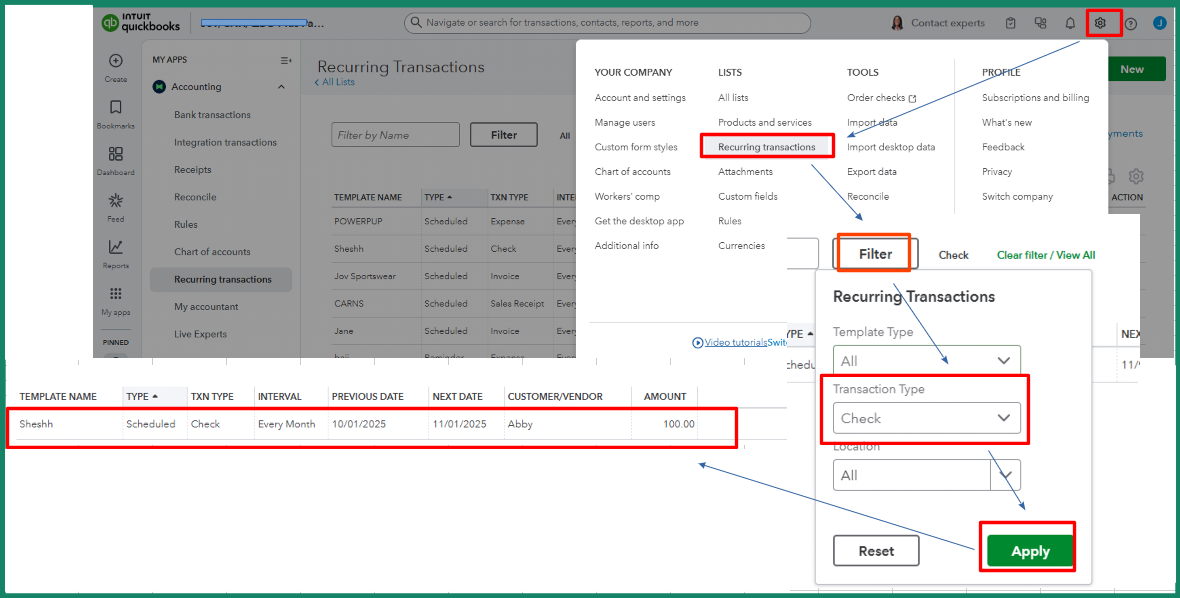
Start by clicking the Gear icon in QuickBooks Online to locate your recurring check, Anita.


Then, follow the steps below to proceed:


  1. Under the Lists section, select Recurring transactions. You’ll see a list of all your recurring transactions.
  2. To quickly find your recurring check, click Filter.
  3. Choose Check under Transaction Type. Then, select Apply.
 

Feel free to return to this thread if you have additional questions.

RheaMaeH
QuickBooks Team

Once you set up a recurring check where do you find it?

Hi, Anita.


I just wanted to follow up and see if the solution we provided helped you locate the recurring check setup in QuickBooks Online.


Please let us know if everything is now working as expected or if you're still experiencing any problems.


We'll be glad to assist you further if needed.

Need QuickBooks guidance?
Log in to access expert advice and community support instantly.

Need to get in touch?

Contact us