Hi there, @roxy5. Thanks for taking the time to post your concern here regarding double payment in QuickBooks Desktop (QBDT). Don't worry, I can clear things up for you.
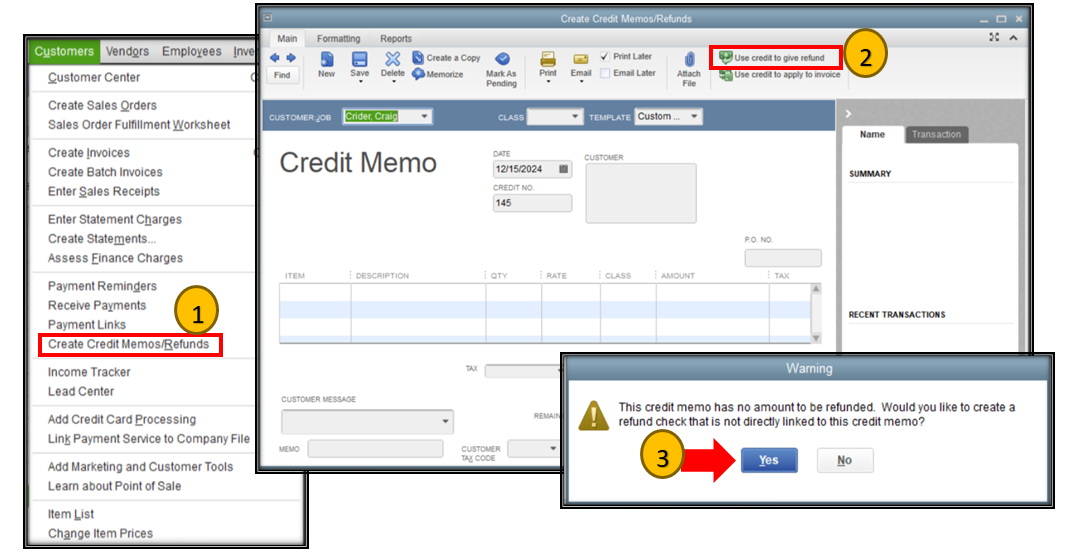
The process of creating a refund check doesn't require you to create a credit memo. If you click on the Customers menu and then Create Credit Memos/Refunds, it doesn't mean that you need to create a credit memo. Based on your scenario, it would be best to directly create a refund check or write checks since there was no balance on the item or service.
To do so, you just need to click on Use credit to give refund from the Credit Memo window. After that, a small window will pop up. Select Yes to open the Write Checks window. Refer to the screenshot below for your visual guide.
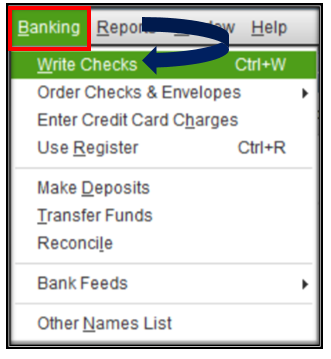
Aside from that, you can also refund checks by going to the Banking menu and then clicking Write Checks.
I'm also adding this article for more details about creating customer refunds: Give your customer credit or refund in QuickBooks Desktop for Windows.
Let me also add this article that can guide you in adding and reconciling your accounts effectively in your QBDT software:
Keep in touch if you need any more assistance with this, or if there's something else I can do for you. I've got your back. Have a good day.


